
🤖 Robot Hardware
This blog summarizes key concepts from 6.4210 Fall 2023 Lecture 2: Let’s get you a robot! and supporting materials, focusing on robot arm hardware, the intricacies of simulation, and the evolving landscape of robot hands.
1. Robot Arm Hardware: Evolution and Key Characteristics
🏭 Industrial Robots (Traditional)
- Characteristics: Strong, fast, highly precise
- Sensors: Primarily joint position sensors
- Safety: Operate in isolated spaces; fault if trajectory deviates or if there’s an unexpected bump
- Control: Mostly position-controlled
- Limitation: Unsafe and impractical for home use
🧍♀️ Collaborative Robots (Cobots)
- Vision: Designed for safe, close human interaction
- Design Philosophy: “Huggability” — sense and react to contact
- Common Arms:
- Universal Robots (UR)
- Kinova Jaco (electronics embedded at the base)
- Kuka iiwa (robust under experimental stress)
- Franka Emika Panda
- ABB Cobots
📡 Sensor Progression for Huggability
- Joint Position/Velocity: Basic
- Force-Torque (Wrist): Detect contact at end-effector
- Joint Torque Sensors: Detect torques along entire arm (iiwa, Panda)
- Tactile Skin: Vision-based sensors or distributed force sensors — active research area
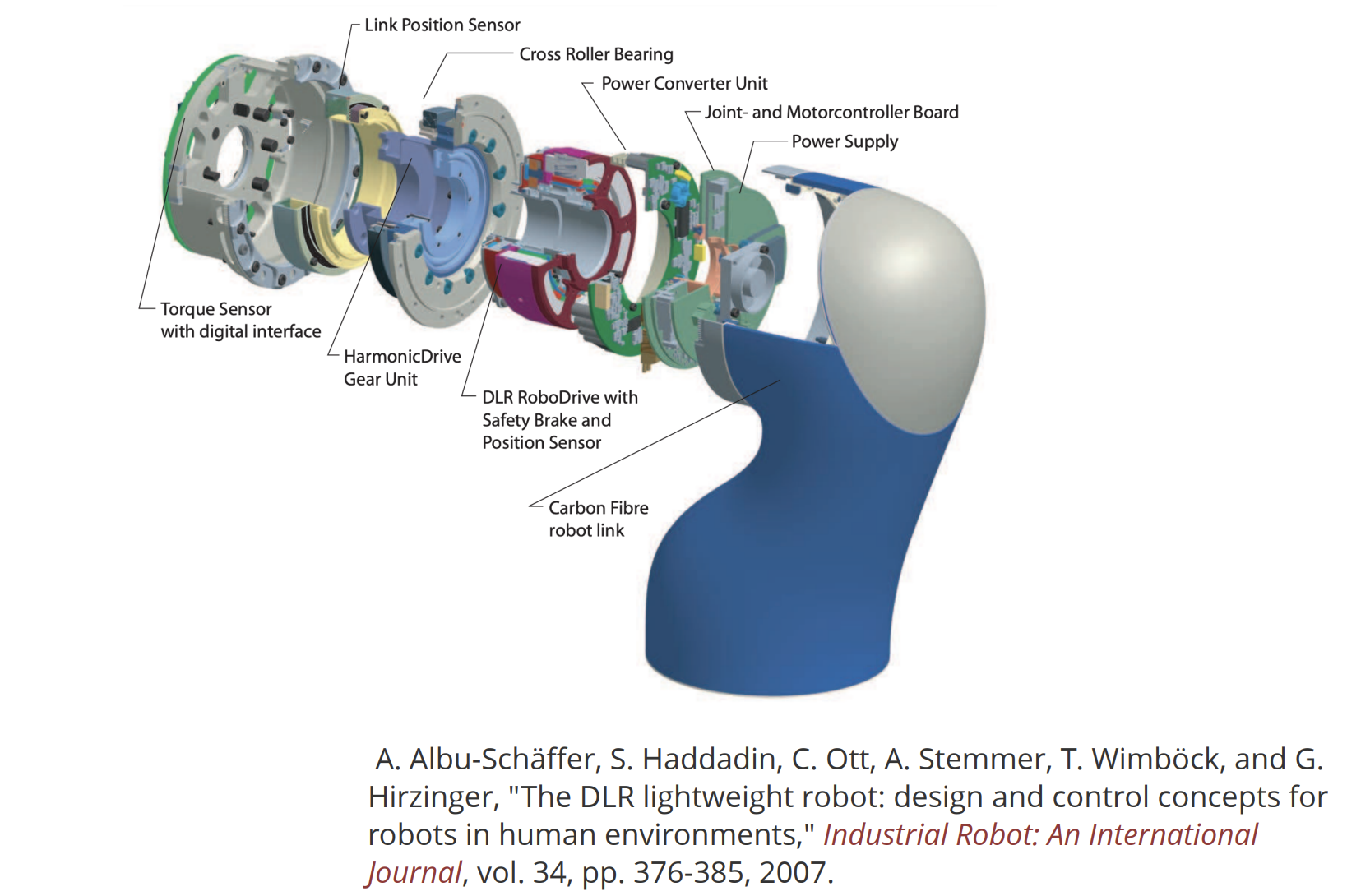
⚙️ Why Most Robots Are Position-Controlled (Role of Transmissions)
Most robot arms today are primarily position-controlled, and while torque control is theoretically possible, practical challenges with hardware make position control the preferred approach. Position-controlled means the robot is told where to go (joint-wise), and it figures out how to apply the necessary forces to get there. It abstracts away the underlying physics so users don’t need to deal with low-level dynamics — which makes it easier to use, but less flexible than torque-controlled systems.
⚙️ A. Motor Characteristics and Desired Robot Motion
- Electric motors are most efficient in a high-speed, low-torque regime.
- Key relationships:
- Current input ∝ Torque output
- Voltage input ∝ Speed output
- However, for manipulation tasks, robots need high torque and low speed — the opposite of motor characteristics.
⚙️ B. The Role of Transmissions
To bridge this mismatch:
- Large transmissions (e.g., harmonic or planetary gearboxes) are used between the motor and robot joints.
- These components are:
- Complicated and lossy
- Introduce backlash (gaps when reversing direction)
- Suffer from flexing and bending under load
- Add nonlinear friction and compliance
🛑 C. Why Torque Control Is Difficult Through Transmissions
- Even if you control motor-side torque precisely (via current), it doesn’t translate reliably to joint-side torque.
- Friction and compliance in the transmission distort the torque mapping.
- This makes direct torque control at the output shaft inaccurate and difficult.
✅ D. The Solution: Joint-Side Position Sensing
To overcome these issues:
- Place a position sensor on the robot’s output shaft (after the transmission).
- Much easier and more reliable than using torque sensors everywhere.
- A feedback loop is closed:
- Controller sends motor current
- Goal: Drive output shaft to desired position or velocity
- PID controllers (Proportional-Integral-Derivative) are widely used:
- Simple to implement
- Works well in practice
🧩 Why Do We Need It?
Most robot arms use electric motors with gearboxes (e.g., harmonic drives, planetary gears) to convert high-speed, low-torque motor output into the high-torque, low-speed motion needed for manipulation.
However, gearboxes introduce issues like:
- Backlash: A small “dead zone” when changing direction
- Friction: Makes torque transmission unpredictable
- Elasticity or compliance: Gear deformation under load
Because of these nonlinearities, measuring motor-side position or torque doesn’t give a reliable view of what the joint is actually doing.
🔍 Joint-Side Position Sensing Solves This
By mounting a sensor after the gearbox, directly on the joint, we measure the actual joint position regardless of what’s happening inside the transmission.
So the controller can:
- Close a position feedback loop using the true joint angle
- Drive the motor until the joint reaches the desired position, not just the motor
- Ignore friction and flexibility of the gearbox
🔄 How It Works in a PID Loop
The joint encoder provides $( Q )$ (actual joint angle), and the controller compares it to the desired angle $( Q_d )$:
\[\tau(t) = K_P (Q_d - Q) + K_I \int (Q_d - Q) \, dt + K_D \frac{d(Q_d - Q)}{dt}\]This generates a motor torque (or current) that moves the output shaft to the right position — not just the motor rotor.
🌀 E. Reflected Inertia and Why PID Works So Well
Surprisingly, fixed PID gains (set at the factory) work across many robot configurations. Why?
- Reflected Inertia: Motor inertia, scaled by gear ratio squared, dominates joint dynamics.
- Example: Gear ratio 160:1 → Reflected inertia = motor inertia × 160²
- In robots like the Kuka iiwa, up to 85% of a link’s inertia may come from moving the motor, not the link.
- Implication:
- Much of the robot’s work is moving its own motor mass
- This stabilizes dynamics across different tasks and configurations
- Fixed PID gains remain effective, avoiding complex gain scheduling
🔁 Alternative: Direct Torque Control Designs
Robots focused on torque control include:
- Direct Drive Robots: Low gear ratios (or no gearboxes), large motors
- Series Elastic Actuators (SEA): Spring in series with motor to measure torque
- Example: Baxter
These represent a different design philosophy, often used for compliant or dynamic interaction but are less common than traditional position-controlled arms.
PID
PID (Proportional-Integral-Derivative) control is one of the most widely used feedback control mechanisms in robotics, particularly in position-controlled robot arms. It’s known to work “shockingly well” — often allowing engineers to set fixed control gains once in the factory, despite variations in robot configuration and payload.
PID control works by:
- Measuring the current system output (e.g., joint angle
Q) - Comparing it to the desired value (
Q_desired) - Computing a control command (e.g., motor current/torque) to reduce the error over time
This forms a feedback loop where sensors track the actual state, and the controller continually adjusts commands to reach and maintain the target.
A. Proportional (P) Term
- Formula:
Kp * (Q_desired - Q) - Meaning: Directly proportional to current error
- Behavior:
- Larger error → stronger response
Kp(proportional gain) determines reaction strength
- Analogy: Like a spring pulling toward the goal
B. Integral (I) Term
- Formula:
Ki * ∫(Q_desired - Q) dt - Meaning: Accumulates past errors over time
- Benefits:
- Eliminates steady-state error
- Helpful when proportional term alone can’t reach the exact setpoint (e.g., balancing against gravity)
Ki(integral gain) scales this effect
C. Derivative (D) Term
- Formula:
Kd * d(Q_desired - Q)/dt - Meaning: Reacts to rate of error change
- Benefits:
- Damps oscillations
- Anticipates overshoot and smooths motion
Kd(derivative gain) sets the sensitivity to change
🔧 Application in Robot Arms
- Used to command motor current to drive the output shaft of a joint to the desired position
Qis typically a relative joint angle- Can be augmented with feedforward terms, such as:
- Gravity compensation (e.g., computing torque required to counteract gravity)
- Trajectory feedforward (for faster or smoother motion)
💡 Why PID Works So Well (Even with Fixed Gains)
One surprising fact: PID gains often don’t need to change across robot configurations. Why?
The Reason: Reflected Inertia
- Electric motors are paired with high gear ratio transmissions (e.g., 160:1 in Kuka iiwa)
- The reflected inertia of the motor is scaled by the square of the gear ratio
- This reflected inertia:
- Can dominate the robot’s joint dynamics
- Makes the joint “feel” very similar regardless of load or configuration
- Result:
- PID control becomes less sensitive to external changes
- Fixed gains like
Kp,Ki, andKdremain effective across a wide range of tasks
🖥️ Implementation Details
- Modern PID controllers are digitally implemented, often running at high control rates (e.g., 10 kHz)
- Advantages:
- High-frequency control loop ensures responsive and stable behavior
- Digital configuration allows easy tuning and monitoring
- In early days, analog circuits were used, but are now obsolete in most applications
✅ Summary
| Component | Role | Common Gain |
|---|---|---|
| Proportional | Reacts to current error | Kp |
| Integral | Accumulates past error | Ki |
| Derivative | Reacts to rate of error change | Kd |
PID control offers a simple yet powerful strategy to control robotic actuators. With reflected inertia helping to stabilize the system’s behavior, fixed PID gains can perform robustly across varied tasks — a key reason why this approach remains standard in modern robot arms.
🌀 Reflected Inertia
- Motor inertia scaled by gear ratio squared
- Can be dominant in robot joint dynamics (e.g., ~85% on Kuka iiwa link)
- Allows fixed PID gains to work well across configurations
🧠 Direct Drive Robots
- Approach: Eliminate large gear ratios (gear ratio ≤ 10)
- Motors: Large direct drive motors or OutRunner motors
- Benefit: Enable true torque control via motor current
🔧 Achieving Joint Torque Sensing
- Strain Gauges: High stiffness sensors (e.g., Kuka iiwa)
- Series Elastic Actuators (SEA):
- Spring in series with motor
- Example: Baxter
- Lower bandwidth than strain gauges
- Hydraulic Actuators: Atlas v1; use differential pressure
- Impact: Enables impedance control, gravity compensation, and safe human-robot interaction
2. 🤖 Drake’s MultibodyPlant: The Core of Robot Physics Simulation
MultibodyPlant is Drake’s physics engine, serving as the core component responsible for simulating the dynamics of robotic systems.
🔧 Core Function
- Takes torque commands as input.
- Computes:
- Body angles
- Joint angles
- Positions
- Velocities
- Accelerations
- Models the robot’s rigid-body physics, capturing how it behaves under applied forces without any high-level control logic.
🧩 Interaction with Other Components
A. SceneGraph
- Drake’s geometry engine that works alongside MultibodyPlant.
- Responsible for:
- Rendering robot visuals
- Collision detection
- Mesh distance queries
B. Robot Description Files
- MultibodyPlant is populated using robot description files such as:
- SDF (Simulation Description Format)
- URDF
- These files define:
- Links and joints
- Inertial properties
- Geometry meshes
- Material characteristics
⚠️ Raw Simulation vs. Real Behavior
- A standalone MultibodyPlant with zero torque input will simulate the robot falling under gravity.
- But real robots (e.g., Kuka iiwa) hold their position when powered on, even without external commands.
Real robots include low-level controllers (e.g., gravity compensation, braking), not modeled by physics alone.
🧠 Simulating Low-Level Control
To replicate real behavior:
- Add controllers like
InverseDynamicsControllerto the simulation. - These:
- Read the estimated current state
- Compare it to a desired state
- Output torques to hold position or track motion
- Enables simulation of:
- Gravity compensation
- Posture maintenance
- Joint-level control
⚙️ Reflected Inertia Support
MultibodyPlant supports:
- Rotor inertia
- Reflected inertia
Reflected Inertia Explained:
- In robots with large gear ratios, motor inertia (small in absolute terms) becomes amplified by the square of the gear ratio.
- This has a major impact on joint dynamics, especially for robots like the Kuka iiwa with high gear ratios (e.g., 160:1).
Limitation:
- Many robot description formats don’t include fields for reflected inertia.
- This can result in inaccurate simulations if not accounted for.
✅ Summary
🧩 Core Components of a Simulator (e.g., Drake)
- MultibodyPlant (Physics Engine): Computes dynamics from torque input
- Scene Graph (Geometry Engine): Collision detection, rendering, distance queries
- Robot Description Files (e.g., SDF):
- Text files with links, meshes, inertia, materials
- Prone to bugs → need visualization
⚙️ Low-Level Controller Modeling
- Real robots use control cabinets (e.g., gravity compensation)
- Simulators must include mathematical models of these controllers
- Often implemented as inverse dynamics
- Needed for realistic and accurate behavior
🚧 Reflected Inertia in Simulation
- Drake supports rotor/reflected inertia
- Most common formats (URDF/SDF) lack fields for this
- Omission leads to less realistic simulation
| Feature | Description |
|---|---|
| MultibodyPlant | Simulates rigid-body dynamics of robots |
| Inputs | Torque commands |
| Outputs | Joint/body states (position, velocity, acceleration) |
| Paired With | SceneGraph for geometry and collision |
| Needs Controllers | To model realistic robot behavior like holding position |
| Supports | Rotor and reflected inertia (when specified) |
MultibodyPlant is essential for high-fidelity robotics simulation, but its effectiveness depends on combining it with low-level controllers and accurate modeling of transmission effects like reflected inertia.
3. Robot Hands: Dexterity vs. Utility
✋ Dexterous Hands
- Examples: Shadow, Allegro, Sandia
- Pros: Capable of complex manipulation (Rubik’s cube, in-hand regrasping)
- Cons: Fragile, hard to calibrate, research-grade only
✂️ Simple Grippers
- Philosophy: “Big brain, simple claw”
- Examples: PR2 with 2-finger gripper, Schunk WSG
- Utility: Perform most household tasks robustly
- Feature: Force control, interchangeable fingers, tactile integration
🧪 Innovative Hand Designs
- Granular Jamming Grippers: Vacuum-packed coffee grounds
- Soft Hands: Pneumatic actuators + vision-based tactile sensing
- Underactuated Hands: Cables and springs compensate for fewer actuators (e.g., iHy hand)
🔮 Future Trends
- Robust Dexterous Hands: Many humanoid startups are tackling the challenge
- High-Speed Hands: Ishikawa hand performs dynamic tasks like dribbling and regrasping
4. Mobile Manipulators
🧍♂️🦾 Mobile + Arm Systems
- Examples:
- PR2, Fetch, HSR
- Google Everyday Robot
- Boston Dynamics Spot
- TRI’s custom platforms
❗Challenges
- Hard to commercially obtain a PR2-class mobile manipulator
- Many research groups build custom hardware
🐶 Spot as a Mobile Base
- Has arm, but limited field of view (must use hand camera to see workspace)