
📚 Automatic Differentiation Lab
This document reviews the main themes and key takeaways from Deep Learning Systems: Algorithms and Implementation** at Carnegie Mellon University, taught by J. Zico Kolter and Tianqi Chen.
🔍 The “Needle” Package: A Deep Dive into Automatic Differentiation Implementation
The “Needle” package is a compact yet powerful framework for implementing automatic differentiation (AD). “Needle” stands for Necessary Elements of Deep Learning, highlighting its focus on core components required to build a deep learning library from scratch. 🚀
📂 Structure and Content
The “Needle” package consists of three primary files:
__init__.py: Handles all necessary imports for the library.autograd.py: Defines essential data structures and the mechanisms for AD. (~400 lines of code).ops.py: Contains operator definitions crucial for various operations (~300 lines of code).
In total, “Needle” is a lightweight framework with around 1,000 lines of code, making it compact yet powerful.
🔑 Key Data Structures and Classes
1. Value Class
- Represents a node in the computational graph.
- Stores:
cached_data: Numerical data.inputs: List of input nodes.op: Operation used to compute the value.requires_grad: Flag indicating if gradients are needed.
2. Tensor Class
- Subclass of
Value. - Acts as the user-facing interface for interacting with tensors.
3. Op Class
- Defines operations within the computational graph.
- Each subclass of
Opimplements two critical functions:compute: Calculates the output data based on input data using an array API (initially NumPy).gradient: Computes input adjoints given the output adjoint, enabling reverse mode AD.
🧵 Tensor.make_from_op in the Needle Framework
The Tensor.make_from_op method is a static method within the Tensor class, playing a critical role in constructing the computational graph in Needle. It creates new Tensor objects that represent nodes in the graph and populates them with essential computation details.
🏗️ Internal Construction: Using __new__
Instead of using the standard __init__ constructor, Tensor.make_from_op utilizes the __new__ method to create Tensor objects.
- Why
__new__?- The
__init__method in theTensorclass is already overloaded to handle user-facing tensor creation from NumPy arrays and other inputs. __new__provides an alternative path for internal construction, bypassing user-facing logic.
- The
📝 Populating Attributes: The _init Function
Once the Tensor object is created with __new__, make_from_op calls the internal _init function (from the base Value class) to populate the object’s attributes:
op: The operation (Opobject) used to compute the tensor’s value.inputs: A list ofValueobjects representing the inputs to the operation.requires_grad: A flag indicating whether the tensor requires gradient computation, determined by checking if any input requires gradients.
⚙️ Data Initialization and Execution Modes
The behavior of make_from_op varies based on the execution mode:
- Eager Mode 🏃♂️:
- Immediately calls
realize_cached_data, which computes the tensor’s value based on its inputs and stores the result incached_data.
- Immediately calls
- Lazy Mode 💤:
- Defers computation.
cached_dataremains unpopulated until explicitly required, such as when accessing the tensor’s data or shape.
- Defers computation.
🔍 Example: Illustrating the Process
Let’s break down the creation of a tensor z from the operation z = x + y:
- Operator Overloading ⚡:
- The addition (
+) triggers the__add__method of theTensorclass, which internally calls theEwiseAddoperator fromneedle.ops.
- The addition (
- Op Call and
make_from_op➡️:EwiseAdd’s__call__method invokesTensor.make_from_op.
- Node Creation and Attribute Initialization 🔧:
make_from_opcreates a newTensorobjectzand initializes its attributes:op:EwiseAdd(the addition operation)inputs:[x, y](input tensors)requires_grad: Based on whetherxoryrequires gradients.
- Data Initialization (Eager vs. Lazy) 🛠️:
- Eager Mode:
- Calls
realize_cached_data, computesz = x + y, and stores the result inz.cached_data.
- Calls
- Lazy Mode:
- Leaves
z.cached_dataasNone, deferring computation until needed.
- Leaves
- Eager Mode:
⚙️ Execution Modes
1. Eager Mode 🏃♂️
- Default mode, similar to PyTorch.
- Computations are performed immediately when operations are defined.
- Pros: Masks graph construction costs by interleaving graph construction and execution.
2. Lazy Mode 💤
- Defers computations until explicitly required (e.g., printing or checking shape).
- Pros: Optimizations for larger computational graphs.
🔄 Automatic Differentiation (AD) Implementation
1. gradient Function
- Defined within each
Opsubclass. - Engine of reverse mode AD, calculating input adjoints from the output adjoint.
2. Computational Graph Traversal
- The
gradient_as_tuplefunction streamlines traversal by ensuring the gradient function returns a tuple of adjoints. - The reverse mode AD algorithm recursively traverses the computational graph, leveraging each
Op’sgradientfunction to compute adjoints.
3. Extended Computational Graph
- Instead of directly computing adjoints, reverse mode AD in “Needle” constructs a new computational graph representing adjoint computations.
- Benefits:
- Facilitates gradient-of-gradient operations.
- Provides opportunities for further optimizations.
🛠️ Addressing Potential Issues
1. Memory Management 🧠
- Naively accumulating values in loops can create extended chains within the computational graph, leading to memory issues.
2. detach Function 🛑
- Similar to PyTorch’s
stop_gradientorno_autograd. - Detaches a tensor from the computational graph, creating a standalone tensor without history.
- Prevents memory leaks by stopping gradient propagation.
Code Walkthrough in HW1
Below is a comprehensive code breakdown that includes the Tensor implementation, the PowerScalar operation, and the related gradient checking functionality.
1. Tensor and Operations
The following code implements a simplified version of tensors and tensor operations, including caching of computations and gradient computation.
import numpy
from typing import List, Optional, NamedTuple, Tuple, Union

# Tensor class to represent a value in the computational graph
class Tensor:
    grad: "Tensor"

    def __init__(
        self,
        array,
        *,
        device: Optional["Device"] = None,
        dtype=None,
        requires_grad=True,
        **kwargs
    ):
        if isinstance(array, Tensor):
            if device is None:
                device = array.device
            if dtype is None:
                dtype = array.dtype
            if device == array.device and dtype == array.dtype:
                cached_data = array.realize_cached_data()
            else:
                # fall back, copy through numpy conversion
                cached_data = Tensor._array_from_numpy(
                    array.numpy(), device=device, dtype=dtype
                )
        else:
            device = device if device else cpu()
            cached_data = Tensor._array_from_numpy(array, device=device, dtype=dtype)

        self._init(
            None,
            [],
            cached_data=cached_data,
            requires_grad=requires_grad,
        )

    @staticmethod
    def _array_from_numpy(numpy_array, device, dtype):
        return numpy.array(numpy_array, dtype=dtype)

    @staticmethod
    def make_from_op(op: "Op", inputs: List["Value"]):
        tensor = Tensor.__new__(Tensor)
        tensor._init(op, inputs)
        tensor.realize_cached_data()
        return tensor


# Base Op class for defining tensor operations
class Op:
    """Operator definition."""

    def __call__(self, *args):
        raise NotImplementedError()

    def compute(self, *args: Tuple[numpy.ndarray]) -> numpy.ndarray:
        """Calculate forward pass of operator."""
        raise NotImplementedError()

    def gradient(self, out_grad: "Value", node: "Value") -> Union["Value", Tuple["Value"]]:
        """Compute partial adjoint for each input value for a given output adjoint."""
        raise NotImplementedError()

    def gradient_as_tuple(self, out_grad: "Value", node: "Value") -> Tuple["Value"]:
        """Convenience method to always return a tuple from gradient call"""
        output = self.gradient(out_grad, node)
        if isinstance(output, tuple):
            return output
        elif isinstance(output, list):
            return tuple(output)
        else:
            return (output,)


class TensorOp(Op):
    """Op class specialized to output tensors, will be alternate subclasses for other structures"""

    def __call__(self, *args):
        return Tensor.make_from_op(self, args)
2. PowerScalar Operation ⚡
Here’s the custom PowerScalar operation that raises a tensor to a given power and computes the gradient for backpropagation.
class PowerScalar(TensorOp):
    """Op raise a tensor to an (integer) power."""

    def __init__(self, scalar: int):
        self.scalar = scalar

    def compute(self, a: NDArray) -> NDArray:
        ### BEGIN YOUR SOLUTION
        return array_api.power(a, self.scalar)
        ### END YOUR SOLUTION

    def gradient(self, out_grad, node):
        ### BEGIN YOUR SOLUTION
        input_a = node.inputs[0]
        return out_grad * self.scalar * power_scalar(input_a, self.scalar - 1)
        ### END YOUR SOLUTION


def power_scalar(a, scalar):
    return PowerScalar(scalar)(a)
3. Tensor and Gradient Checking
We use gradient checking to verify that the gradients calculated by backpropagation match numerically computed gradients using finite differences. This ensures the correctness of the backward pass.
def gradient_check(f, *args, tol=1e-6, backward=False, **kwargs):
    eps = 1e-4
    numerical_grads = [numpy.zeros(a.shape) for a in args]

    # Compute numerical gradients using finite difference method
    for i in range(len(args)):
        for j in range(args[i].realize_cached_data().size):
            args[i].realize_cached_data().flat[j] += eps
            f1 = float(f(*args, **kwargs).numpy().sum())
            args[i].realize_cached_data().flat[j] -= 2 * eps
            f2 = float(f(*args, **kwargs).numpy().sum())
            args[i].realize_cached_data().flat[j] += eps
            numerical_grads[i].flat[j] = (f1 - f2) / (2 * eps)

    # Compute gradients using backpropagation
    if not backward:
        out = f(*args, **kwargs)
        computed_grads = [
            x.numpy()
            for x in out.op.gradient_as_tuple(Tensor(numpy.ones(out.shape)), out)
        ]
    else:
        out = f(*args, **kwargs).sum()
        out.backward()
        computed_grads = [a.grad.numpy() for a in args]

    # Compare computed gradients with numerical gradients
    error = sum(
        numpy.linalg.norm(computed_grads[i] - numerical_grads[i]) for i in range(len(args))
    )
    assert error < tol
    return computed_grads
4. Unit Test for PowerScalar Operation
def test_power_scalar_forward():
    np.testing.assert_allclose(
        power_scalar(Tensor([[0.5, 2.0, 3.0]]), scalar=2).numpy(),
        np.array([[0.25, 4.0, 9.0]]),
    )

def test_power_scalar_backward():
    gradient_check(
        power_scalar, Tensor(np.random.randn(5, 4)), scalar=np.random.randint(1)
    )
Code Explain
1. Tensor Initialization and cached_data 🧑💻
Understanding cached_data
In Needle, tensors are objects that hold data and operations. One of the key components of the Tensor class is cached_data. This variable stores the actual data of the tensor after it has been computed and cached.
In the example below, realize_cached_data() checks if cached_data has already been computed. If not, it triggers the computation of cached_data by calling the compute method.
Initialization Example
When you initialize a tensor, the data is either provided directly or computed from other tensors. Here’s an example:
A tensor a with data [2, 3, 4] is created.
2. The Forward Pass 🔄
The forward pass involves computing the output of a tensor operation. In Needle, each operation (e.g., addition, multiplication) is defined as an Op class. Let’s look at an example where we define an operation that raises a tensor to a scalar power:
For example, if a = [[2, 3, 4]] and scalar = 3, the result would be:
$[ a^{2} = \begin{bmatrix} 8 & 27 & 64 \end{bmatrix} ]$
Step 1: Create Tensor a 🧮
A tensor a with data [2, 3, 4] is created.
This tensor is initialized with requires_grad=True, which means it will track operations for gradient computation during the backward pass.
Step 2: Apply PowerScalar Operation ⚡
The power_scalar function is applied to tensor a with a scalar value of 3.
This means we are calculating a raised to the power of 3:
\(b = a^3\)
The PowerScalar operation is applied, and:
- b.op is set to PowerScalar(scalar=3).
- b.inputs contains the tensor a.
Step 3: Access b.cached_data 🔍
The call to b.cached_data triggers the realize_cached_data function.
Since b.cached_data is initially None, it proceeds to compute the result.
Step 4: Recursive Realization of Inputs 🔄
The realize_cached_data function is called on a.
Since a.cached_data is already set to [2, 3, 4], it is simply returned without any further computation.
Step 5: Compute b 📊
The compute method of PowerScalar is invoked to calculate b.
Using the formula for element-wise exponentiation:
\(b = a^3 = [2^3, 3^3, 4^3] = [8, 27, 64]\)
The result [8, 27, 64] is stored in b.cached_data.
Step 6: Return Result ✅
The computed result [8, 27, 64] is returned by realize_cached_data.
3. The Backward Pass 🔙
The backward pass is used to calculate the gradients for the tensor operations. In Needle, backpropagation is implemented through the gradient() method, which calculates the derivative of the output with respect to the inputs.
For example, in the PowerScalar operation, the gradient with respect to the input a is calculated as:
$[ \frac{\partial}{\partial a} a^{n} = n \cdot a^{n-1} ]$
This formula is used in the gradient() method to compute the gradients for backpropagation.
4. Numerical Gradient Calculation 🧮
What is Numerical Gradient Calculation?
Numerical gradient checking is a method for verifying the correctness of your backpropagation implementation. It approximates the gradient of a function using finite differences.
The basic formula for computing the gradient numerically is:
$[ \frac{f(x + \epsilon) - f(x - \epsilon)}{2\epsilon} ]$
Where $( \epsilon )$ is a small perturbation value.
Steps in Numerical Gradient Calculation
- Perturbing the Input: A small value
epsis added to the $( j )$-th element of the $( i )$-th input tensor. - Computing the Forward Pass (f1): The function
fis called with the perturbed input, and the output is computed. - Perturbing in the Opposite Direction: We subtract
2 * epsto perturb the input in the opposite direction. - Computing the Forward Pass (f2): The output is computed again with the perturbed input.
- Restoring the Input: The input is restored to its original value by adding
epsback. - Calculating the Numerical Gradient: The numerical gradient is calculated by taking the difference between
f1andf2, and dividing by2 * eps.
5. Unit Test for Power Scalar Operation 🧑🔬
Forward Unit Test
Here’s an example of a unit test for the PowerScalar operation’s forward pass:
This test checks if the power_scalar function correctly raises each element of the input tensor to the power of 2.
Backward Unit Test
The backward test uses gradient checking to compare the gradients computed by backpropagation with those calculated numerically.
Example Workflow 🚀
The gradient_check function ensures that the analytical gradients (calculated via PowerScalar.gradient) match the numerical gradients (calculated using finite differences). Below is the step-by-step breakdown of this process:
Step 1: Input Tensor Initialization 🧑💻
First, we initialize a random input tensor a, for example:
a = [[1.0, 2.0], [3.0, 4.0]]
The cached_data of tensor a is initialized to:
cached_data = [[1.0, 2.0], [3.0, 4.0]]
Next, a random scalar is selected:
scalar = 3
Step 2: Forward Pass 🔄
The power_scalar function is applied to tensor a with the scalar 3. Here’s how the forward pass works:
y = ndl.power_scalar(a, scalar=3)
Forward Workflow:
- The
PowerScalaroperation is initialized withscalar=3. - Inside
PowerScalar.compute, the computation is carried out:
The result is stored in y.cached_data as:
y.cached_data = [[1.0, 8.0], [27.0, 64.0]]
Step 3: Numerical Gradient Calculation 🧮
Numerical gradients are computed for each element of a using finite differences. The steps are as follows:
Example: Computing Gradient for $( a_{0,0} )$
- Perturb the Element $( a_{0,0} )$:
- Increase $( a_{0,0} )$ by a small value $( \epsilon = 10^{-4} )$:
-
Compute the Perturbed Output:
Perform the forward pass with the perturbed input:
- Decrease $( a_{0,0} )$ by $( 2\epsilon )$:
-
Compute the Perturbed Output:
Perform the forward pass with the new perturbed input:
-
Restore the Original Value:
Restore $( a_{0,0} )$ to its original value by adding back $( \epsilon )$.
-
Calculate the Numerical Gradient:
The gradient is approximated as:
Substituting the values:
\[\text{numerical\_grad}_{0,0} = \frac{1.00030003 - 0.99970003}{2 \cdot 10^{-4}} = 3.0\]This process is repeated for all elements in a.
Step 4: Analytical Gradient Calculation 🧑🏫
Backward Pass:
The backward() function is called on the sum of the output tensor y, which propagates the gradients backward through the computational graph.
Inside PowerScalar.gradient, the gradient formula is:
For $( \text{scalar} = 3 )$:
\[\text{grad\_input} = 1 \cdot 3 \cdot a^{3-1} = 3 \cdot a^2\]Substituting values of a:
\(\text{grad\_input} = 3 \cdot
\begin{bmatrix}
1^2 & 2^2 \\
3^2 & 4^2
\end{bmatrix}
= 3 \cdot
\begin{bmatrix}
1 & 4 \\
9 & 16
\end{bmatrix}
=
\begin{bmatrix}
3 & 12 \\
27 & 48
\end{bmatrix}\)
The gradients are stored in a.grad.cached_data as:
a.grad.cached_data = [[3.0, 12.0], [27.0, 48.0]]
Step 5: Gradient Comparison ⚖️
-
Error Calculation:
Compute the error between the numerical and analytical gradients:
$[ \text{error}_{0,0} = |3.0 - 3.0| = 0 ]$
This process is repeated for all elements.
-
Assert Tolerance:
The total error is compared to the tolerance $( \text{tol} = 10^{-6} )$:
$[ \text{assert error} < \text{tol} ]$
If the error is within the tolerance, the test passes.
Summary 📚
- Numerical Gradient: Computed using finite differences:
$[ \frac{f(a+\epsilon) - f(a-\epsilon)}{2 \cdot \epsilon} ]$
- Analytical Gradient: Derived from the formula in
PowerScalar.gradient:
$[ \text{grad_input} = \text{out_grad} \cdot \text{scalar} \cdot a^{\text{scalar}-1} ]$
- Comparison: Numerical and analytical gradients are compared to ensure the correctness of the
PowerScalar.gradientimplementation.
By following these steps, we verify the accuracy of the backpropagation implementation, which is crucial for ensuring that our models learn effectively. Happy coding! 🎉
Key Implementation
Here we will go through the workflow of three different tensor operations: BroadcastTo, Summation, and MatMul, explaining each operation in detail, including their forward and backward passes with examples. Let’s dive into each operation and its gradient calculation.
class BroadcastTo(TensorOp):
    def __init__(self, shape):
        self.shape = shape

    def compute(self, a):
        ### BEGIN YOUR SOLUTION
        return array_api.broadcast_to(a, self.shape)
        ### END YOUR SOLUTION

    def gradient(self, out_grad, node):
        ### BEGIN YOUR SOLUTION
        a_shape = node.inputs[0].shape
        shape = [1] * (len(self.shape) - len(a_shape)) + list(a_shape)
        dele_shape = []
        for i in range(len(self.shape)):
          if self.shape[i] != shape[i]:
            dele_shape.append(i)
        return reshape(summation(out_grad, tuple(dele_shape)), a_shape)
        ### END YOUR SOLUTION

def broadcast_to(a, shape):
    return BroadcastTo(shape)(a)


class Summation(TensorOp):
    def __init__(self, axes: Optional[tuple] = None):
        self.axes = axes

    def compute(self, a):
        ### BEGIN YOUR SOLUTION
        return a.sum(axis=self.axes)
        ### END YOUR SOLUTION

    def gradient(self, out_grad, node):
        ### BEGIN YOUR SOLUTION
        a = node.inputs[0]
        old_shape = out_grad.shape
        new_shape = [1] * len(a.shape)
        j = 0
        for i in range(len(a.shape)):
          if j < len(old_shape) and old_shape[j] == a.shape[i]:
            new_shape[i] = a.shape[i]
            j += 1
        return broadcast_to(reshape(out_grad, tuple(new_shape)), a.shape)
        ### END YOUR SOLUTION

def summation(a, axes=None):
    return Summation(axes)(a)


class MatMul(TensorOp):
    def compute(self, a, b):
        ### BEGIN YOUR SOLUTION
        return array_api.matmul(a, b)
        ### END YOUR SOLUTION

    def gradient(self, out_grad, node):
        ### BEGIN YOUR SOLUTION
        a, b = node.inputs
        # print(a.shape, b.shape, out_grad.shape)
        grad_a = matmul(out_grad, transpose(b))
        grad_b = matmul(transpose(a), out_grad)
        # print(grad_a.shape, grad_b.shape)

        if len(grad_a.shape) != len(a.shape):
          grad_a = summation(grad_a, tuple(range(len(grad_a.shape)-len(a.shape))))
        if len(grad_b.shape) != len(b.shape):
          grad_b = summation(grad_b, tuple(range(len(grad_b.shape)-len(b.shape))))
        return (grad_a, grad_b)
        ### END YOUR SOLUTION

def matmul(a, b):
    return MatMul()(a, b)
1. BroadcastTo Operation 🔄
The BroadcastTo operation allows for expanding the dimensions of a tensor to match a target shape, aligning dimensions as necessary.
Example:
Suppose we have a tensor a with shape (2, 3) and we want to broadcast it to shape (5, 2, 3).
Forward Pass:
The operation expands a to the shape (5, 2, 3) by broadcasting. This means that the values in a are replicated along the new dimensions.
Formula:
For a of shape (2, 3) being broadcast to (5, 2, 3):
\(\text{BroadcastTo}(a) =
\begin{bmatrix}
\begin{bmatrix}
a_1 & a_2 & a_3 \\
a_4 & a_5 & a_6 \\
\end{bmatrix}
\end{bmatrix}\)
Where the matrix is repeated to match the desired shape.
Backward Pass: During backpropagation, the gradient is computed with respect to the original shape of a. It involves summing gradients along the broadcasted dimensions to match the shape of a.
2. Summation Operation ➕
The Summation operation computes the sum of elements along specified axes of a tensor. While the forward pass is straightforward, the backward pass (gradient calculation) requires careful handling to propagate gradients back to the original tensor shape. During the backward pass, the gradient from the output is equally distributed back to all input elements that contributed to the summation.
Forward Pass Recap
Given a tensor a of shape (4, 5) and summing along axis=0, the output will have a shape (5):
\(\text{Summation}(a, \text{axis}=0) =
\begin{bmatrix}
a_{1,1} + a_{2,1} + a_{3,1} + a_{4,1} \\
a_{1,2} + a_{2,2} + a_{3,2} + a_{4,2} \\
\vdots \\
a_{1,5} + a_{2,5} + a_{3,5} + a_{4,5}
\end{bmatrix}\)
This effectively reduces the shape of a from (4, 5) to (5) by summing along rows.
Backward Pass Explanation
In the backward pass, the gradient of the output (out_grad) is propagated back to the input tensor. This requires reshaping and broadcasting.
Key Steps:
- Identify the Reduced Axes:
- In the forward pass, elements along the specified axis are summed. For backpropagation, these summed axes must be “restored.”
- Example: Summing along
axis=0reduces(4, 5)to(5). The reduced axis is0.
- Reshape
out_grad:- The gradient
out_gradmust be reshaped to align with the dimensions of the input tensor. For each reduced axis, insert a singleton dimension (1). - Example:
- If
out_gradhas shape(5), reshape it to(1, 5)to align with the input shape(4, 5).
- If
- The gradient
- Broadcast Gradient:
- Once reshaped,
out_gradis broadcast along the reduced axes to match the shape of the original tensor. - Example:
- Broadcast
(1, 5)to(4, 5).
- Broadcast
- Once reshaped,
- Result:
- The broadcasted gradient is now ready to be used in subsequent gradient calculations.
Example: Summation Backward Pass
Forward Pass Example:
Tensor a:
\(a =
\begin{bmatrix}
1 & 2 & 3 & 4 & 5 \\
6 & 7 & 8 & 9 & 10 \\
11 & 12 & 13 & 14 & 15 \\
16 & 17 & 18 & 19 & 20
\end{bmatrix}\)
Shape: (4, 5)
Summation along axis=0:
\(\text{output} =
\begin{bmatrix}
1+6+11+16, & 2+7+12+17, & 3+8+13+18, & 4+9+14+19, & 5+10+15+20
\end{bmatrix}
=
\begin{bmatrix}
34, & 38, & 42, & 46, & 50
\end{bmatrix}\)
Shape: (5)
Backward Pass Example:
Suppose out_grad for the output is:
\(\text{out\_grad} =
\begin{bmatrix}
2, & 3, & 4, & 5, & 6
\end{bmatrix}\)
Shape: (5)
-
Reshape
out_grad: Insert a singleton dimension for the reduced axis: \(\text{out\_grad reshaped} = \begin{bmatrix} 2, & 3, & 4, & 5, & 6 \end{bmatrix}\) Reshaped to(1, 5): \(\text{out\_grad reshaped} = \begin{bmatrix} 2 & 3 & 4 & 5 & 6 \end{bmatrix}\) -
Broadcast Gradient: Broadcast along the reduced axis to match the input shape
(4, 5): \(\text{out\_grad broadcasted} = \begin{bmatrix} 2 & 3 & 4 & 5 & 6 \\ 2 & 3 & 4 & 5 & 6 \\ 2 & 3 & 4 & 5 & 6 \\ 2 & 3 & 4 & 5 & 6 \end{bmatrix}\) -
Final Gradient: The broadcasted gradient now matches the shape of the original tensor
(4, 5). This gradient is propagated back for further computations.
General Formula
For summation along an axis:
- Reshape
out_grad:- Insert singleton dimensions for reduced axes.
- Let the original shape of the tensor be $( S_{\text{original}} )$ and the output shape be $( S_{\text{output}} )$.
- Reshape
out_gradto match $( S_{\text{output}} )$ with singleton dimensions in the reduced axes.
- Broadcast
out_grad:- Match the shape of $( S_{\text{original}} )$ using broadcasting.
Gradient Formula: \(\text{grad\_input} = \text{BroadcastTo}(\text{Reshape}(\text{out\_grad}, \text{new\_shape}), \text{original\_shape})\)
3. MatMul Operation 📊
The MatMul operation performs matrix multiplication between two tensors.
Example:
Consider two matrices a and b with shapes (2, 3) and (3, 4), respectively. The result will be a matrix with shape (2, 4).
Forward Pass:
Matrix multiplication follows the formula:
\(C = A \times B\)
For a of shape (2, 3) and b of shape (3, 4), the result C will have shape (2, 4).
Backward Pass: During backpropagation, we need to compute the gradients of a and b. The gradient of a is computed as: \(\text{grad\_a} = \text{MatMul}(out\_grad, \text{transpose}(b))\)
Similarly, the gradient of b is computed as: \(\text{grad\_b} = \text{MatMul}(\text{transpose}(a), out\_grad)\)
Formula:
For matrix multiplication:
\(\text{grad\_a} = \text{out\_grad} \times b^T\)
\(\text{grad\_b} = a^T \times \text{out\_grad}\)
In cases where the shapes of gradients do not match the shapes of a or b, the gradients are summed along the appropriate axes and broadcasted to match the original shapes.
4. Softmax and NN
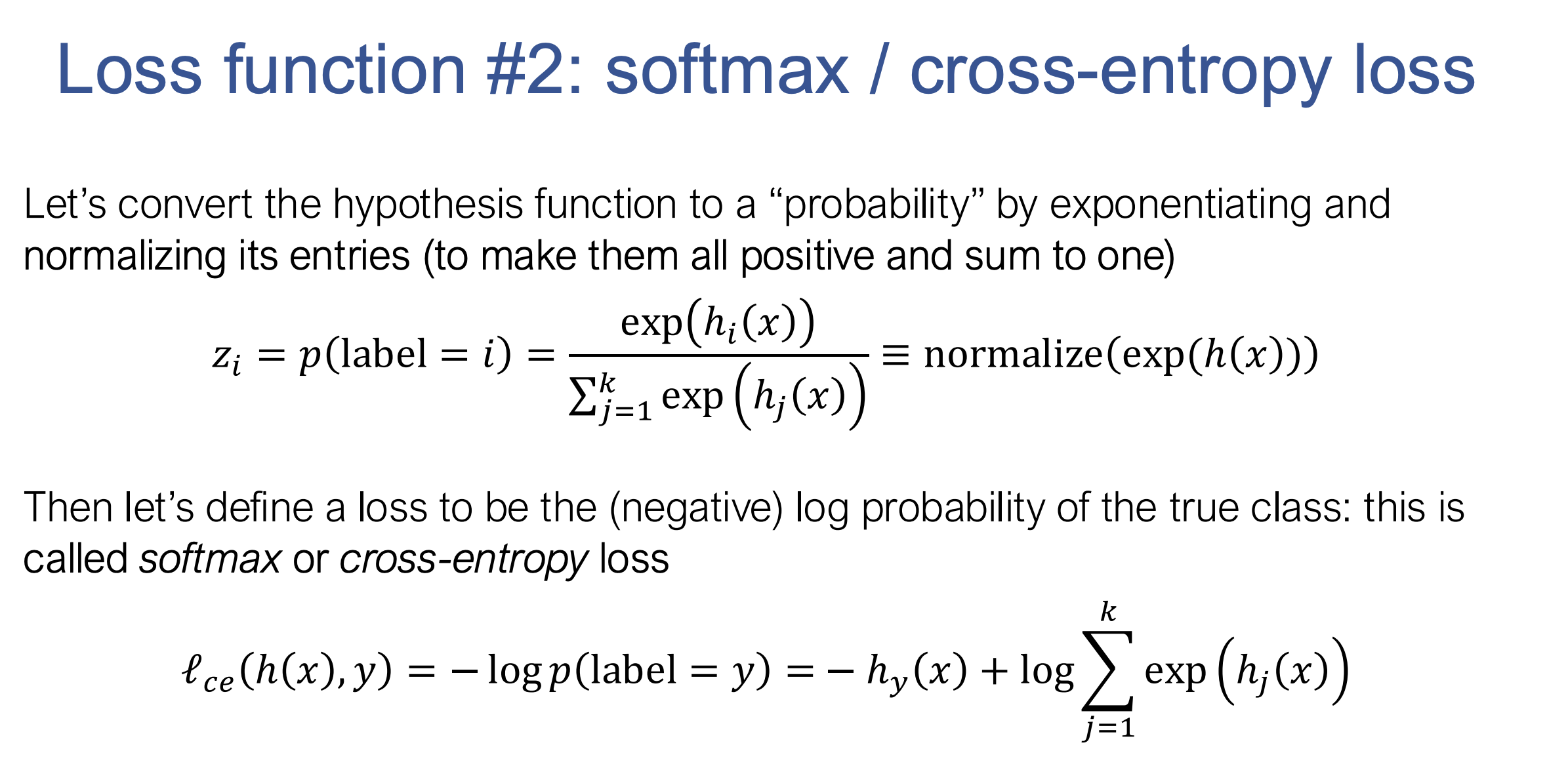
Now we can use the needle package to train models. Remember the softmax loss equation? Converts logits to probabilities and measures the negative log probability of the true class: \(\ell_c(h(x), y) = -h_y(x) + \log \left( \sum_{j=1}^k \exp(h_j(x)) \right)\)
def softmax_loss(Z, y_one_hot):
    """Return softmax loss.  Note that for the purposes of this assignment,
    you don't need to worry about "nicely" scaling the numerical properties
    of the log-sum-exp computation, but can just compute this directly.

    Args:
        Z (ndl.Tensor[np.float32]): 2D Tensor of shape
            (batch_size, num_classes), containing the logit predictions for
            each class.
        y (ndl.Tensor[np.int8]): 2D Tensor of shape (batch_size, num_classes)
            containing a 1 at the index of the true label of each example and
            zeros elsewhere.

    Returns:
        Average softmax loss over the sample. (ndl.Tensor[np.float32])
    """
    ### BEGIN YOUR SOLUTION
    m = Z.shape[0]
    Z1 = ndl.ops.summation(ndl.ops.log(ndl.ops.summation(ndl.ops.exp(Z), axes=(1, ))))
    Z2 = ndl.ops.summation(Z * y_one_hot)
    return (Z1 - Z2) / m
    ### END YOUR SOLUTION


def nn_epoch(X, y, W1, W2, lr=0.1, batch=100):
    """Run a single epoch of SGD for a two-layer neural network defined by the
    weights W1 and W2 (with no bias terms):
        logits = ReLU(X * W1) * W1
    The function should use the step size lr, and the specified batch size (and
    again, without randomizing the order of X).

    Args:
        X (np.ndarray[np.float32]): 2D input array of size
            (num_examples x input_dim).
        y (np.ndarray[np.uint8]): 1D class label array of size (num_examples,)
        W1 (ndl.Tensor[np.float32]): 2D array of first layer weights, of shape
            (input_dim, hidden_dim)
        W2 (ndl.Tensor[np.float32]): 2D array of second layer weights, of shape
            (hidden_dim, num_classes)
        lr (float): step size (learning rate) for SGD
        batch (int): size of SGD mini-batch

    Returns:
        Tuple: (W1, W2)
            W1: ndl.Tensor[np.float32]
            W2: ndl.Tensor[np.float32]
    """

    ### BEGIN YOUR SOLUTION
    m = X.shape[0]
    for i in range(0, m, batch):
      X_batch = X[i : i+batch]
      y_batch = y[i : i+batch]
      X_batch = ndl.Tensor(X_batch)
      Z1 = ndl.ops.relu(X_batch @ W1)
      Z = Z1 @ W2
      y_one_hot = np.zeros(Z.shape, dtype="float32")
      y_one_hot[np.arange(Z.shape[0]),y_batch] = 1
      loss = softmax_loss(Z, ndl.Tensor(y_one_hot))
      loss.backward()

      W1 = (W1 - lr * W1.grad).detach()
      W2 = (W2 - lr * W2.grad).detach()
    return W1, W2
    ### END YOUR SOLUTION
🌟 Future Development
The sources highlight that “Needle” has the potential to evolve into a full-fledged deep learning framework. Future developments may include:
- Replacing NumPy arrays with a custom multi-dimensional array library.
- Enabling GPU acceleration.
- Supporting more sophisticated deep learning models.
🎉 Conclusion
“Needle” is a concise yet powerful package that encapsulates the essential elements of deep learning. Despite its small codebase, it demonstrates how to build a robust framework for automatic differentiation and computational graph construction, laying the groundwork for future expansion. 💡