
TinyML LLM Deployment Techniques
Modern AI models are becoming increasingly large, demanding substantial computational resources and memory. This creates a gap between the computational demands of these models and the available hardware capabilities. Pruning addresses this gap by reducing model size, memory footprint, and ultimately, energy consumption.
This lecture summarizes key concepts and techniques for efficient deployment of Large Language Models (LLMs), focusing on reducing computational cost, memory footprint, and latency while maintaining accuracy. The lecture covers:
- 🔢 Quantization
- ✂️ Pruning & Sparsity
- 🖥️ System Support for LLM Inference
1. 🔢 Quantization
1.1. The Challenge of Quantizing LLMs
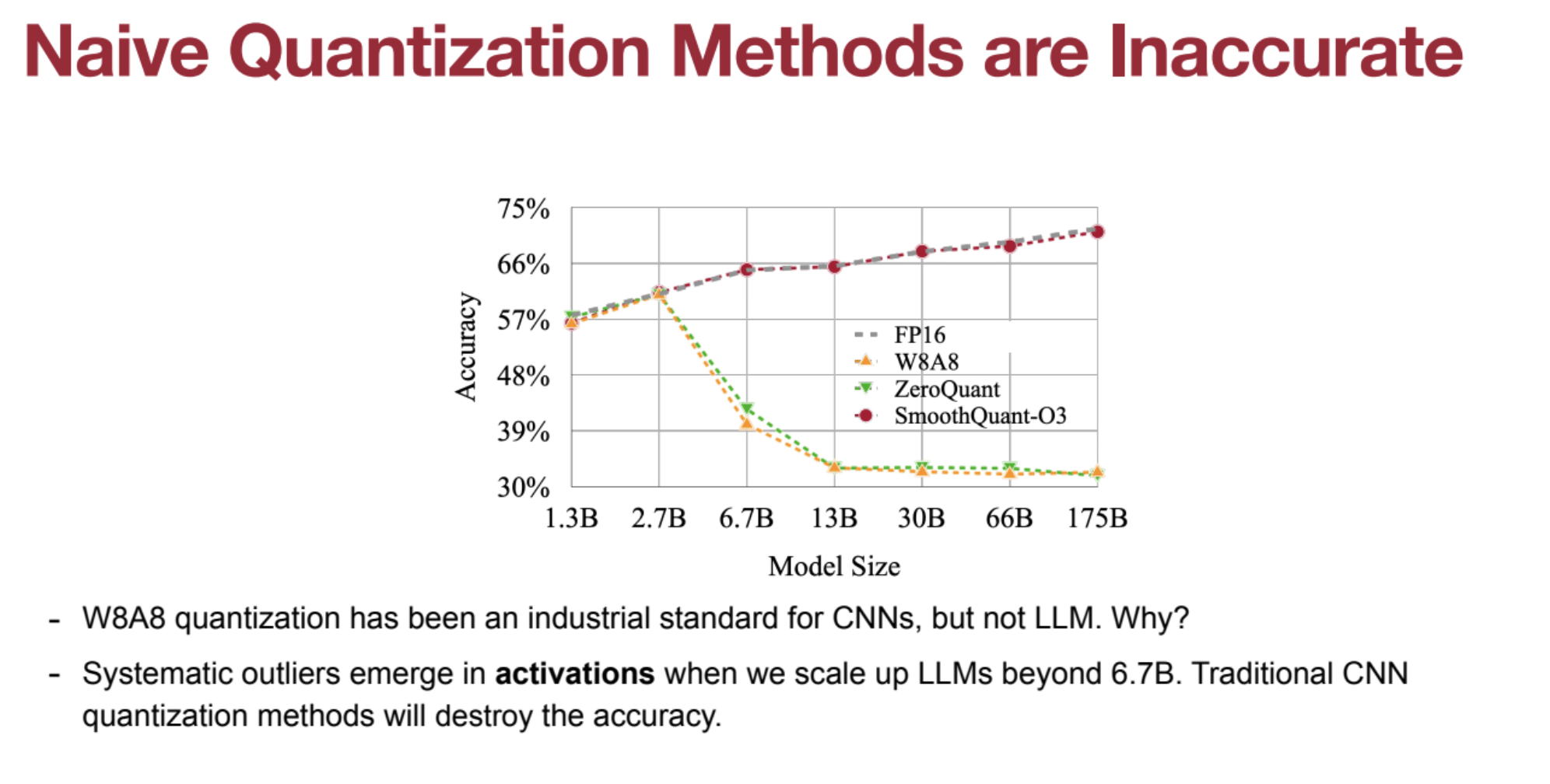
- Conventional Limitations: Standard quantization degrades accuracy for models >6.7B parameters.
- Outliers in Activations: Large activation values dominate quantization, reducing smaller activations to zero.
- Weights vs. Activations: Weights are easier to quantize, activations are harder.
1.2. 🔄 SmoothQuant
SmoothQuant is a method of quantization that addresses the challenge of quantizing large language models (LLMs) by migrating the quantization difficulty from activations to weights. This is done because the weights in LLMs are easier to quantize than the activations, which often have outlier channels with very large values.
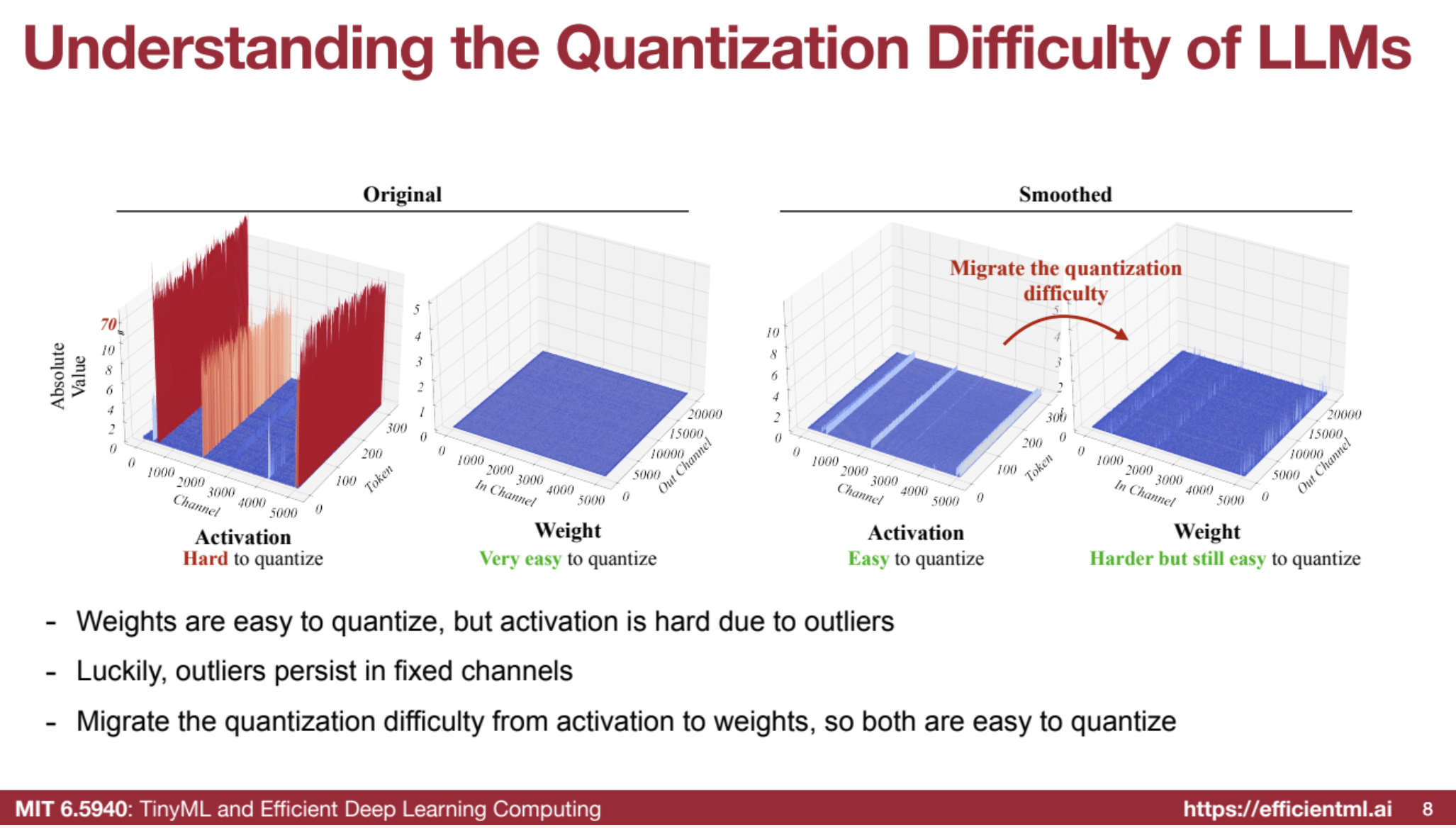
- Migrating Quantization Difficulty: Scale activations down and weights up to balance quantization difficulty.
- Calibration: Use small batches to compute scaling factors.
-
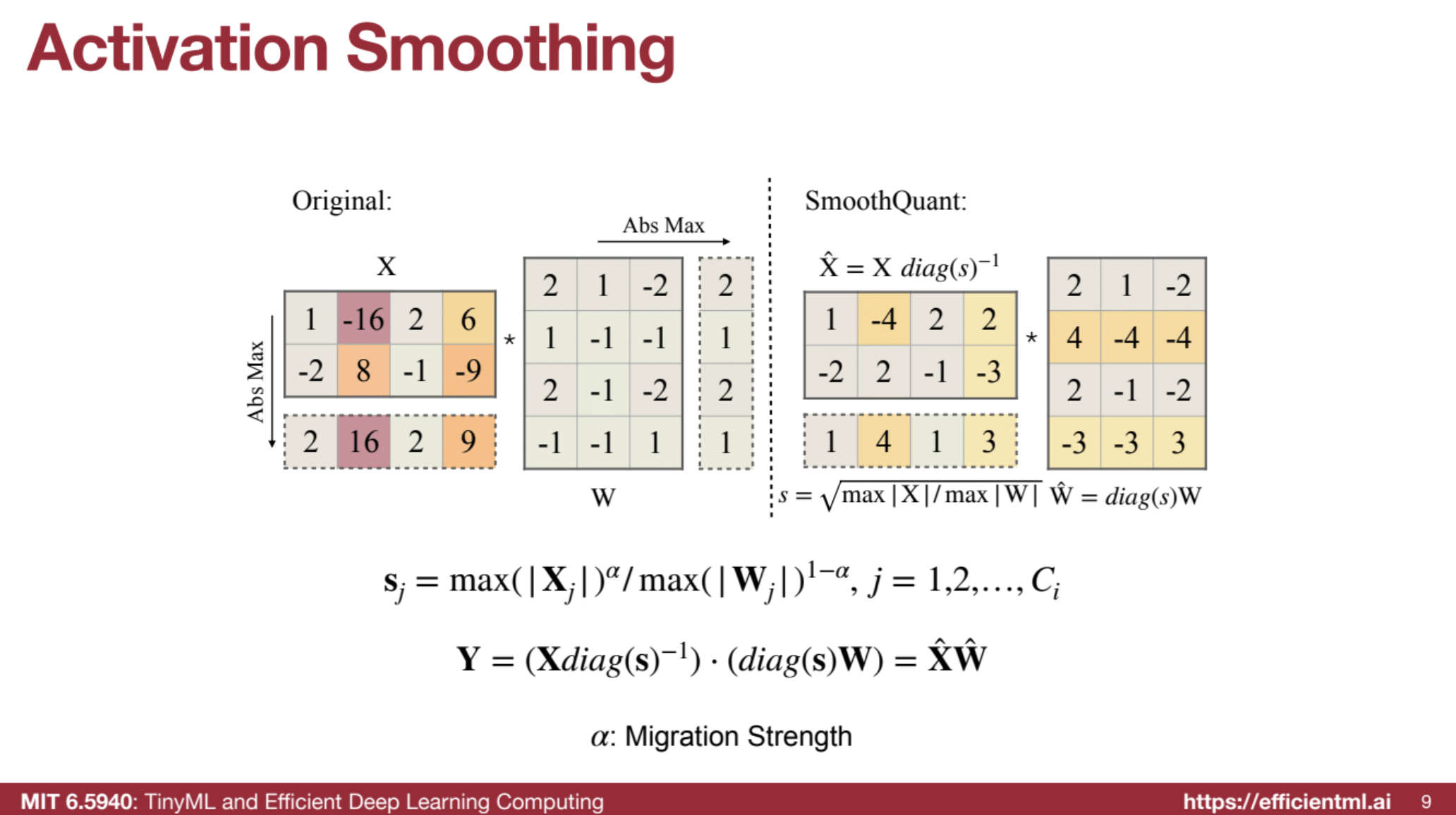
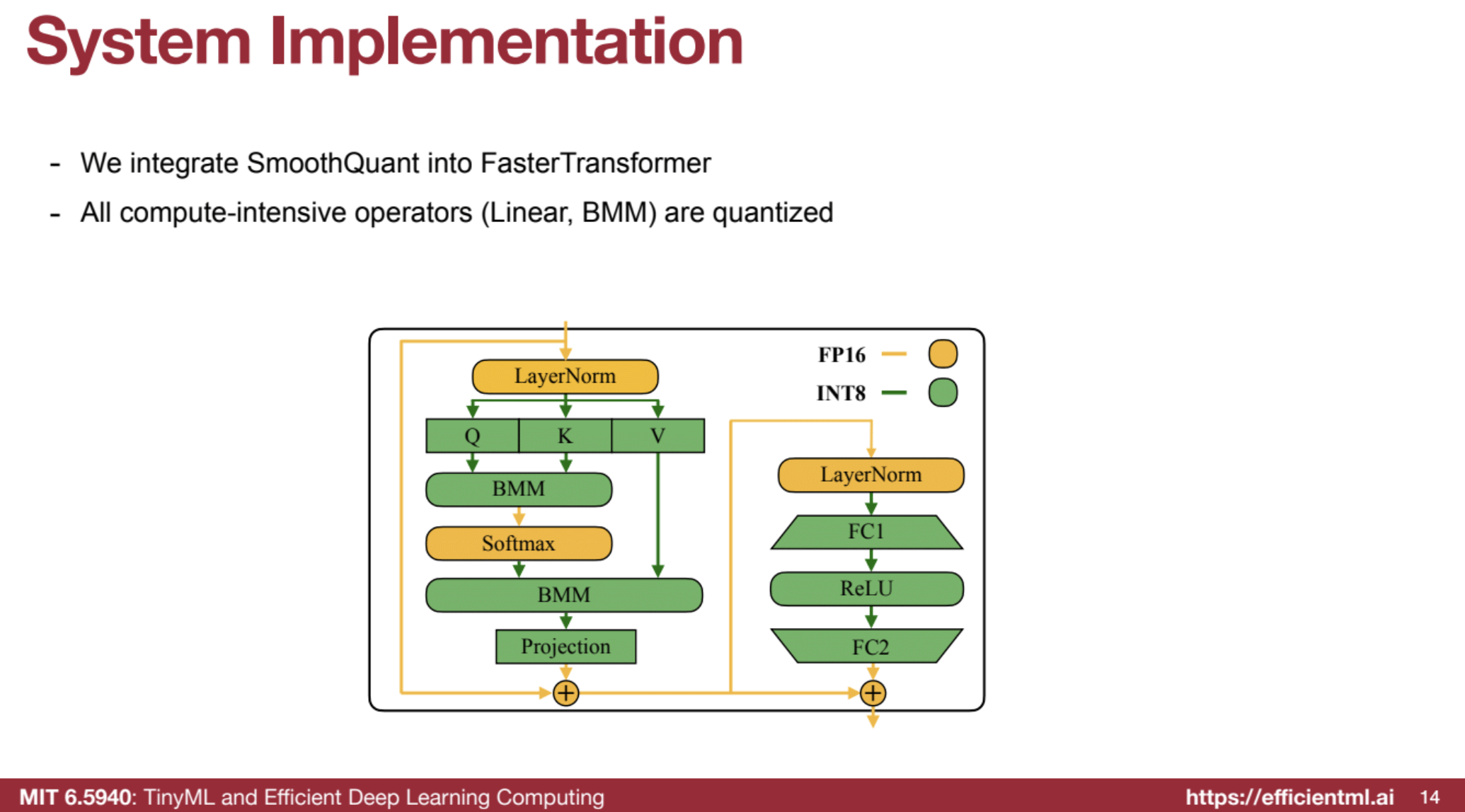
Formula: sj = max( Xj )^α / max( Wj )^(1−α) - System Integration: Works with FasterTransformer, keeping non-linear ops in FP16.
- Benefits: Halves GPU usage (e.g., 175B model from 8 to 4 GPUs).
Steps:
- Scaling (Smoothing Step):
- Activations are scaled down by dividing each channel by a scaling factor.
- Weights are scaled up by multiplying each channel by the same scaling factor.
- This redistributes the quantization difficulty from activations to weights, making activations smoother and easier to quantize.
- Quantization (INT8):
- After scaling, both the weights and activations are quantized to INT8 for transformer layers (e.g., linear layers and matrix multiplications).
- This improves efficiency while preserving accuracy because the smoothing process reduces outlier values in activations that would otherwise degrade performance.
- Inference (Efficient Execution):
- During inference, the model operates with INT8 matrix multiplications for compute-heavy layers, while non-linear operations (like LayerNorm or Softmax) remain in FP16 for accuracy.
- The quantization-aware scaled values ensure minimal accuracy loss while benefiting from faster and more memory-efficient operations.
I. 🎯 Understanding the Problem
- 🔸 Traditional quantization methods, like 8-bit quantization (W8A8) effective for CNNs, fail for LLMs.
- 🔸 Outlier channels in activations have very high values, causing accuracy loss during quantization.
- 🔸 Weights in LLMs are generally flat and easy to quantize.
- ✨ Core Idea:
By leveraging matrix multiplication’s linearity, SmoothQuant scales activations down and scales weights up, shifting quantization difficulty from activations to weights.
II. 🛠️ Calibration Stage (Offline)
- 🧪 Batch Calibration: Run a few data batches to collect statistics.
- 📊 Calculate Maximums:
- For activations (X) – max absolute value per column (channel).
- For weights (W) – max absolute value per row (channel).
- 📐 Scaling Factor (s):
$( sⱼ = \frac{\text{max}(|Xⱼ|)^{\alpha}}{\text{max}(|Wⱼ|)^{1-\alpha}} )$
where α is the migration strength (typically 0.5, or square root).
III. 🧹 Smoothing Stage (Offline)
- 🔻 Scale Down Activations:
$( \hat{X} = X \cdot \text{diag}(s)^{-1} )$ - 🔺 Scale Up Weights:
$( \hat{W} = \text{diag}(s) \cdot W )$ - 🔗 Mathematical Equivalence:
$( \hat{X} \hat{W} = (X \cdot \text{diag}(s)^{-1}) \cdot (\text{diag}(s) \cdot W) = XW )$ - ⚖️ Migration Strength (α):
- Larger α ➡️ More difficulty shifted to weights.
- Smaller α ➡️ More difficulty retained in activations.
- Sweet Spot: $( \alpha = 0.5 )$ ensures balance and high accuracy.
IV. 🏃 Inference (Deployed Model)
- 🔢 Scaled activations $( \hat{X} )$ and scaled weights $( \hat{W} )$ are used during inference.
- 🛠️ Folding Scaling: Scaling factors are folded at compile time for zero runtime overhead.
- 📉 Outlier Problem Solved: Activations are smoother, quantization becomes effective.
- 🔧 Integer Math: Matrix multiplications are done in INT8 for higher efficiency.
V. ⚙️ System Implementation
- 🔗 Integration: SmoothQuant can be integrated with systems like FasterTransformer.
- ⚡ INT8 Operations: Compute-heavy tasks (e.g., linear ops, BMM) are quantized.
- 🧮 FP16 for Accuracy:
- Non-linear layers (LayerNorm, Softmax) remain in FP16.
- Bypass branches and layer norm inputs stay in FP16 (low compute cost).
🌟 Key Advantages of SmoothQuant
- 🎯 Accuracy: Maintains accuracy without fine-tuning.
- ⚡ Efficiency:
- Reduces memory footprint and accelerates inference.
- Example: A 175B model can run on 4 GPUs (down from 8).
- 📈 Scalability: Supports various model sizes – can serve a 530B model on a single GPU node.
- 🔄 Versatility: Works with SwishGLU activations (e.g., LLaMA models).
Code Example
https://github.com/mit-han-lab/smoothquant/blob/main/README.md
1.3. 🧠 AWQ (Activation-Aware Weight-Only Quantization)
- Edge Inference Focus: Optimized for on-device, single-batch inference.
- Weight Bottleneck: Targets weight memory access as the limiting factor.
- Preserving Salient Channels: Protects 1% of weights from quantization based on activation magnitudes.
- TinyChat: Lightweight LLM inference engine supporting AWQ with efficient weight packing.
AWQ is a weight-only quantization technique designed to efficiently compress large language models (LLMs) for deployment on edge devices. By considering activations during weight quantization, AWQ overcomes limitations of traditional methods.
📌 I. The Need for Weight-Only Quantization
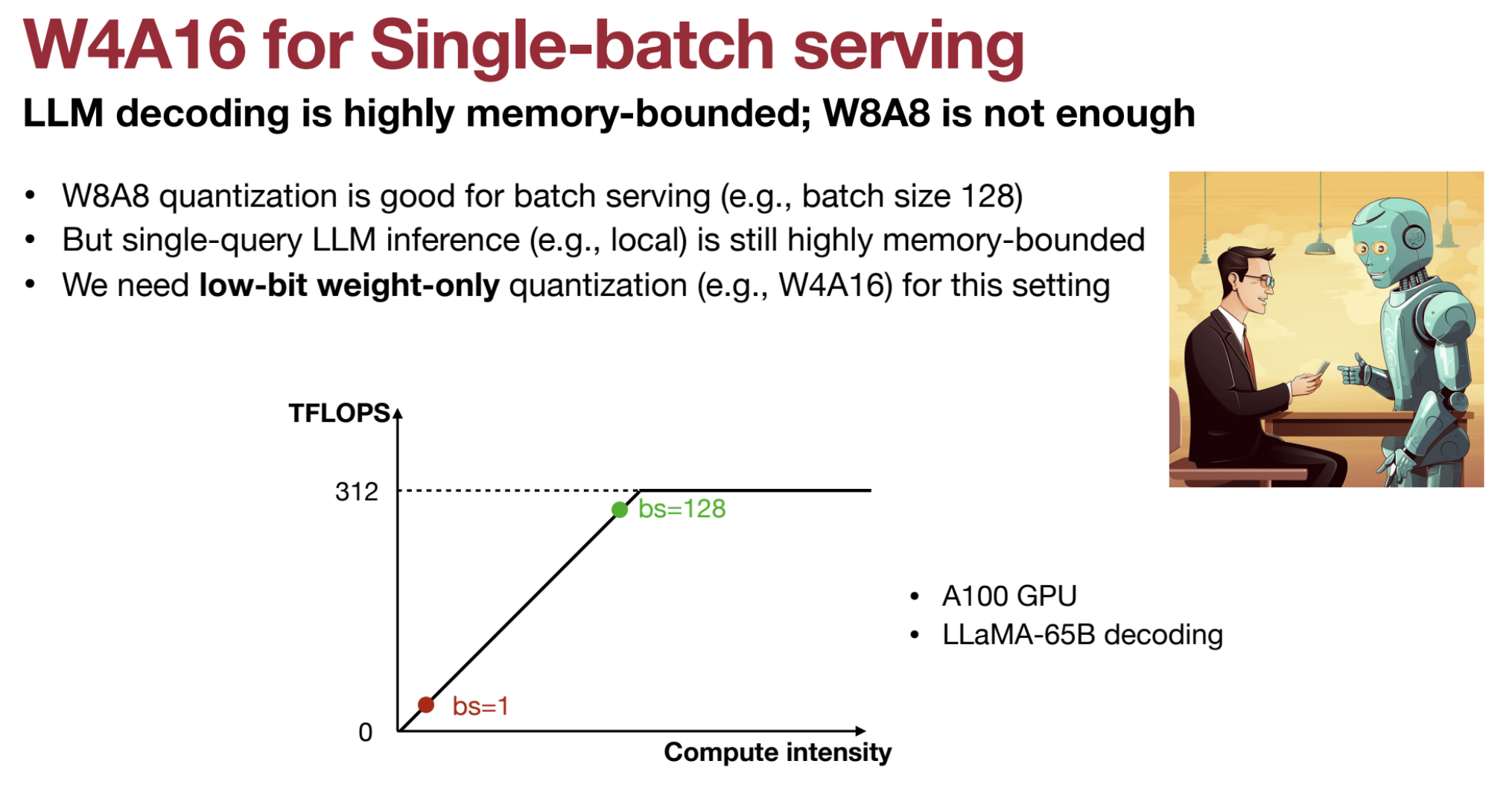
- ⚙️ In single-batch LLM serving, weight memory access is the bottleneck, not activations.
- 🔢 Low-batch settings reduce computation intensity to matrix-vector multiplication.
- 🧩 Efficient quantization of weights (e.g., to 4 bits) saves memory, while activations remain at higher precision (e.g., FP16).
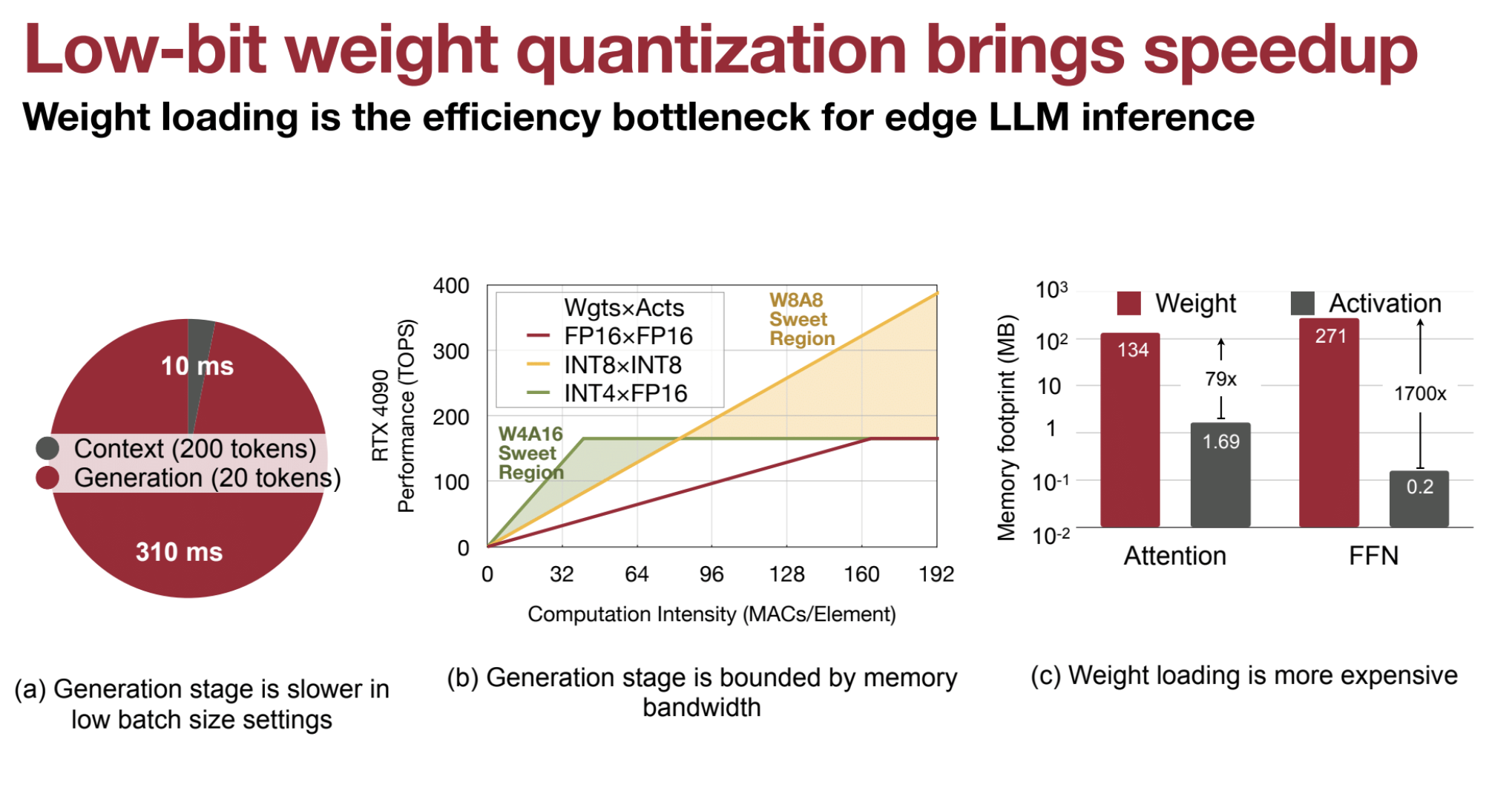
- ⏱️ Generation stages are critical, as they are memory bandwidth bound during inference.
🚀 W4A16 vs W8A8: Why W4A16 Has Lower Latency
W4A16 (4-bit weights, 16-bit activations) achieves lower latency than W8A8 (8-bit weights and activations) in single-batch serving scenarios. Here’s why:
- 🛑 Memory Bandwidth Bottleneck
- 🔗 Memory access is the primary bottleneck during inference on edge devices or single-batch scenarios.
- ⏳ Loading weights dominates overall latency due to limited bandwidth.
- 🎯 Weight-Only Quantization (W4A16)
- ⚖️ W4A16 quantizes weights to 4 bits, keeping activations at 16 bits.
- 📉 This reduces weight memory footprint significantly, minimizing memory traffic.
- 🔄 In contrast, W8A8 quantizes both weights and activations to 8 bits, increasing memory load.
- 🚀 Reduced Memory Access Time
- 📦 4-bit weights reduce data loading requirements compared to 8-bit weights.
- 🔄 Faster load times lead to lower latency in W4A16 models.
- ⚙️ Weights contribute 70x more to memory footprint than activations, making efficient weight quantization critical.
- ⚡ Focus on Generation Stage
- 📊 During LLM generation stages (low batch sizes), performance is bound by memory bandwidth.
- 🔧 Reducing weight size lowers this bottleneck, speeding up generation.
- 🔢 Compute Intensity (Single-Batch)
- 🧮 Single-batch inference involves matrix-vector multiplications (not matrix-matrix).
- 🔻 This reduces computation intensity, making 8-bit activations less beneficial.
- 🏎️ W4A16’s memory savings have a greater impact on latency than 8-bit activations.
- 🔧 Hardware Efficiency
- 🚀 Smaller memory footprint enhances hardware efficiency.
- 🔩 Techniques like weight packing and kernel fusion (e.g., TinyChat) accelerate W4A16 performance.
- 📱 Edge Device Suitability
- 🌐 W4A16 is ideal for edge devices with limited memory and computational power.
- 🎯 Provides an excellent balance between size and performance.
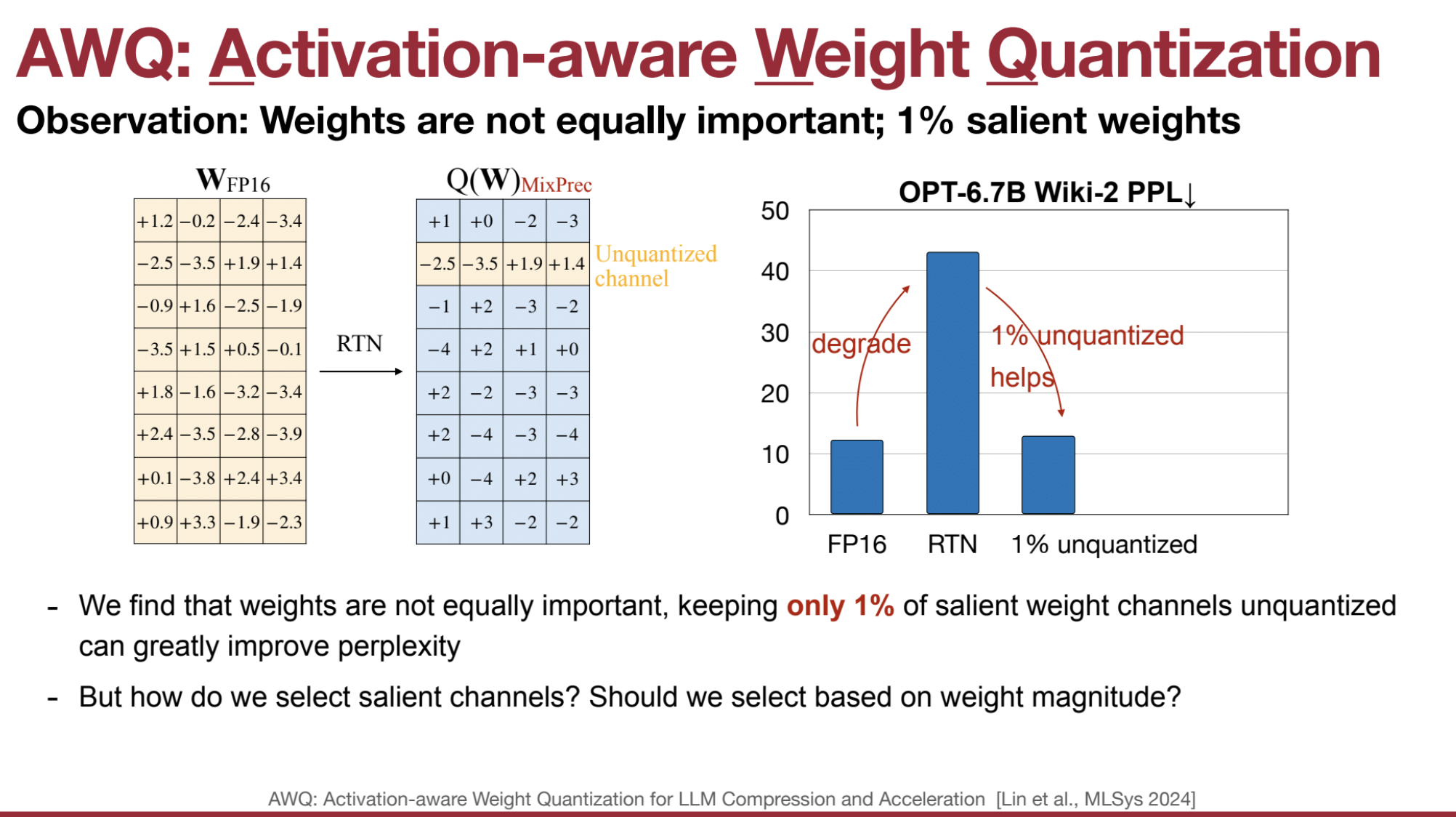
❌ II. Limitations of Naive Quantization
- 🎯 Direct weight quantization leads to significant accuracy loss.
- 🛠️ Preserving a small percentage of weight channels can significantly improve perplexity.
- ❓ The key challenge: Which weight channels to preserve?
🔍 III. Identify Outlier Channels
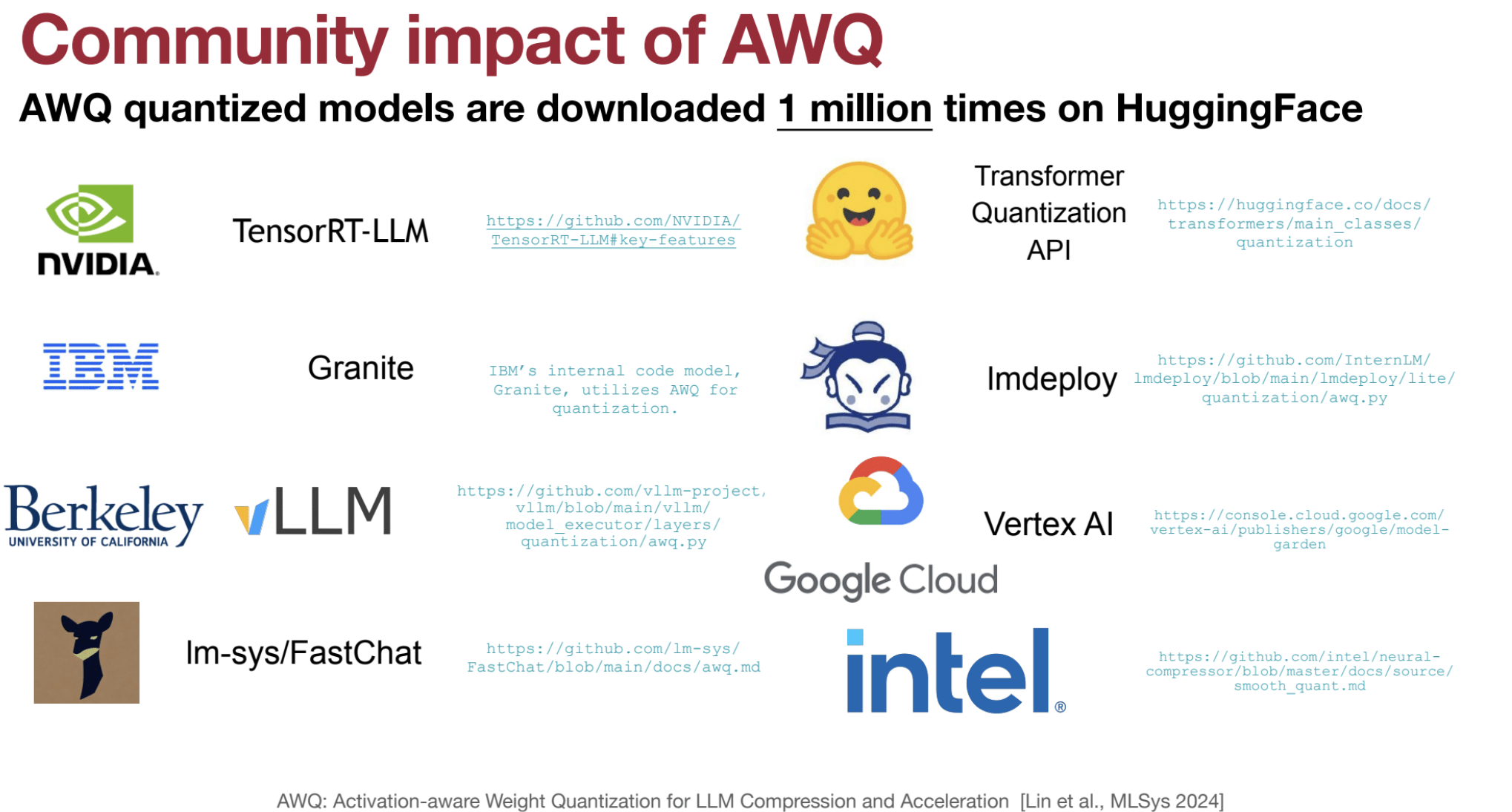
- Outlier channels are activation channels with consistently high values across tokens.
- These channels dominate the dynamic range and can degrade quantization accuracy if left unchecked.
What is a Channel in LLMs? Each linear layer in LLMs operates on input tensors, which can be thought of as having the following dimensions:
- Batch size (B)
- Sequence length (S) – number of tokens
- Embedding dimension (D) – hidden size
Channels in this context correspond to the dimensions of the weight matrix in the linear layer. Specifically:
- Channels refer to rows or columns of the weight matrix in the fully connected layers.
- For activation quantization, channels are along the embedding or hidden dimension.
- For weight quantization, channels correspond to the output features (neurons) of the linear layer.
Linear Layer Operation: $[ \text{Output} = \text{Input} \times W ]$
Where:
- Input Shape: $( (B, S, D) )$
- Weight Matrix $(W)$ Shape: $( (D, M) )$
-
Output Shape: $( (B, S, M) )$
- Channels in Weight Matrix: $( M )$ (output channels or neurons)
- Channels in Activations: $( D )$ (embedding size)
🎯 IV. Activation-Aware Selection
- AWQ selects channels for protection based on activation distributions, not weight magnitudes.
- Intuition: Channels with high activation values are sensitive to weight changes and should be preserved during quantization.
🔧 V. Scaling for Protection
- AWQ scales the weights of sensitive channels instead of leaving them in full precision.
- Simultaneously, activations are scaled down, shifting quantization difficulty from activations to weights.
- This balances the quantization process, making it more efficient.
📐 VI. Calculation of Scaling Factors
-
Scaling factor $( s )$ is calculated as:
$[ s = \frac{(\max(|X_j|)^\alpha)}{(\max(|W_j|)^{1-\alpha})} ]$
Where:
- $( X_j )$ = Activation in channel $( j )$
- $( W_j )$ = Weight in channel $( j )$
- $( \alpha )$ = Migration strength (typically 0.5)
-
Alternatively:
$[ s = s_x^\alpha ]$- $( s_x )$ = Average activation magnitude
🔄 VII. Weight and Activation Transformation
- During the smoothing stage:
- Activations are scaled:
$[ \hat{X} = X \cdot \text{diag}(s)^{-1} ]$ - Weights are scaled:
$[ \hat{W} = \text{diag}(s) \cdot W ]$ - This transformation ensures:
$[ Y = XW = \hat{X}\hat{W} ]$
- Activations are scaled:
🧱 VIIII. Quantization
- Scaled weights are quantized to 4 bits:
$[ Q(w) = \Delta \cdot \text{round}\left(\frac{w}{\Delta}\right) ]$- $( \Delta )$ = Quantization scalar (absolute max value)
- With scaling:
$[ Q(w \cdot s) \cdot \left(\frac{x}{s}\right) ]$
🔍 X. Optimal Scaling Search
- Scaling factors are optimized to minimize the mean square root error between the scaled and original results.
- The objective focuses on minimizing activation error, ensuring activation-awareness.
🚀 XI. Inference
- Scaled weights and activations are used during inference.
- Scaling factors are folded into previous layer normalization at compile time, enabling:
- Integer-only matrix multiplication at runtime 🚀
- No additional overhead
AWQ Implementation in HW
Pseudo Quantization is used to simulate the effects of quantization on a model without actually quantizing the model’s weights. (i.e. rounding to the nearest quantized value and then dequantizing back to a float.)
# core quantization method (simulated quantization)
def pseudo_quantize_tensor(w, n_bit=4, q_group_size=-1):
    org_w_shape = w.shape
    if q_group_size > 0:
        assert org_w_shape[-1] % q_group_size == 0
        w = w.reshape(-1, q_group_size)

    assert w.dim() == 2

    # Calculate the maximum (\alpha) and minimum values (\beta) in the tensor.
    max_val = w.amax(dim=1, keepdim=True)
    assert max_val.dim() == 2 and max_val.size(0) == w.size(0) and max_val.size(1) == 1
    min_val = w.amin(dim=1, keepdim=True)
    assert min_val.dim() == 2 and min_val.size(0) == w.size(0) and min_val.size(1) == 1

    # Calculate the scale factor and zero point.  (Formula 1 & 2)
    max_int = 2 ** n_bit - 1
    scales = (max_val - min_val).clamp(min=1e-5) / max_int
    assert scales.shape == max_val.shape
    zeros = (-torch.round(min_val / scales)).clamp_(0, max_int)
    assert scales.shape == min_val.shape

    assert torch.isnan(scales).sum() == 0
    assert torch.isnan(w).sum() == 0

    # Quantize W: Map values in the range [\beta, \alpha] to lie within [0, 2^b - 1] (Formula 3)
    w = torch.clamp(torch.round(w / scales) + zeros, 0, max_int)
    assert w.dim() == 2 and w.size(0) == scales.size(0) and w.size(1) == q_group_size

    # Dequantize W (pseudo quantization, the inverse transformation of Formula 3)
    w = (w - zeros) * scales
    assert w.dim() == 2 and w.size(0) == scales.size(0) and w.size(1) == q_group_size

    assert torch.isnan(w).sum() == 0

    w = w.reshape(org_w_shape)
    return w

@torch.no_grad()
def pseudo_quantize_model_weight(
    model, w_bit, q_group_size,
):
    for n, m in model.named_modules():
        if isinstance(m, nn.Linear):
            m.weight.data = pseudo_quantize_tensor(m.weight.data, n_bit=w_bit, q_group_size=q_group_size)
Example
- Tensor:
$[ w = \begin{bmatrix} 2.3 & 1.7 & 3.8 & -0.5 \ 4.1 & -2.4 & 1.0 & 0.3 \end{bmatrix} ]$ - Bit-width: $( n_bit = 4 )$
- Group size: $( q_group_size = 2 )$
- Max integer for 4-bit quantization:
$[ max_int = 2^4 - 1 = 15 ]$
a. Calculate Min/Max Per Group:
- Reshape tensor for group quantization:
$[ w \rightarrow \begin{bmatrix} 2.3 & 1.7 \ 3.8 & -0.5 \ 4.1 & -2.4 \ 1.0 & 0.3 \end{bmatrix} ]$ - Compute group-wise maximum and minimum:
$[ max_val = \begin{bmatrix} 2.3 \ 3.8 \ 4.1 \ 1.0 \end{bmatrix}, \quad min_val = \begin{bmatrix} 1.7 \ -0.5 \ -2.4 \ 0.3 \end{bmatrix} ]$
b. Compute Scale and Zero Point:
- Formula for scale:
$[ scale = \frac{max_val - min_val}{max_int} ]$ $[ scale = \frac{2.3 - 1.7}{15} = 0.04 ]$ - Formula for zero point:
$[ zero_point = \text{clamp}\left(-\text{round}\left(\frac{min_val}{scale} \right), 0, max_int \right) ]$ $[ zero_point = \text{clamp}\left(-\text{round}\left(\frac{1.7}{0.04} \right), 0, 15 \right) = \text{clamp}(-43, 0, 15) = 0 ]$ Correction: Zero point is clamped between 0 and 15, not 43.
c. Quantize the Weights:
- Apply the quantization formula:
$[ Q(w) = \text{clamp}\left(\text{round}\left(\frac{w}{scale} \right) + zero_point, 0, max_int \right) ]$ For $( w = 2.3 )$:
$[ Q(2.3) = \text{clamp}\left(\text{round}\left(\frac{2.3}{0.04} \right) + 0, 0, 15 \right) = \text{clamp}(58, 0, 15) = 15 ]$ - For $( w = 1.7 )$:
$[ Q(1.7) = \text{clamp}\left(\text{round}\left(\frac{1.7}{0.04} \right), 0, 15 \right) = 15 ]$
Example Output:
- Quantized tensor:
$[ Q(w) = \begin{bmatrix} 15 & 15 \ 15 & 0 \ 15 & 0 \ 15 & 7 \end{bmatrix} ]$ - Dequantized tensor:
$[ w’ = (Q(w) - zero_point) \times scale ]$ $[ w’ = \begin{bmatrix} 0.6 \ 3.8 \ 3.6 \ 0.28 \end{bmatrix} ]$
@torch.no_grad()
def get_calib_feat(model, tokenizer):
    input_dict = dict()
    def stat_input_max_hook(m, x, y, name):
        if isinstance(x, tuple):
            x = x[0]
        x_max = x.view(-1, x.shape[-1]).abs().mean(dim=0).cpu().detach()
        if name not in input_dict:
            input_dict[name] = [x_max]
        else:
            input_dict[name] += [x_max]

    hooks = []
    for name, m in model.named_modules():
        if isinstance(m, nn.Linear):
            hooks.append(
                m.register_forward_hook(
                    partial(stat_input_max_hook, name=name)))

    print("Collecting activation scales...")
    device = torch.device("cuda" if torch.cuda.is_available() else "cpu")

    samples = get_calib_dataset(tokenizer)
    pbar = tqdm.tqdm(samples)
    for input_ids in pbar:
        input_ids = input_ids.to(device)
        model(input_ids)

    for hook in hooks:
        hook.remove()
    return input_dict
What is a Hook?
In PyTorch, a hook is a function that can be registered to a module (e.g., a layer) or a tensor to perform specific actions during the forward or backward pass of the model. Hooks are useful for monitoring and modifying intermediate outputs during training or inference without modifying the core code of the model. They allow for flexible inspection of the model’s behavior.
Types of Hooks:
- Forward Hook: Runs after the output of a layer is computed during the forward pass. Can be used to collect statistics, modify outputs, or track activations.
- Backward Hook: Runs during the backward pass and allows inspection or modification of gradients.
In the context of the provided code, we focus on forward hooks.
@torch.no_grad()
def pseudo_quantize_model_salient_weight_fp16(
    model, w_bit, q_group_size, input_feat
):
    for n, m in model.named_modules():
        if isinstance(m, nn.Linear):
            importance = sum(input_feat[n]).float()

            ############### YOUR CODE STARTS HERE ###############

            # Step 1: Find 1% of the salient weight channels according to importance (hint: use torch.topk())
            outlier_indices = torch.topk(importance, int(len(importance) * 0.01))[1]
            assert outlier_indices.dim() == 1

            ############### YOUR CODE ENDS HERE #################

            # Back up the values of the salient weight channels
            outlier = m.weight.data[:, outlier_indices].clone()

            m.weight.data = pseudo_quantize_tensor(m.weight.data, n_bit=w_bit, q_group_size=q_group_size)

            ############### YOUR CODE STARTS HERE ###############

            # Step 2: Restore the 1% salient weight channels to their original FP16 values
            m.weight.data[:, outlier_indices] = outlier

            ############### YOUR CODE ENDS HERE #################

del model
gc.collect()
torch.cuda.empty_cache()
model = AutoModelForCausalLM.from_pretrained(model_path, device_map="auto")
pseudo_quantize_model_salient_weight_fp16(model, w_bit=3, q_group_size=128, input_feat=input_feat)

# Evaluate the model
model_perplexity = evaluate(model, tokenizer)
model_size = get_model_size(model, data_width=3, group_size=128)
print(f"\nmodel perplexity: {model_perplexity:.2f}")
print(f"model size: {model_size/MiB:.2f} MiB")
Despite keeping 0.1% of weights in FP16 can improve the quantized performance without a noticeable increase in model size (measured in total bits), such a mixed-precision data type will make the system implementation difficult. We need to come up with a method to protect the important weights without actually keeping them as FP16.
According to the methodology of AWQ, simply scaling up the salient weight channels can protect them.
Mathematical Framework:
For a linear layer with $( y = wx )$, the quantization error is expressed as: $[ \text{Err}(Q(w)x) = \Delta \times \text{RoundErr}\left(\frac{w}{\Delta}\right) \times x ]$ Where:
-
$( \Delta = \frac{\max( w )}{2^N - 1} )$ for $( N )$-bit quantization. - $( \text{RoundErr} )$ is approximately 0.25, averaged over the rounding range 0 to 0.5.
Scaling the weights by a factor $( s )$ changes the error to: $[ \text{Err}(Q(w \times s)(x/s)) = \Delta \times \text{RoundErr}\left(\frac{w}{\Delta}\right) \times x \times \frac{1}{s} ]$ For large group sizes (e.g., 128), scaling one channel generally doesn’t affect the maximum value in the group, meaning $( \Delta )$ remains constant, and the scaled version typically has less error than the unscaled version.
Practical Example:
For 3-bit quantization ($( N = 3 )$):
-
Original Quantization Error for a weight value of 1.4: $[ \text{Err} = \left(\frac{4}{2^3 - 1}\right) \times |1.4 - 1.0| \times (2 + 2 + 2) = 2.4 ]$
-
After Scaling by 2: When the weight is scaled to 2.8, the new error becomes: $[ \text{Err} = \left(\frac{4}{2^3 - 1}\right) \times |2.8 - 3.0| \times (1 + 1 + 1) = 0.6 ]$ This demonstrates that scaling the weight reduces the quantization error.
Why 1.0 in $( |1.4 - 1.0| )$
The 1.0 is the base value or quantization reference point. It’s used as the center for the quantization process, helping to calculate how far the real value (1.4) is from the quantized level. The base value is typically chosen based on the data’s distribution, with 0 or 1 often used for normalized weights or parameters.
| __Why 3.0 in $( | 2.8 - 3.0 | )$__ |
| The 3.0 comes from the target quantized value for the weight 2.8 after scaling. For 3-bit quantization, the closest integer in the range (0–7) to 2.8 is 3. The difference $( | 2.8 - 3.0 | = 0.2 )$ is used to calculate the quantization error. |
@torch.no_grad()
def pseudo_quantize_model_weight_scaleup(
    model, w_bit, q_group_size, input_feat, scale_factor
):
    for n, m in model.named_modules():
        if isinstance(m, nn.Linear):
            importance = sum(input_feat[n]).float()

            ############### YOUR CODE STARTS HERE ###############

            # Step 1: Find 1% of the salient weight channels
            outlier_mask = torch.topk(importance, int(len(importance) * 0.01))[1]
            assert outlier_mask.dim() == 1

            ############### YOUR CODE ENDS HERE #################

            # To simulate applying the scale factor, we can simply multiply it before quantization, and then divide by the scale factor after quantization.
            # Scale up the values of the salient weight channels
            m.weight.data[:, outlier_mask] *= scale_factor

            m.weight.data = pseudo_quantize_tensor(m.weight.data, n_bit=w_bit, q_group_size=q_group_size)

            ############### YOUR CODE STARTS HERE ###############

            # Step 2: Scale back down the values of the salient weight channels
            m.weight.data[:, outlier_mask] /= scale_factor

            ############### YOUR CODE ENDS HERE #################
1.4. 🛠️ Compare SmoothQuant And AWQ
🎯 Similarities:
-
Activation Scaling –
Both AWQ and SmoothQuant address outliers in activations by scaling them down. This reduces the quantization difficulty for weights, leading to smoother and more balanced quantization. -
Weight Scaling –
They scale weights up to compensate for the reduced activations. This approach ensures that the matrix multiplication result remains unchanged while making the quantization process more robust. -
Quantization-Friendly –
By shifting part of the quantization burden from activations to weights, both methods make it easier to quantize large models without significant accuracy loss. -
Objective –
Both methods are designed to improve transformer-based models (like LLMs) and focus on optimizing memory and latency during inference, especially for edge devices or single-batch serving.
🔍 Differences:
| Feature | AWQ | SmoothQuant | |———————————|————————————————|————————————————–| | Focus | Weight-only quantization | Mixed quantization (weights + activations) | | Goal | Minimize perplexity by protecting key weights | Enable full INT8 quantization for LLMs | | Selection Method | Based on activation distributions | Based on weight and activation magnitudes | | Scaling Strategy | Per-channel scaling | Per-token dynamic scaling | | Inference Complexity | Scaled at compile time (no runtime cost) | Activation scaling at inference time | | Quantization Level | Typically W4A16 (4-bit weights, 16-bit acts)| W8A8 (8-bit weights and activations) | | Deployment Target | Edge devices, low-batch inference | General-purpose LLM deployment (server + edge) |
⚙️ Why SmoothQuant is Harder to Implement
-
Dynamic Activation Scaling –
SmoothQuant performs token-level dynamic scaling of activations during inference. This means that for each token, the activations are scaled differently, requiring real-time scaling computations. In contrast, AWQ scales activations and weights once during calibration (offline), simplifying the process. -
Per-Token Variability –
Since activations can vary significantly between tokens, SmoothQuant adapts the scaling factors dynamically. This introduces runtime complexity and requires additional hardware or software logic to manage the scaling efficiently during inference. -
End-to-End Quantization (W8A8) –
SmoothQuant aims to quantize both weights and activations to 8 bits (W8A8). This full quantization process introduces more quantization error to activations, necessitating careful tuning to maintain accuracy.
AWQ, on the other hand, primarily focuses on weight-only quantization (W4A16), which avoids activation quantization challenges. -
Fine-Grained Scaling –
SmoothQuant applies scaling at a fine granularity (per-token and per-layer), while AWQ scales at the channel level across the entire model. Fine-grained scaling adds complexity in managing and computing the correct scale dynamically.
🔄 Token-Level Quantization
SmoothQuant operates at token-level during inference:
- For each token, activations are dynamically scaled to reduce outliers.
- This results in different quantization scales for different tokens, making the quantization process highly adaptive but computationally more demanding.
In contrast:
- AWQ uses a static scaling factor derived from activation statistics across the dataset during calibration, making it simpler to deploy with consistent scaling across all tokens.
🛠️ Implementation Complexity Breakdown
| Feature | SmoothQuant | AWQ | |———————————-|————————————————|————————————————–| | Scaling | Dynamic (token-level) | Static (channel-level, per layer) | | Quantization Scope | Weights + Activations (W8A8) | Weights only (W4A16) | | Inference Overhead | Higher (real-time activation scaling) | Lower (pre-computed scaling at compile time) | | Implementation Effort | Complex (requires runtime scaling logic) | Simple (offline calibration, no runtime scaling) | | Target | Full quantization for high throughput models | Weight compression for low-latency edge models |
🎯 Summary
- SmoothQuant is more powerful for general-purpose LLM quantization but harder to implement due to token-level scaling and real-time computation needs.
- AWQ simplifies the process by focusing on weight-only quantization with static scaling, making it easier to integrate into existing models, especially for edge devices and low-batch environments.
1.5. 🚀 TinyChat: Lightweight Inference Engine for LLMs
TinyChat is a lightweight inference engine designed to deploy large language models (LLMs) on edge devices and resource-constrained environments. It prioritizes efficiency, low latency, and ease of use while supporting multiple platforms. TinyChat is optimized to work with quantized models like those using Activation-aware Weight Quantization (AWQ).
🌟 Key Features and Implementation Details
⚡ Lightweight and Efficient
- TinyChat is designed to have a small footprint and minimal overhead, making it ideal for laptops, mobile devices, and edge GPUs.
- Optimized for low-latency inference on resource-constrained devices.
🐍 Python-Native
- Built using Python, allowing easy integration with Python-based stacks and libraries, such as vLLM.
🖥️ Multi-Platform Support
- Supports cloud, desktop, laptop, and edge GPUs as well as mobile CPUs, enabling versatile deployment across different hardware environments.
🔧 Hardware-Aware Packing
TinyChat addresses the mismatch between the bit width of quantized weights (4-bit in AWQ) and the byte-oriented hardware.
- 🗂️ Weight Packing – 4-bit weights are packed into 8-bit registers to maximize efficiency.
- 📤 Efficient Unpacking – Weights are unpacked at runtime using bitwise operations (AND + shift).
- 🔄 Example:
- Original order: w31, w30, w16, w15, … w1, w0.
- Packed order: w31, w15, w2, w17, w1, w16, w0.
- Unpacking process:
- Lower 4 bits extracted with masking.
- Weights are shifted by 4 bits and masked again to extract higher 4 bits.
⚙️ Kernel Fusion
- AWQ models are deployed using TinyChat, a lightweight inference engine supporting multiple platforms.
- 4-bit weights are packed into 8-bit registers to match hardware byte alignment.
- Efficient unpacking is done through bitwise masking and shifting.
- Kernel fusion combines operations (BMM, Softmax, Attention) to:
- Reduce memory access
- Accelerate inference by up to 3x
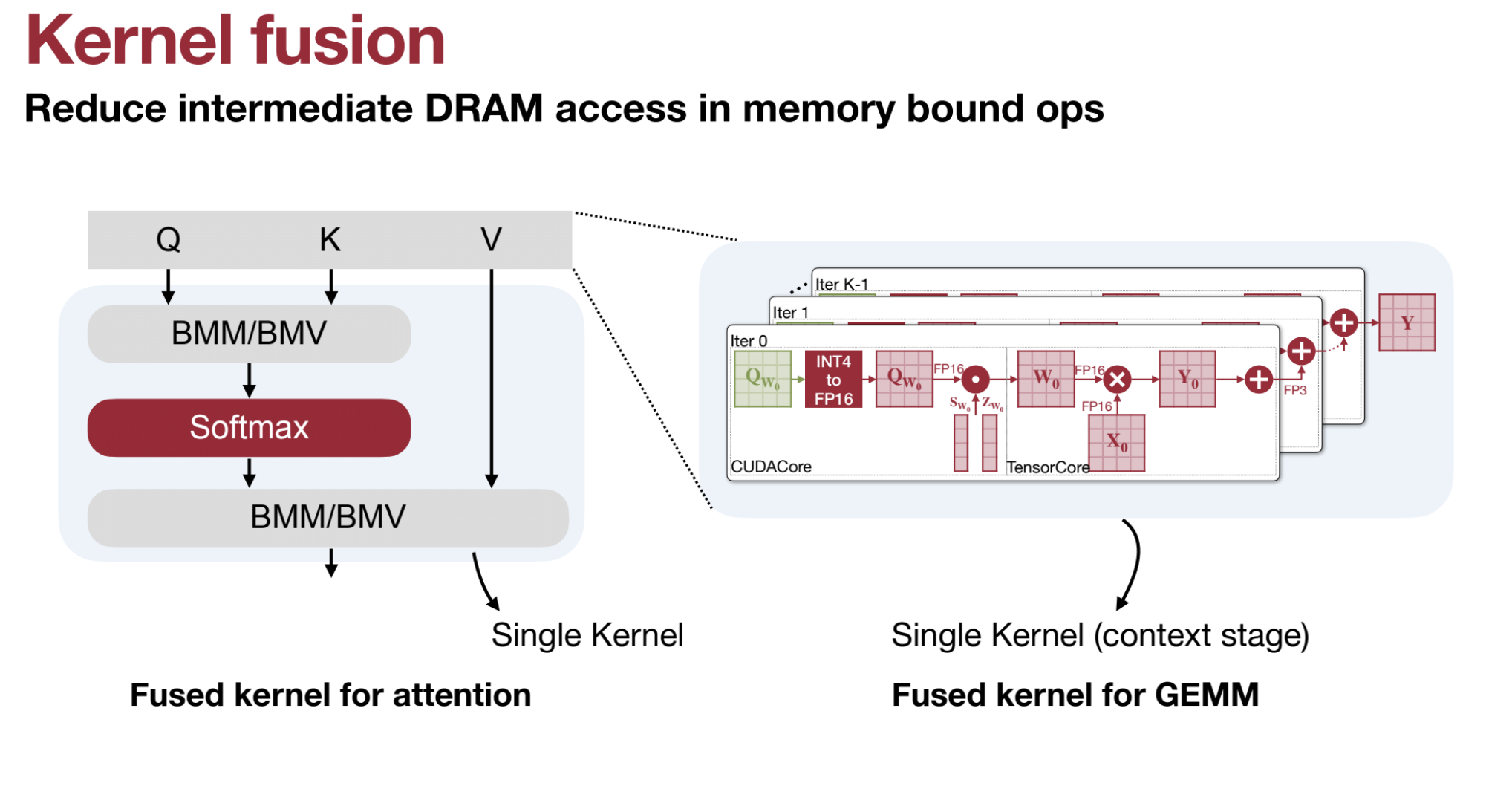
Kernel fusion is a powerful optimization technique that combines multiple operations into a single GPU kernel, reducing memory bottlenecks and improving computational efficiency. This approach is crucial for accelerating deep learning tasks, especially in large language models (LLMs) and Activation-aware Weight Quantization (AWQ). Below is a detailed explanation with examples, including the role of CUDA cores and Tensor Cores.
-
Combining Operations:
Kernel fusion merges multiple sequential operations (e.g., matrix multiplications, activations, normalizations) into one single kernel.
Example: Instead of performing separate operations like $( QK^\top )$, softmax, and $( PV )$, these are fused into one step. -
Reduced Memory Access:
Fused kernels avoid writing intermediate results to GPU High-Bandwidth Memory (HBM) and then reading them back, significantly reducing memory access overhead. -
Improved Performance:
By minimizing memory reads/writes and kernel launch overhead, kernel fusion accelerates computations and optimally utilizes GPU resources.
Kernel Fusion in AWQ
Activation-aware Weight Quantization (AWQ) leverages kernel fusion for efficient LLM inference:
- Fused Operations: Combines operations such as:
- Batch Matrix Multiplication (BMM)
- Attention score calculation: $( QK^\top )$
- Softmax application
- Multiplication with $( V )$: $( PV )$
-
GEMM Operations:
General Matrix Multiplication (GEMM) benefits greatly from kernel fusion by avoiding redundant memory accesses. - Edge Device Optimization:
Fusion ensures that quantized operations run efficiently on edge devices, where memory bandwidth is often limited.
CUDA Cores vs. Tensor Cores
To understand the impact of kernel fusion, it’s important to distinguish between CUDA cores and Tensor Cores in NVIDIA GPUs:
**CUDA Cores**:
- General-purpose units for a variety of tasks (e.g., integer and floating-point calculations).
- Less specialized for deep learning operations like matrix multiplications.
**Tensor Cores**:
- Specialized units designed for deep learning tasks, especially tensor operations like matrix multiplications.
- Tensor Cores perform mixed-precision arithmetic (e.g., FP16 + FP32) much faster than CUDA cores.
**Why Tensor Cores Matter**:
- Efficiency: Tensor Cores handle fused operations (e.g., $( QK^\top )$) more efficiently than CUDA cores.
- Optimization with Kernel Fusion: By fusing operations, Tensor Cores process them in one pass, reducing overhead.
How Kernel Fusion Works: An Example
Without Kernel Fusion: Imagine three sequential matrix operations $( A \times B )$, softmax, and $( C \times D )$:
- Read $( A )$, $( B )$ from memory → Compute $( A \times B )$ → Write the result to memory.
- Read the intermediate result → Apply softmax → Write back to memory.
- Read softmax output and $( C )$, $( D )$ → Compute $( C \times D )$ → Write final output to memory.
Each step involves multiple reads/writes to memory, wasting GPU bandwidth.
With Kernel Fusion:
- Read $( A )$, $( B )$, $( C )$, $( D )$ from memory once.
- Perform all operations (matrix multiplication, softmax, etc.) in a single fused kernel, leveraging Tensor Cores.
- Write the final output back to memory.
**Benefits**:
- Fewer Memory Accesses: Avoids repeated reads/writes for intermediate results.
- Faster Execution: All operations are processed in Tensor Cores, maximizing throughput.
Why Kernel Fusion is Crucial in AWQ
- Quantized Weights: AWQ reduces the model’s memory footprint by quantizing weights, but this can introduce inefficiencies in computations if intermediate results are repeatedly written to memory.
- Fusion Efficiency: Kernel fusion ensures that:
- Quantized computations are performed efficiently.
- Tensor Cores handle as many operations as possible, minimizing reliance on CUDA cores.
Example in AWQ:
- Operations like $( QK^\top )$, softmax, and $( PV )$ are fused into a single kernel.
- This minimizes the data movement between SRAM and HBM, reducing overhead and speeding up inference.
Visualization of Kernel Fusion vs. No Fusion
| Step | Without Fusion | With Fusion |
|---|---|---|
| Reads/Writes | Multiple memory reads/writes for each step. | Single read at the start, single write at the end. |
| Compute Units Used | CUDA cores handle each step sequentially. | Tensor Cores process fused operations in parallel. |
| Latency | Higher due to memory access overhead. | Lower due to minimized data movement. |
🔢 Dequantization Optimization
Dequantization is critical for handling quantized weights.
- Converts 4-bit weights to 8-bit integers and applies scaling factors during matrix multiplication.
- 🛡️ Overflow Prevention:
- Multiplies quantized weights by the scaling factor first and then subtracts the zero point.
- This order avoids overflow issues at low precision.
🌐 Edge Deployment
- Enables LLM deployment on edge devices with limited memory.
- 🧠 Can deploy a 7B parameter model on devices with 7 GB of available memory.
- Ideal for local processing to ensure privacy and security.
📈 Performance
- 🚀 Up to 3x speedup over FP16 baselines on mobile GPUs like Jetson Orin.
- Outperforms systems like AutoGPTQ, llama.cpp, and exllama.
- Combines weight packing, kernel fusion, and optimized memory access for higher efficiency.
🖼️ Visual Language Model (VLM) Support
- TinyChat supports VLMs, achieving 3x speedup on platforms like Jetson Orin.
- Enables interactive VLM deployment on edge devices such as laptops and AIoT hardware.
🏁 Summary
TinyChat is a lightweight, efficient, and scalable inference engine tailored for LLM deployment in resource-constrained environments.
It leverages hardware-aware weight packing, kernel fusion, and optimized dequantization to achieve low latency and high performance across platforms.
1.6. 🛠️ QServe (W4A8KV4)
- Combines SmoothQuant & AWQ: Uses 4-bit weights, 8-bit activations, 4-bit KV cache.
- Efficient Dequantization: Avoids overhead by dequantizing outside GEMM loops.
- Benefits: 2.4x-3.5x speedup over TensorRT-LLM.
Quantized GEMM (General Matrix Multiplication) on GPUs introduces several overheads that can affect performance. These inefficiencies arise from the need to convert low-precision quantized values back to higher precision for computation. The implementation of these operations can significantly influence the overall efficiency.
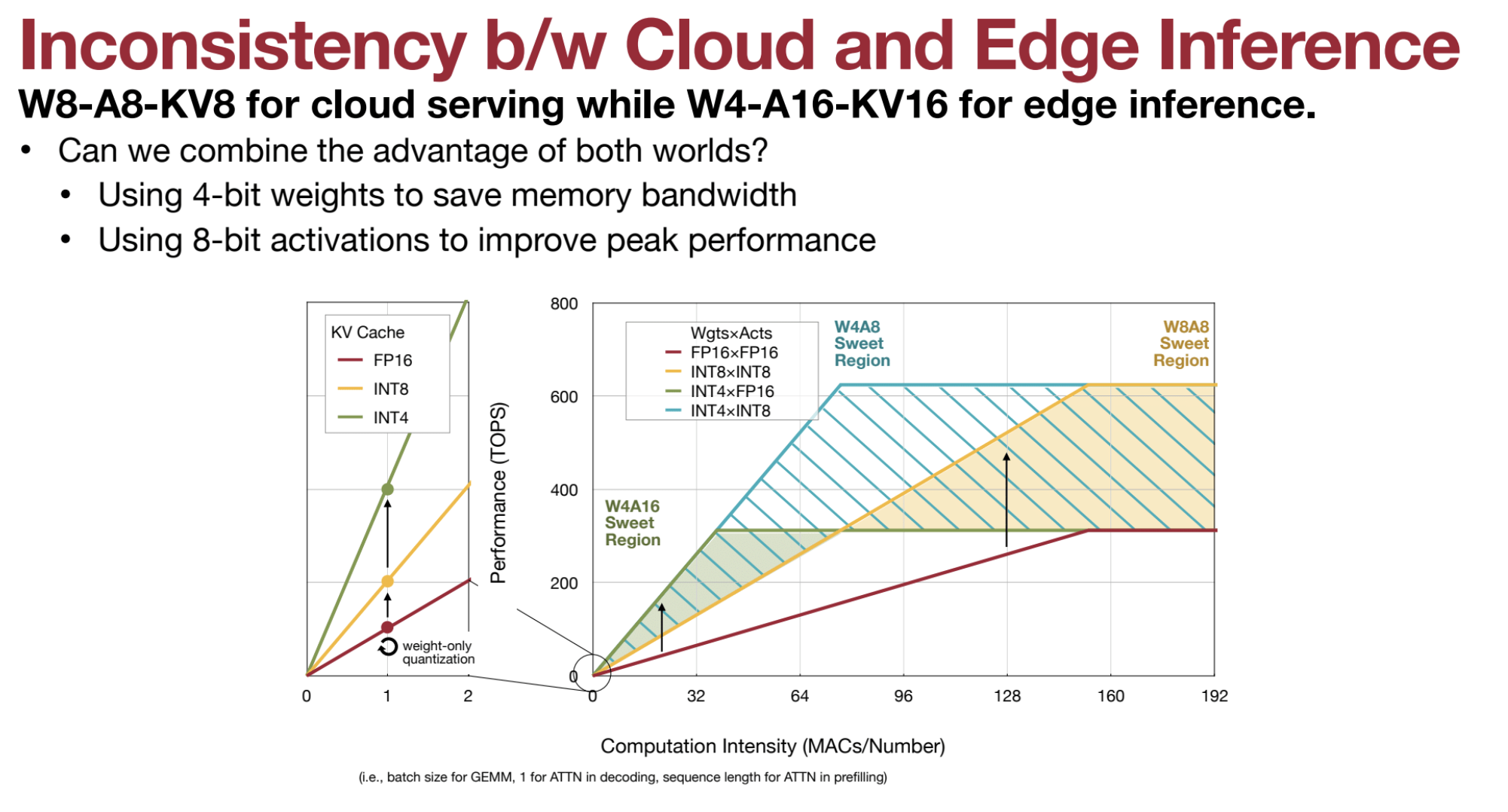
🚧 CUDA Core Operations in the Main Loop
- 🔄 The main loop in GEMM requires intensive matrix multiplication. Optimally, this should leverage Tensor Cores, which are designed for efficient matrix operations.
- ❌ In quantized GEMM, operations like dequantization and scaling are often executed by CUDA cores instead of Tensor Cores.
- ⏳ CUDA core operations in the main loop are slower and introduce significant overhead compared to Tensor Core computations.
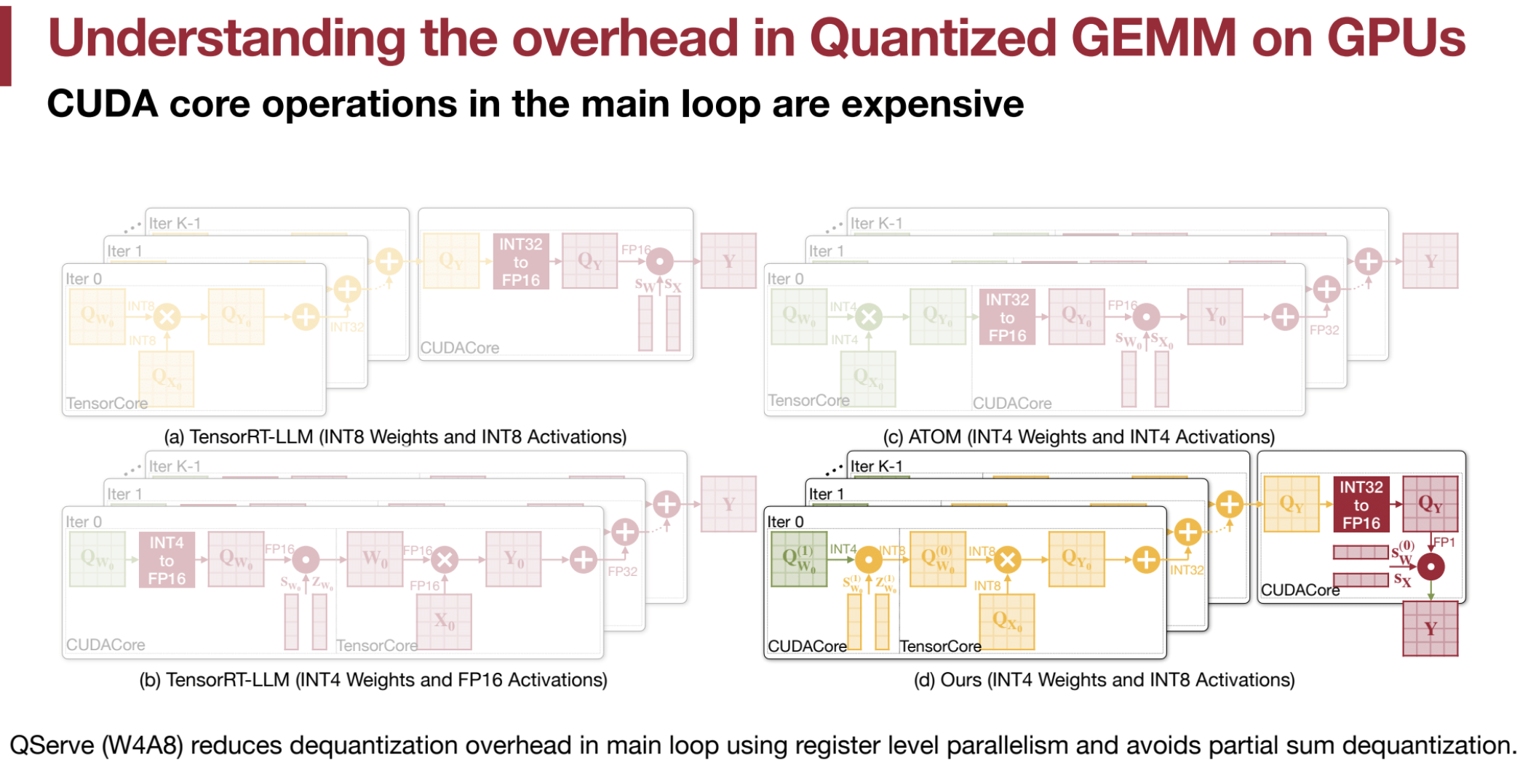
🎛️ Dequantization Overhead
- 📉 Quantization reduces precision, leading to faster computation and lower memory usage.
- 🔄 Dequantization (converting low-bit integers to floating-point values) must occur for matrix multiplication, adding overhead.
- ⚠️ Inefficient dequantization methods in the main loop slow down performance.
- 💡 Example: Converting 4-bit integers to 16-bit floating-point numbers can be costly if not optimized.
➗ Partial Sum Dequantization
- During GEMM, some methods perform dequantization on partial sums after each multiplication step.
- ❌ This approach is not hardware-efficient and increases register usage.
- 🔧 Doubling registers for software pipelining leads to high register pressure and performance degradation.
🧮 Register Pressure
- 🏋️ Partial sum dequantization increases demand for GPU registers.
- 🚫 Insufficient registers force the system to spill into memory, causing slowdowns.
🔢 TensorRT-LLM (INT8)
- 🧩 Uses 8-bit weights and activations.
- ✅ Main computation is done using Tensor Cores.
- ✅ CUDA cores are only involved in the epilogue (final steps), resulting in efficient performance.
🔢 TensorRT-LLM (INT4)
- 🧩 Uses 4-bit weights but converts them to 16-bit floating-point values during computation.
- ❌ This conversion happens inside the main loop using CUDA cores, reducing efficiency.
⚛️ ATOM (INT4)
- 🧩 Uses 4-bit weights and activations.
- ❌ Introduces dequantization in the main loop, increasing overhead.
- ❌ Partial sum dequantization raises register usage and computational load, making it less efficient.
🎯 Quantization Strategy
- Weights:
- QServe uses 4-bit quantization for weights to reduce memory usage.
- Activations:
- Activations are quantized to 8-bit to enhance performance.
- Arithmetic:
- 8-bit arithmetic is employed for computations.
💡 SmoothAttention for KV Cache
- Outliers in Keys:
- Keys in the KV cache may contain significant outliers that negatively affect quantization.
- Migrating Quantization Difficulty:
- Like SmoothQuant, SmoothAttention shifts the quantization difficulty from the key (K) matrix to the query (Q) matrix.
- This is done by scaling the key matrix based on the maximum value in each channel of K, while keeping the query matrix at a higher precision.
- Scaling Factor (λ):
- Calculated as:
λi = max(|Ki|)^α - The key matrix is scaled as KΛ−1, while the query matrix is scaled by Λ, resulting in:
(QΛ)(KΛ−1)T
- Calculated as:
- Since the query matrix is small, it is kept at higher precision (fp16).
⚙️ Efficient Dequantization
- Overhead Reduction:
- QServe minimizes dequantization overhead by limiting operations in the main loop of GEMM.
- Register-Level Parallelism:
- 4-bit weights are converted to 8-bit integers before matrix multiplication.
- Matrix multiplication uses 8-bit integer arithmetic, applying the scaling factor in the epilogue (outside the main loop), enhancing efficiency.
- Sequence of Operations:
- To address overflow:
- QServe multiplies by the scaling factor first and then subtracts the zero point.
- This contrasts with the less efficient subtract-then-multiply approach, which risks overflow.
- The “multiply-before-subtract” method ensures register-level parallelism and avoids unnecessary overhead.
- To address overflow:
🛠️ Implementation Details
- Weight Conversion:
- 4-bit weights are converted to 8-bit integers before GEMM, similar to TinyChat’s weight packing.
- Matrix Multiplication:
- Performed using 8-bit integer arithmetic.
- Scaling Factor Application:
- Applied in the epilogue (outside the main loop) to reduce GEMM overhead.
- Partial Sum Dequantization:
- Avoided to prevent excessive register consumption.
🚀 Performance
- Superior Performance:
- QServe surpasses RTN, AWQ, and QuaRot in performance and accuracy.
- Throughput Gains:
- Achieves 2.4x to 3.5x higher throughput than TensorRT-LLM on A100 and L40S GPUs.
- Balanced Approach:
- QServe provides an optimal balance between low perplexity and high performance.
2. ✂️ Pruning and Sparsity
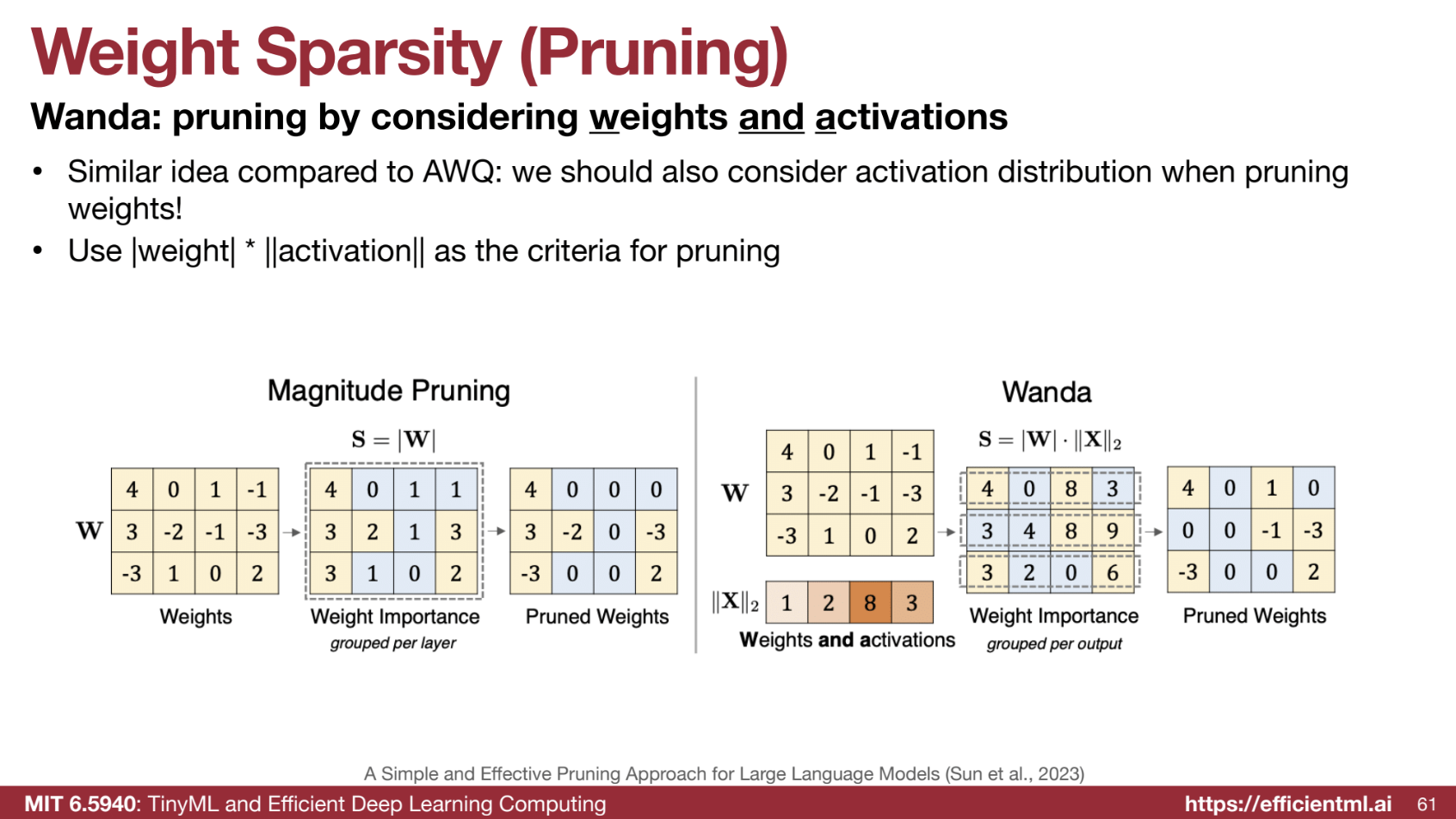
2.1. 🔍 Weight Sparsity (Wanda)
-
Activation Awareness: Pruning is guided by weight * activation . - Output Focus: Removes small output activations.
2.2. 🧠 Contextual Sparsity (DejaVu, MoE)
- Static Sparsity Issues: Static pruning degrades accuracy.
- Dynamic Pruning: Predicts which dimensions to prune per token.
- MoE: Routes tokens to different “experts” during inference.
Both Deja Vu and MoE are techniques that leverage contextual sparsity to improve the efficiency of large language models. Deja Vu focuses on identifying and removing redundant parts of the model based on the input, while MoE focuses on having a model that has different experts that can be sparsely activated.
2.3. 🎯 Attention Sparsity (SpAtten, H2O)
- SpAtten: Prunes unimportant tokens/heads.
- H2O: Prunes tokens in the KV cache.
🧠 Quantization vs. Sparsity for LLM Deployment: A Comparison
Both quantization and sparsity are crucial for optimizing large language models (LLMs). While both techniques hold immense potential, quantization seems to have a slight edge in real-world adoption due to its simplicity, hardware compatibility, and performance gains. Here’s a detailed comparison:
⚡ Quantization
- Simplicity and Efficiency
🟢 Techniques like SmoothQuant and AWQ are straightforward to implement and highly effective:- SmoothQuant maintains accuracy while halving memory usage and integrates with systems like FasterTransformer.
- AWQ is simple, efficient, and accurate, making it ideal for on-device deployments with faster token generation and reduced memory needs.
-
Hardware Support
💾 Quantization methods align well with device bit-widths, ensuring compatibility with existing hardware. This makes implementation smoother and more practical for real-world scenarios. - Performance Gains
🚀 Examples from sources show significant improvements in latency, memory usage, and throughput:- QServe achieves 2.4x–3.5x speedups over TensorRT-LLM on A100 and L40S GPUs.
- Wide Adoption
🌍 Quantization is widely used:- AWQ-quantized models have been downloaded millions of times.
- Supported by various libraries and platforms, making integration easier for developers.
🌟 Sparsity
-
Complexity
🔴 Sparsity techniques, such as Wanda (weight sparsity), are effective but more complex to implement compared to quantization. While they leverage activation distributions like AWQ, they are not as widely adopted. -
Contextual Sparsity
🌐 Techniques like Deja Vu and Mixture of Experts (MoE) reduce parameters and improve efficiency but introduce additional overhead (e.g., prediction or routing complexities). -
Implementation Challenges
🛠️ Sparsity often requires mixed precision for small unquantized weight percentages, which complicates inference libraries. While scaling methods can mitigate this, they still increase complexity. -
Less Mature
📉 Sparsity is an active research area with fewer concrete implementations compared to quantization. Real-world applications are still emerging, with less community support or detailed implementation guides.
Summary
- Quantization:
- ✅ Advantages: Simple, efficient, hardware-compatible, and widely adopted.
- ⭐ Techniques like SmoothQuant, AWQ, and QServe demonstrate clear performance gains and seamless integration into systems.
- 🔗 Strong community support ensures continued innovation and adoption.
- Sparsity:
- ⚠️ Challenges: More complex, with higher barriers to implementation.
- 🔬 Promising techniques exist (e.g., Wanda, Deja Vu, MoE), but adoption is hindered by complexity and a lack of maturity in tools and frameworks.
3. 🖥️ LLM Serving Systems
3.1. 📊 Key Metrics
- TTFT (Time to First Token)
- TPOT (Time Per Output Token)
- Latency & Throughput
3.2. 📦 Paged Attention (vLLM)
- KV Cache Waste: Uses paging to avoid memory fragmentation.
3.3. ⚡ FlashAttention
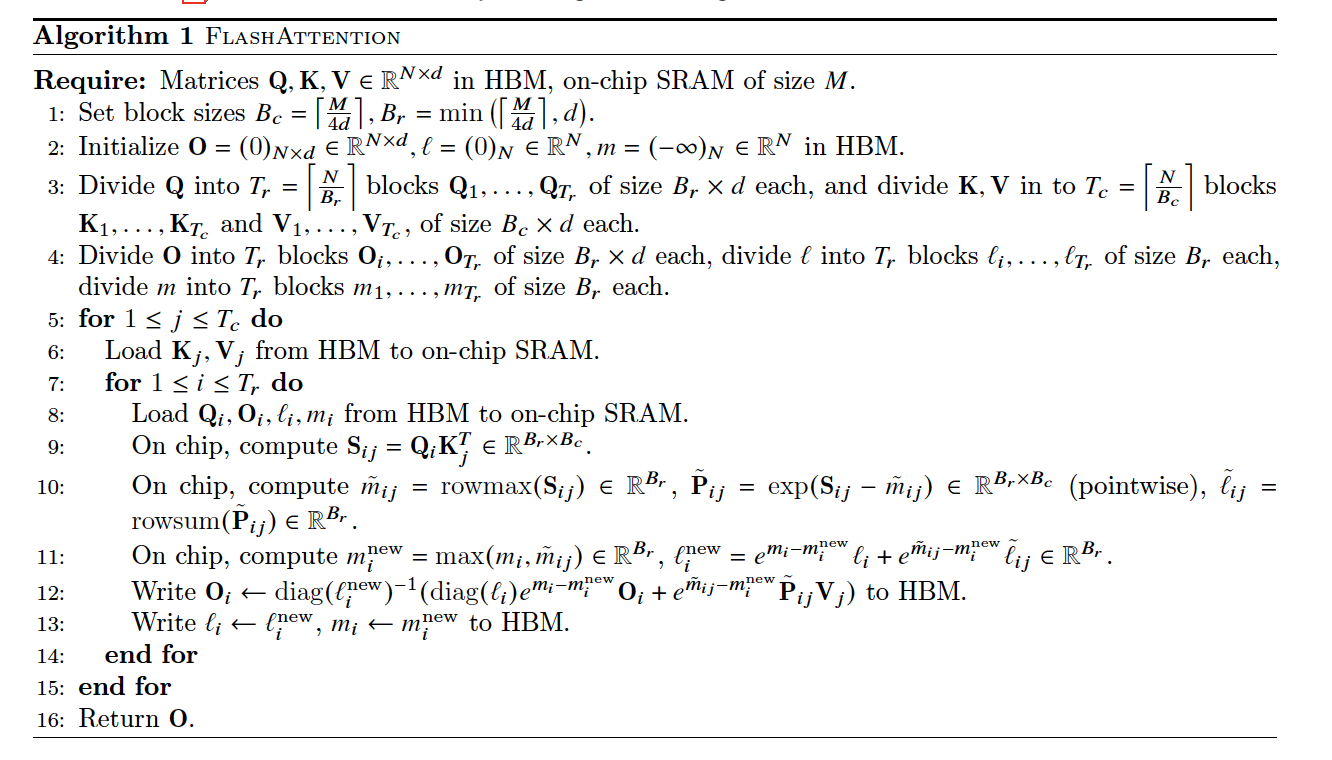
FlashAttention is designed to speed up and reduce the memory usage of attention by avoiding materializing the full $( N \times N )$ attention matrix in GPU memory. This is achieved through tiling, dynamic global updates, and recomputation. Below is a detailed breakdown of how FlashAttention works, including step-by-step calculations and examples.
Problem: Standard Attention
Given matrices $( Q )$, $( K )$, and $( V )$:
- Compute attention scores: $( S = QK^\top )$.
- Normalize $( S )$ with softmax:
$[ P = \text{softmax}(S) = \frac{e^S}{\sum e^S}. ]$ - Compute the final output: $( O = PV )$.
For large sequence lengths $( N )$, the $( N \times N )$ matrix $( S )$ is computationally expensive to materialize in memory.
Solution: FlashAttention
- Tiling: Divide $( Q )$, $( K )$, and $( V )$ into smaller blocks (tiles) that fit in fast SRAM. Compute local softmax within each tile.
- Dynamic Updates: Incrementally update global statistics (maximum and exponential sum) to calculate the global softmax across all tiles.
- Recomputation: Avoid storing intermediate matrices $( S )$ and $( P )$ by recomputing them during the backward pass.
Steps to Compute FlashAttention
Step 1: Tiling
- Divide $( Q )$, $( K )$, and $( V )$ into tiles (blocks).
- Example: If $( Q )$ and $( K )$ are $( 4 \times 3 )$ matrices, split them into two tiles: $[ Q_1 = \begin{bmatrix} 1 & 2 & 3 \ 4 & 5 & 6 \end{bmatrix}, \quad Q_2 = \begin{bmatrix} 7 & 8 & 9 \ 10 & 11 & 12 \end{bmatrix}. ]$
- Process one tile at a time to compute local softmax.
Step 2: Local Softmax Calculation
For each tile $( S )$ (e.g., $( S_1 = Q_1K^\top )$):
- Compute the row-wise maximum $( \tilde{m}i )$ for numerical stability: $[ \tilde{m}_i = \max_j S{ij}. ]$
- Stabilize $( S )$ by subtracting $( \tilde{m}i )$ from each element: $[ S{ij} \leftarrow S_{ij} - \tilde{m}_i. ]$
- Compute the exponentials: $[ P_{ij} = e^{S_{ij}}. ]$
- Compute the row-wise sum: $[ \tilde{\ell}i = \sum_j P{ij}. ]$
- Normalize each element: $[ P_{ij} = \frac{P_{ij}}{\tilde{\ell}_i}. ]$
Step 3: Dynamic Global Updates
Since softmax must be computed across all tiles, dynamic updates are applied:
-
Global Maximum: Update the global max: $[ m^\text{new}_i = \max(m_i, \tilde{m}_i). $]
-
Global Exponential Sum: Incrementally update the global sum: $[ \ell^\text{new}_i = e^{m_i - m^\text{new}_i} \ell_i + e^{\tilde{m}_i - m^\text{new}_i} \tilde{\ell}_i. ]$
-
Global Softmax: Normalize each element using global values: $[ P^\text{global}{ij} = \frac{P^\text{local}{ij} e^{\tilde{m}_i - m^\text{new}_i}}{\ell^\text{new}_i}. ]$
Example: Step-by-Step Calculation
Inputs:
Matrix $( S )$: $[ S = \begin{bmatrix} 1 & 2 & 3 \ 4 & 5 & 6 \ 7 & 8 & 9 \ 10 & 11 & 12 \end{bmatrix}. ]$ Split into two tiles: $[ S_1 = \begin{bmatrix} 1 & 2 & 3 \ 4 & 5 & 6 \end{bmatrix}, \quad S_2 = \begin{bmatrix} 7 & 8 & 9 \ 10 & 11 & 12 \end{bmatrix}. ]$
Step 1: Local Softmax for $( S_1 )$
- Row Maximums: $[ \tilde{m}_1 = 3, \quad \tilde{m}_2 = 6. ]$
- Subtract Max: $[ S_1 = \begin{bmatrix} -2 & -1 & 0 \ -2 & -1 & 0 \end{bmatrix}. ]$
- Exponentials: $[ e^{S_1} = \begin{bmatrix} 0.14 & 0.37 & 1 \ 0.14 & 0.37 & 1 \end{bmatrix}. ]$
- Row Sums: $[ \tilde{\ell}_1 = 1.51, \quad \tilde{\ell}_2 = 1.51. ]$
- Local Softmax: $[ P_1 = \begin{bmatrix} 0.09 & 0.25 & 0.66 \ 0.09 & 0.25 & 0.66 \end{bmatrix}. ]$
Step 2: Local Softmax for $( S_2 )$
Repeat the same steps for $( S_2 )$, yielding: $[ \tilde{m}_3 = 9, \quad \tilde{m}_4 = 12, \quad \tilde{\ell}_3 = 1.51, \quad \tilde{\ell}_4 = 1.51. ]$
Step 3: Dynamic Updates
- Global Max: $[ m^\text{new} = \max(3, 6, 9, 12) = 12. ]$
- Global Sum: $[ \ell^\text{new} = e^{3-12} \cdot 1.51 + e^{6-12} \cdot 1.51 + e^{9-12} \cdot 1.51 + e^{12-12} \cdot 1.51. ]$ Approximation: $[ \ell^\text{new} \approx 1.51. ]$
- Global Softmax: Normalize each tile’s output using global values: $[ P^\text{global}{ij} = \frac{P^\text{local}{ij} e^{\tilde{m}_i - m^\text{new}}}{\ell^\text{new}}. ]$
How FlashAttention Enables Parallelism
- Each tile’s softmax is computed independently in parallel.
- Combining global statistics (max and exponential sum) only requires small data ($( \tilde{m}_i $), $( \tilde{\ell}_i )$) from each tile.
- Avoids materializing the full $( N \times N )$ matrix, reducing memory overhead and enabling efficient GPU usage.
FlashAttention achieves speed and memory efficiency by leveraging tiling, dynamic updates, and recomputation. This makes it ideal for handling large sequences in Transformer models.
3.4. 🚀 Speculative Decoding
- Two Models: Small draft model + large target model verify tokens in parallel.
- Benefits: 2x-3x speedup.
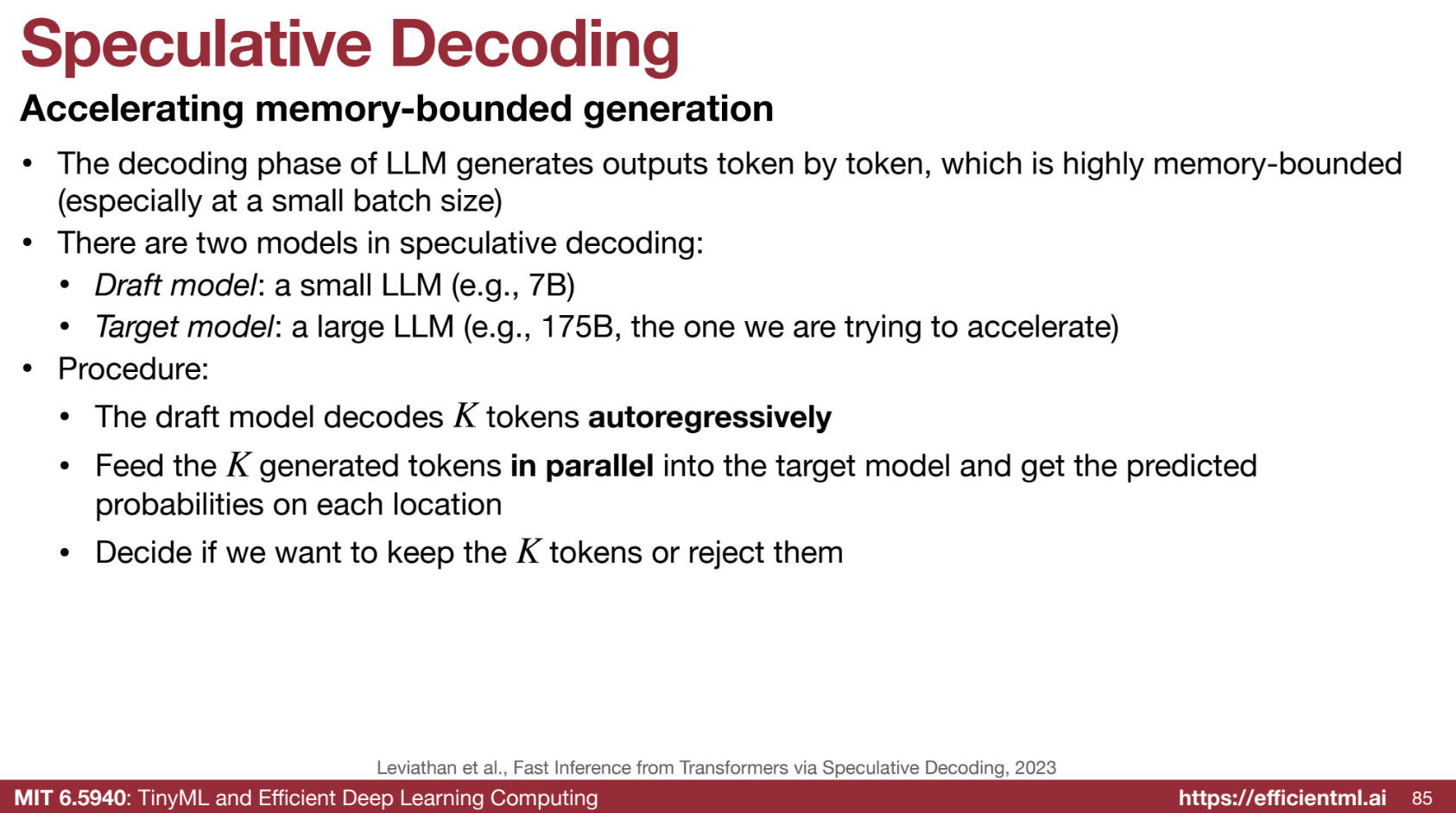
Speculative decoding is a technique designed to accelerate the token generation process in large language models (LLMs), addressing the bottlenecks of memory-bound operations, especially with small batch sizes. By using a smaller draft model alongside the larger target model, speculative decoding increases efficiency while maintaining output quality.
1️⃣ The Bottleneck: Memory-Bound Generation
- Problem: The decoding phase in LLMs is memory-bound:
- Generating tokens sequentially limits GPU utilization.
- Memory access patterns are inefficient, especially for small batch sizes, leading to slower performance.
2️⃣ Speculative Decoding: Two Models
- Draft Model: A smaller, faster LLM that generates a sequence of draft tokens auto-regressively.
- Target Model: The larger, more accurate LLM that verifies the draft tokens generated by the draft model.
3️⃣ The Process
-
Draft Generation:
The draft model generates a sequence of tokens auto-regressively. Each token is generated one at a time, using previously generated tokens as input. -
Parallel Verification:
The draft tokens are fed in parallel to the target model, enabling efficient batch processing. - Accept or Reject:
- If the target model deems a token correct, it is accepted.
- If incorrect, the target model replaces the token and rejects subsequent tokens. The draft model restarts generation from the last accepted token.
- Repeat:
The process continues until the full output is generated.
4️⃣ Example: Sentence Generation
Let’s generate the sentence: "The cat sat on the mat."
Initialization:
- The target model begins by generating the first token:
"The".
Draft Generation:
The draft model starts from "The" and generates speculative tokens:
"cat""sat""on""the""mat"
Parallel Verification:
- All draft tokens,
"cat", "sat", "on", "the", "mat", are batched and verified by the target model in parallel.
Acceptance/Rejection:
- The target model evaluates each token:
- ✅ Accepts:
"cat","sat","on". - ❌ Rejects:
"the"(replaced with"a").
- ✅ Accepts:
Next Round:
- The draft model restarts generation from
"on"and produces:"a","mat","."
- The target model verifies:
- ✅ Accepts:
"a","mat",".".
- ✅ Accepts:
Final Output:
The complete sentence is:
"The cat sat on the mat."
5️⃣ Benefits of Speculative Decoding
-
⚡ Increased Speed:
Parallel verification with the target model accelerates token generation. -
📉 Reduced Memory Bottleneck:
Parallel processing alleviates the sequential generation bottleneck. -
📈 Improved Throughput:
Higher token generation rates mean more requests can be served simultaneously. -
👌 No Loss in Accuracy:
The final output quality matches that of using the target model alone.
6️⃣ Key Considerations
-
Draft Model Accuracy:
The draft model must generate tokens that the target model accepts most of the time to maximize efficiency. -
Batch Size Optimization:
Parallel verification batch sizes should be optimized to balance efficiency and overhead.
3.5. 🧮 Batching
Batching techniques are essential for fully utilizing GPU resources and minimizing idle time during inference. The primary objective of batching is to process multiple inputs simultaneously in parallel. Below is a comparison of the main batching methods and an explanation of continuous (in-flight) batching, which is particularly useful for large language models (LLMs).
1️⃣ Comparison of Batching Techniques
1. No Batching
- Description: Each request is processed individually as it arrives.
- Pros: Low latency for individual requests.
- Cons: Inefficient GPU utilization, as resources are often underutilized.
2. Static Batching
- Description: Waits for a complete batch of requests before processing.
- Pros: Suitable for offline or scheduled tasks.
- Cons: Increases latency for real-time tasks due to the wait time for a full batch.
3. Dynamic Batching
- Description: Processes batches either when they are full or after a predefined time limit.
- Pros: Balances latency and throughput; effective for tasks with uniform inference latency (e.g., image generation).
- Cons: May struggle with tasks that have highly variable inference times.
4. Continuous Batching (In-Flight Batching)
- Description: Processes requests token by token instead of waiting for entire sequences to complete.
- Pros: Highly efficient for LLMs, where response lengths vary; minimizes GPU idle time.
2️⃣ Continuous Batching (In-Flight Batching) Explained
Continuous batching is particularly suited to large language models (LLMs), which generate variable-length responses. Here’s how it works:
1. Token-by-Token Processing
- Instead of processing an entire request at once, the GPU computes one token at a time for each request.
- Once the computation for a token is complete, the GPU is freed to process a token from another request.
2. Maximizing GPU Efficiency
- By operating at a finer granularity, in-flight batching ensures that no GPU resources are left idle.
- This is especially useful for tasks where some responses are much longer than others.
3. Ideal for LLMs
- LLMs often generate outputs of varying lengths across different requests.
- Continuous batching dynamically handles this variability, allowing new requests to start as soon as resources become available, rather than waiting for the longest response to finish.
3️⃣ Summary
| Batching Method | Key Features | Best Use Cases |
|---|---|---|
| No Batching | Processes one request at a time. | Low-latency, low-throughput tasks. |
| Static Batching | Waits for a full batch of requests. | Offline or scheduled tasks. |
| Dynamic Batching | Processes full batches or on a timer. | Uniform latency tasks (e.g., images). |
| Continuous Batching | Token-by-token processing. | Large language models (LLMs). |
🚀 Why Continuous Batching is the Future for LLMs
Continuous batching is the most efficient solution for LLM inference due to its ability to handle:
- Variable-length outputs: Allows faster requests to free up GPU resources for other requests.
- Token-level granularity: Keeps GPUs consistently busy, maximizing throughput without increasing latency.