
TinyML Quantization I
Modern AI models are becoming increasingly large, demanding substantial computational resources and memory. This creates a gap between the computational demands of these models and the available hardware capabilities. Pruning addresses this gap by reducing model size, memory footprint, and ultimately, energy consumption.
I. Introduction 🚀
This section introduces quantization as a method to reduce the size and computational cost of neural network models by lowering the precision of parameters. It outlines the lecture agenda:
- 📋 Reviewing numeric data types.
- 🤖 Basics of neural network quantization.
- 🔍 Exploring quantization approaches (K-means, linear, binary, and ternary).
II. Numeric Data Types 🔢
A. Integers ✏️
- Unsigned vs. Signed integers.
- Explains sign-magnitude representation and its limitations.
- Introduces two’s complement for signed integers.
B. Fixed-Point Numbers 📐
- Introduces fixed-point numbers with integer and fractional bits.
- Representation via two’s complement and value interpretation.
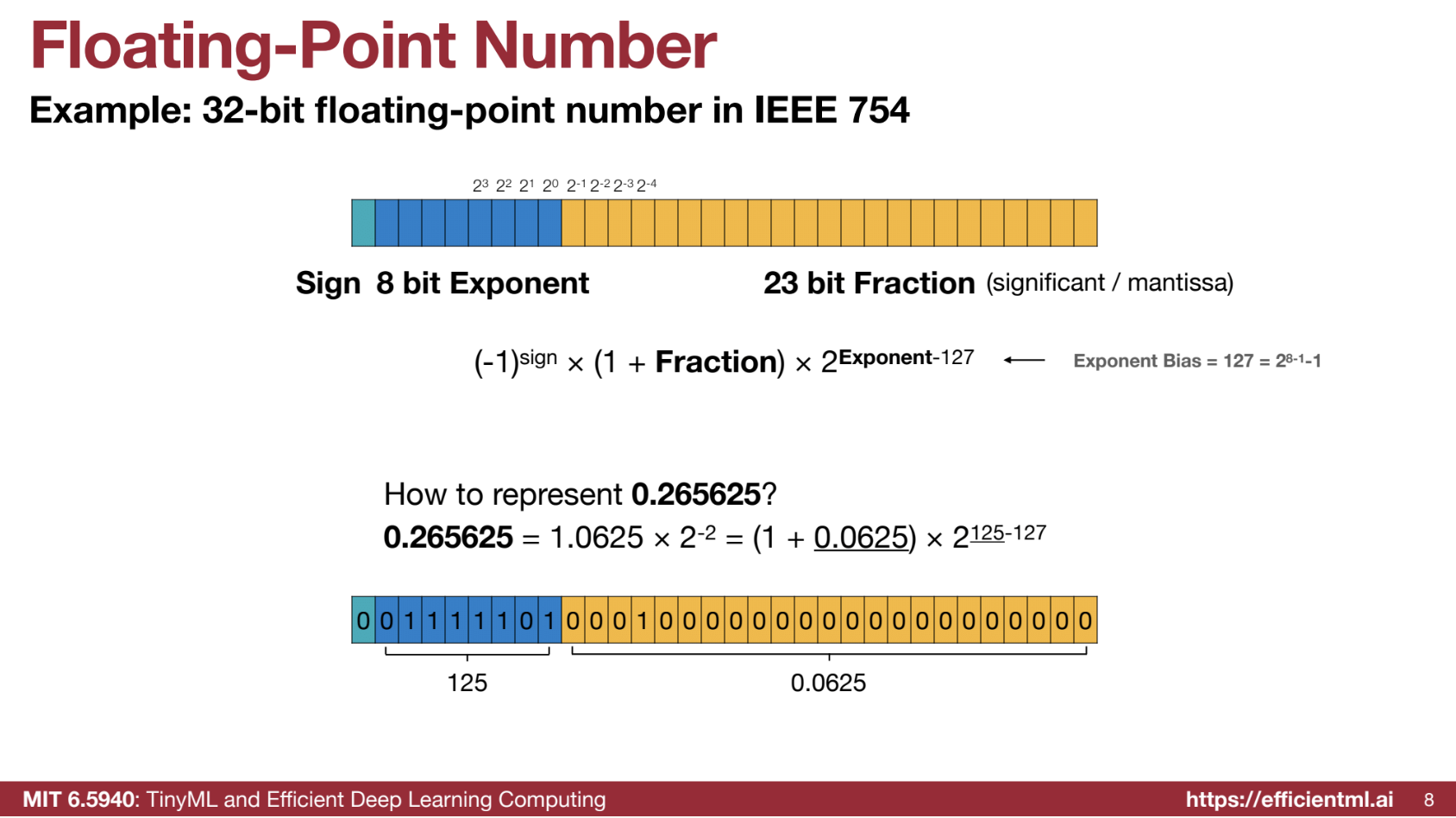
C. Floating-Point Numbers 🌊
- IEEE 754 standard for 32-bit floating-point numbers.
- Components: sign bit, exponent bits, fraction bits.
- Example of floating-point representation calculation.
- Subnormal numbers for representing zero.
- Special values: positive/negative infinity and NaN.
D. Floating-Point Precision Variations 🔍
- FP32, FP16, BF16 formats and trade-offs:
- BF16: Larger dynamic range, less precision.
E. FP8 and INT4/FP4 Representations 🎛️
- Nvidia’s FP8 format (E4M3, E5M2 configurations).
- INT4/FP4 for weight and gradient representation.
Summary
| Data Type | Description | Example | Range | Notes |
|---|---|---|---|---|
| Unsigned Integer | Represents non-negative whole numbers. | An 8-bit unsigned integer can represent values from 0 to 255. For example, 00000000 is 0, and 11111111 is 255. |
[0, 2n - 1] where n is the number of bits | Simple and efficient for positive-only values. |
| Signed Integer | Represents positive and negative whole numbers. | Sign-Magnitude: 8-bit 00000001 is 1, 10000001 is -1. Two’s Complement: 8-bit 00000001 is 1, 11111111 is -1. |
[-2n-1, 2n-1 - 1] | Two’s complement is standard due to the absence of duplicate zeros. |
| Fixed-Point Number | Numbers with fixed digits before and after the decimal point. | 8-bit, 4 for integer and 4 for fraction: 0011.0001 represents 3.0625. |
Depends on bit allocation | Simpler than floating-point but limited in range and precision. |
| Floating-Point | Uses sign, exponent, and fraction for wider range and precision. | 32-bit floating-point 0.265625 is calculated as (1 + 0.0625) * 2<sup>125-127</sup>. |
Large, depends on exponent and fraction bits | Supports subnormal numbers, infinity, and NaN. |
| Subnormal Number | Special floating-point case with zero exponent bits. | Smallest subnormal in FP32 is 2<sup>-23</sup> * 2<sup>-126</sup>. |
Close to zero | Fills the gap between zero and smallest normal number. |
| FP32 | 32-bit float: 1 sign, 8 exponent, 23 fraction bits. | Used in high-precision tasks. | Wide | High precision, expensive computation. |
| FP16 | 16-bit float: 1 sign, 5 exponent, 10 fraction bits. | Decimal -7 as sign 1, exponent 10001 (17), fraction 1100000000 (0.75). |
Smaller than FP32 | Lower memory, suitable for deep learning. |
| BF16 | 16-bit float: 1 sign, 8 exponent, 7 fraction bits. | Decimal 2.5 as sign 0, exponent 10000000 (128), fraction 0100000 (0.25). |
Same exponent range as FP32 | Helps mitigate divergence in neural networks. |
| FP8 | 8-bit float, configurations like E4M3 and E5M2. | E4M3: Smaller range, higher precision. E5M2: Larger range, lower precision. | Varies by E4M3 or E5M2 | Used in GPUs to optimize training and reduce precision. |
| INT4 | 4-bit integer. | Values from -8 to 7. |
[-8, 7] | Ultra-low precision for specific workloads. |
| FP4 | 4-bit float, configurations like E1M2, E2M1, and E3M0. | E1M2 can represent 0.5, 1, 1.5, 2, 2.5, 3.5. |
Varies by configuration | Extremely low precision; useful for memory-constrained systems. |
III. Introduction to Quantization 📉
Defines quantization: converting continuous values into a discrete set. Includes visual examples (signals/images) and highlights minimizing quantization error.
IV. K-Means-Based Quantization 📊
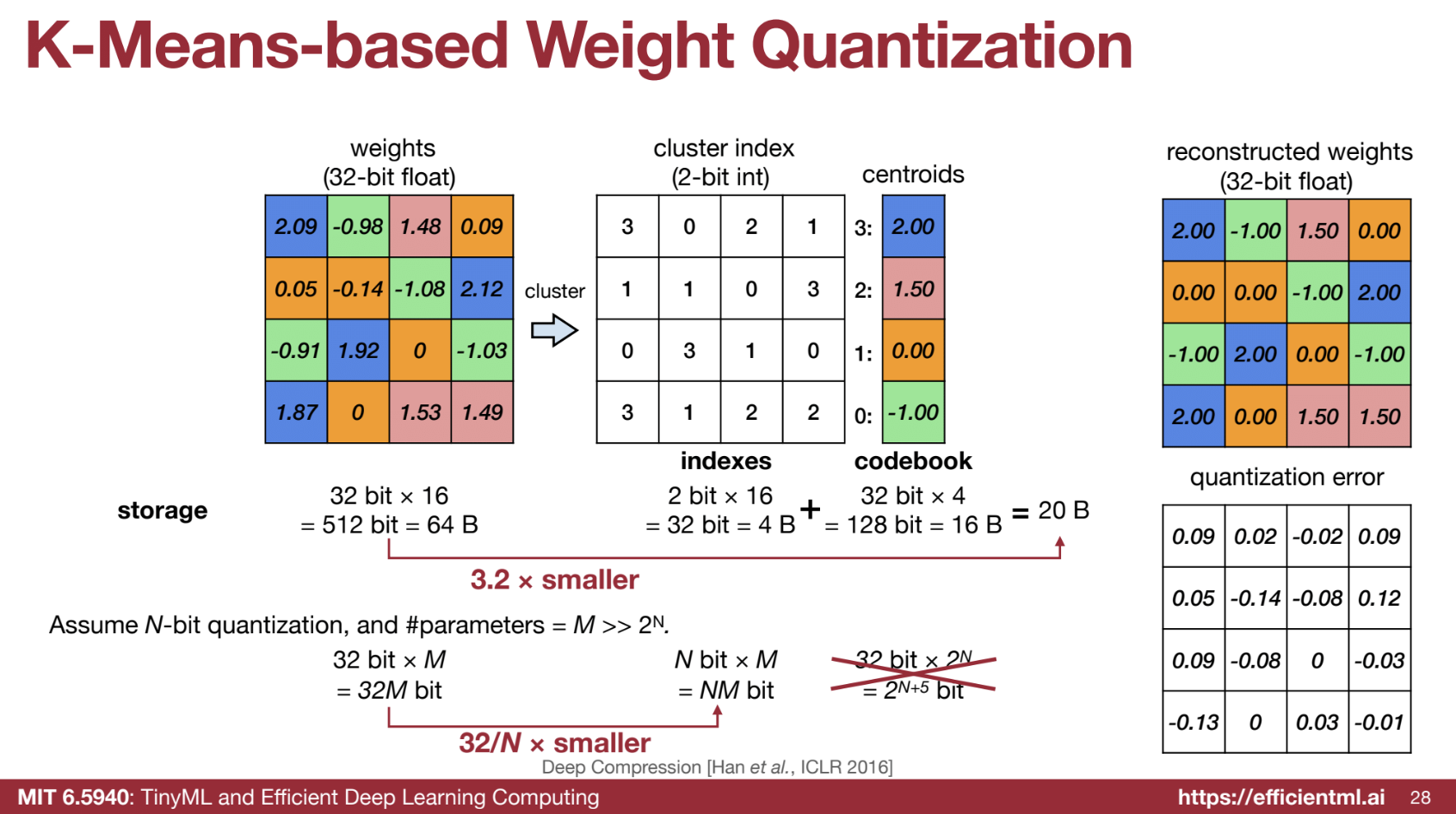
A. Weight Quantization Process 🧮
- Uses K-means clustering for weight quantization.
- Saves storage by storing indices and codebooks.
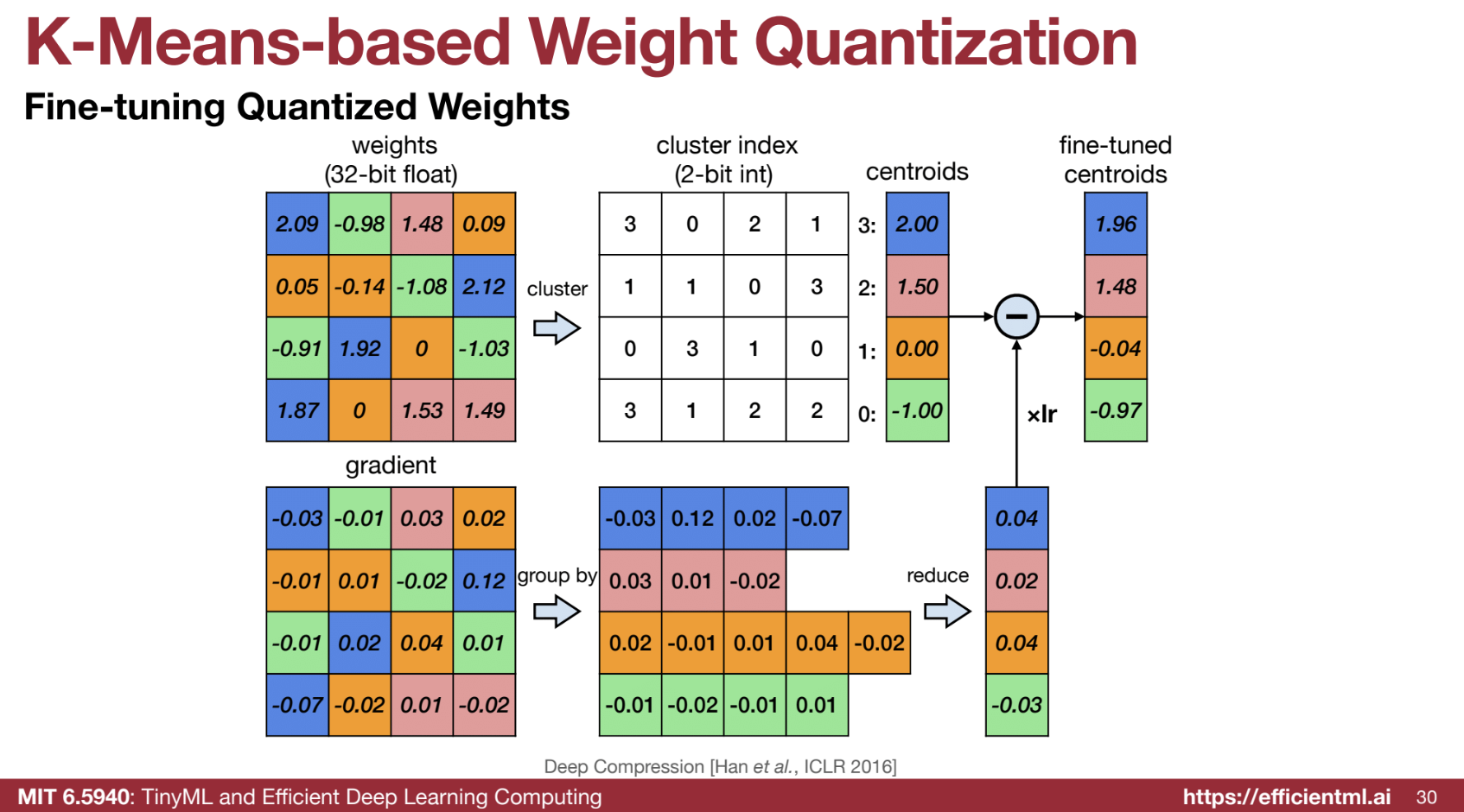
B. Fine-Tuning Quantized Weights 🔧
- Group gradients by centroids, update centroids during training.
C. Accuracy vs. Compression 🎯
- Example: AlexNet.
- Compares quantization, pruning, and combined approaches.
D. Weight Distribution and Number of Bits 📉
- Discretization into centroids.
- Practical bit choices: 4 bits (convolution), 2 bits (fully connected).
E. Huffman Coding 📦
- Compression using non-uniform weight distributions.
F. Deep Compression Pipeline 🛠️
- Stages: pruning → quantization → Huffman coding.
- Demonstrates high compression with retained accuracy.
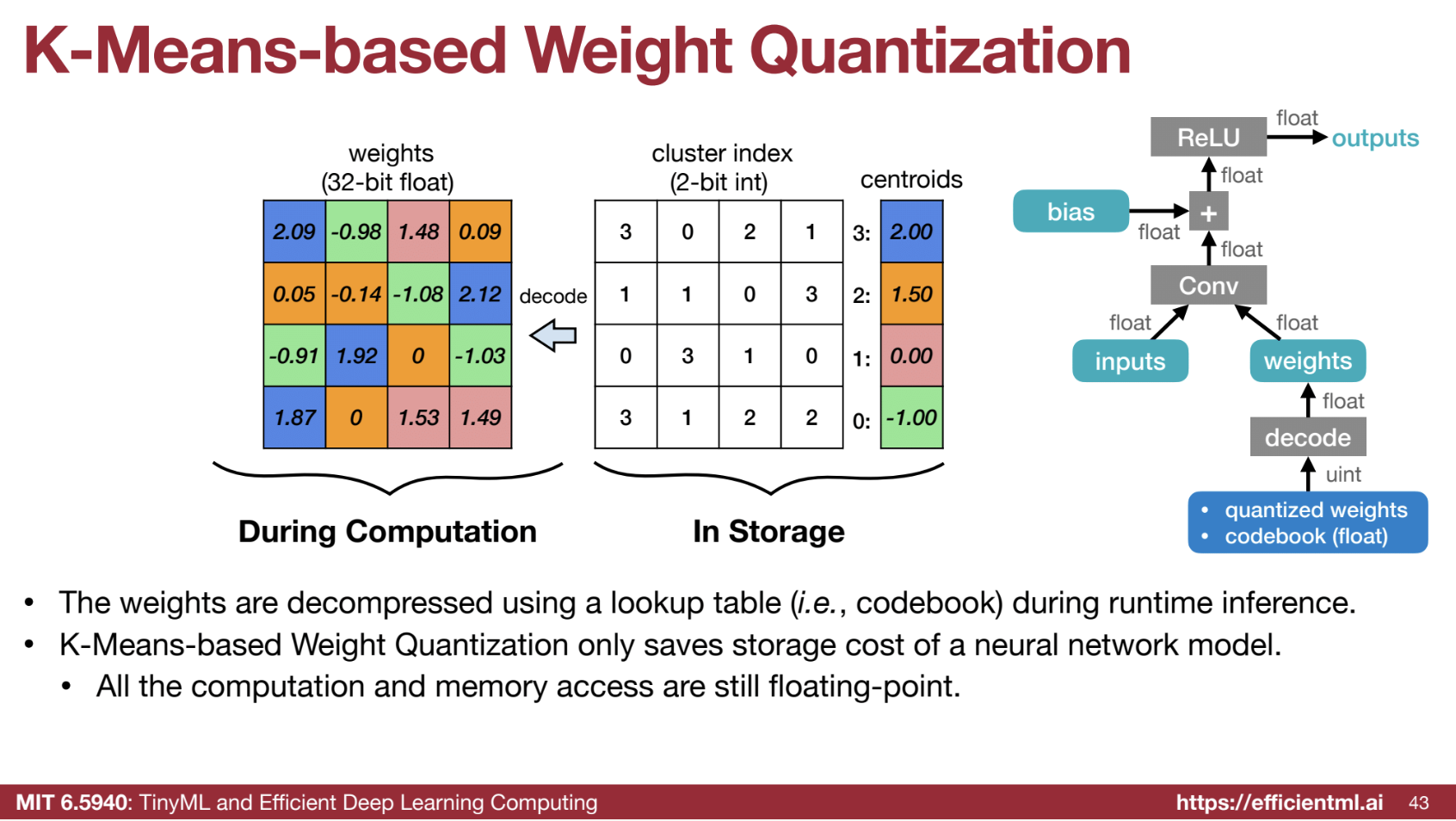
G. Computation with K-means Quantization 🖥️
- Storage savings but no computational savings.
- Decoding weights requires floating-point operations.
Code Example from HW
Part of the code solutions and explainations.
from collections import namedtuple
from fast_pytorch_kmeans import KMeans
from torch.nn import parameter

Codebook = namedtuple('Codebook', ['centroids', 'labels'])

# This function updates the centroids of a k-means codebook based on the latest
# floating-point weights. It recalculates the centroid for each cluster by averaging
# the weights that belong to that cluster. This helps maintain the representativeness
# of the centroids as the model is finetuned.
def update_codebook(fp32_tensor: torch.Tensor, codebook: Codebook):
    """
    Update the centroids in the codebook using the updated fp32_tensor.
    :param fp32_tensor: [torch.(cuda.)Tensor] Tensor containing updated weights.
    :param codebook: [Codebook] The codebook containing centroids and cluster labels.
    """
    n_clusters = codebook.centroids.numel()  # Get the total number of clusters (centroids).
    fp32_tensor = fp32_tensor.view(-1)  # Flatten the tensor to ensure all weights are considered.
    for k in range(n_clusters):
        # Calculate the mean of all weights that belong to cluster k, and update the centroid.
        codebook.centroids[k] = torch.mean(fp32_tensor[codebook.labels == k])

# This function performs k-means quantization on a floating-point tensor.
# Quantization reduces the precision of weights by clustering similar values
# and representing them with shared centroids. This decreases the model size
# and computation but may introduce a small accuracy drop.
def k_means_quantize(fp32_tensor: torch.Tensor, bitwidth=4, codebook=None):
    """
    Quantize a tensor using k-means clustering.
    :param fp32_tensor: Tensor to be quantized.
    :param bitwidth: [int] Bitwidth for quantization (default is 4).
    :param codebook: Optional precomputed codebook. If None, k-means clustering is applied.
    :return: Codebook containing centroids and cluster labels.
    """
    if codebook is None:
        # Determine the number of clusters by 2^bitwidth, as bitwidth controls the number of representable values.
        n_clusters = 2 ** bitwidth

        # Perform k-means clustering to derive cluster centroids and labels.
        kmeans = KMeans(n_clusters=n_clusters, mode='euclidean', verbose=0)

        # Flatten the tensor to a 1D array and apply k-means clustering.
        labels = kmeans.fit_predict(fp32_tensor.view(-1, 1)).to(torch.long)

        # Store the cluster centroids and labels in a namedtuple (Codebook).
        centroids = kmeans.centroids.to(torch.float).view(-1)
        codebook = Codebook(centroids, labels)

    # Reconstruct the quantized tensor by replacing each element with the centroid of its cluster.
    quantized_tensor = codebook.centroids[codebook.labels]

    # Replace the original floating-point tensor values with the quantized tensor values.
    fp32_tensor.set_(quantized_tensor.view_as(fp32_tensor))

    return codebook

# This class applies k-means quantization to an entire model. It can update centroids
# after finetuning to minimize the accuracy drop caused by quantization.
class KMeansQuantizer:
    def __init__(self, model: nn.Module, bitwidth=4):
        # Perform initial quantization for the model's weights.
        self.codebook = KMeansQuantizer.quantize(model, bitwidth)

    @torch.no_grad()
    def apply(self, model, update_centroids):
        # Apply k-means quantization to the model parameters.
        for name, param in model.named_parameters():
            if name in self.codebook:
                # Optionally update centroids after finetuning.
                if update_centroids:
                    update_codebook(param, codebook=self.codebook[name])

                # Reapply quantization using the updated centroids.
                self.codebook[name] = k_means_quantize(param, codebook=self.codebook[name])

    @staticmethod
    @torch.no_grad()
    def quantize(model: nn.Module, bitwidth=4):
        # Quantize all model parameters according to the specified bitwidth.
        codebook = dict()
        if isinstance(bitwidth, dict):
            # If different bitwidths are specified for different layers, apply them accordingly.
            for name, param in model.named_parameters():
                if name in bitwidth:
                    codebook[name] = k_means_quantize(param, bitwidth=bitwidth[name])
        else:
            for name, param in model.named_parameters():
                # Quantize weight tensors (dim > 1), but skip biases (dim == 1).
                if param.dim() > 1:
                    codebook[name] = k_means_quantize(param, bitwidth=bitwidth)
        return codebook


"""
Explanation of Quantization-Aware Training (QAT):
- After initial quantization, accuracy drops, especially at lower bitwidths (e.g., 4-bit or 2-bit).
- To recover accuracy, we perform finetuning with quantization-aware training (QAT).
- During QAT, centroids are periodically updated by recalculating them based on the weights in each cluster.
- Finetuning continues until the accuracy drop is below a specified threshold (0.5% in this case).
- The goal is to ensure minimal accuracy loss while benefiting from the reduced model size and faster computation.

Key Concepts:
- Centroid Update: Average of weights in the same cluster replaces the cluster center.
- KMeans Quantization: Weights are clustered and represented by cluster centers (centroids).
- Lower Bitwidth: Reduces model size and speeds up computation but may require finetuning to recover performance.
"""

accuracy_drop_threshold = 0.5
quantizers_before_finetune = copy.deepcopy(quantizers)
quantizers_after_finetune = quantizers

for bitwidth in [8, 4, 2]:
    recover_model()
    quantizer = quantizers[bitwidth]
    print(f'k-means quantizing model into {bitwidth} bits')
    quantizer.apply(model, update_centroids=False)
    quantized_model_size = get_model_size(model, bitwidth)
    print(f"    {bitwidth}-bit k-means quantized model has size={quantized_model_size/MiB:.2f} MiB")
    quantized_model_accuracy = evaluate(model, dataloader['test'])
    print(f"    {bitwidth}-bit k-means quantized model has accuracy={quantized_model_accuracy:.2f}% before quantization-aware training ")
    accuracy_drop = fp32_model_accuracy - quantized_model_accuracy
    if accuracy_drop > accuracy_drop_threshold:
        print(f"        Quantization-aware training due to accuracy drop={accuracy_drop:.2f}% is larger than threshold={accuracy_drop_threshold:.2f}%")
        num_finetune_epochs = 5
        optimizer = torch.optim.SGD(model.parameters(), lr=0.01, momentum=0.9)
        scheduler = torch.optim.lr_scheduler.CosineAnnealingLR(optimizer, num_finetune_epochs)
        criterion = nn.CrossEntropyLoss()
        best_accuracy = 0
        epoch = num_finetune_epochs
        while accuracy_drop > accuracy_drop_threshold and epoch > 0:
            train(model, dataloader['train'], criterion, optimizer, scheduler,
                  callbacks=[lambda: quantizer.apply(model, update_centroids=True)])
            model_accuracy = evaluate(model, dataloader['test'])
            is_best = model_accuracy > best_accuracy
            best_accuracy = max(model_accuracy, best_accuracy)
            print(f'        Epoch {num_finetune_epochs-epoch} Accuracy {model_accuracy:.2f}% / Best Accuracy: {best_accuracy:.2f}%')
            accuracy_drop = fp32_model_accuracy - best_accuracy
            epoch -= 1
    else:
        print(f"        No need for quantization-aware training since accuracy drop={accuracy_drop:.2f}% is smaller than threshold={accuracy_drop_threshold:.2f}%")
V. Linear Quantization ➕➗
📊 Linear quantization involves mapping floating-point numbers to integers for efficient computation and storage
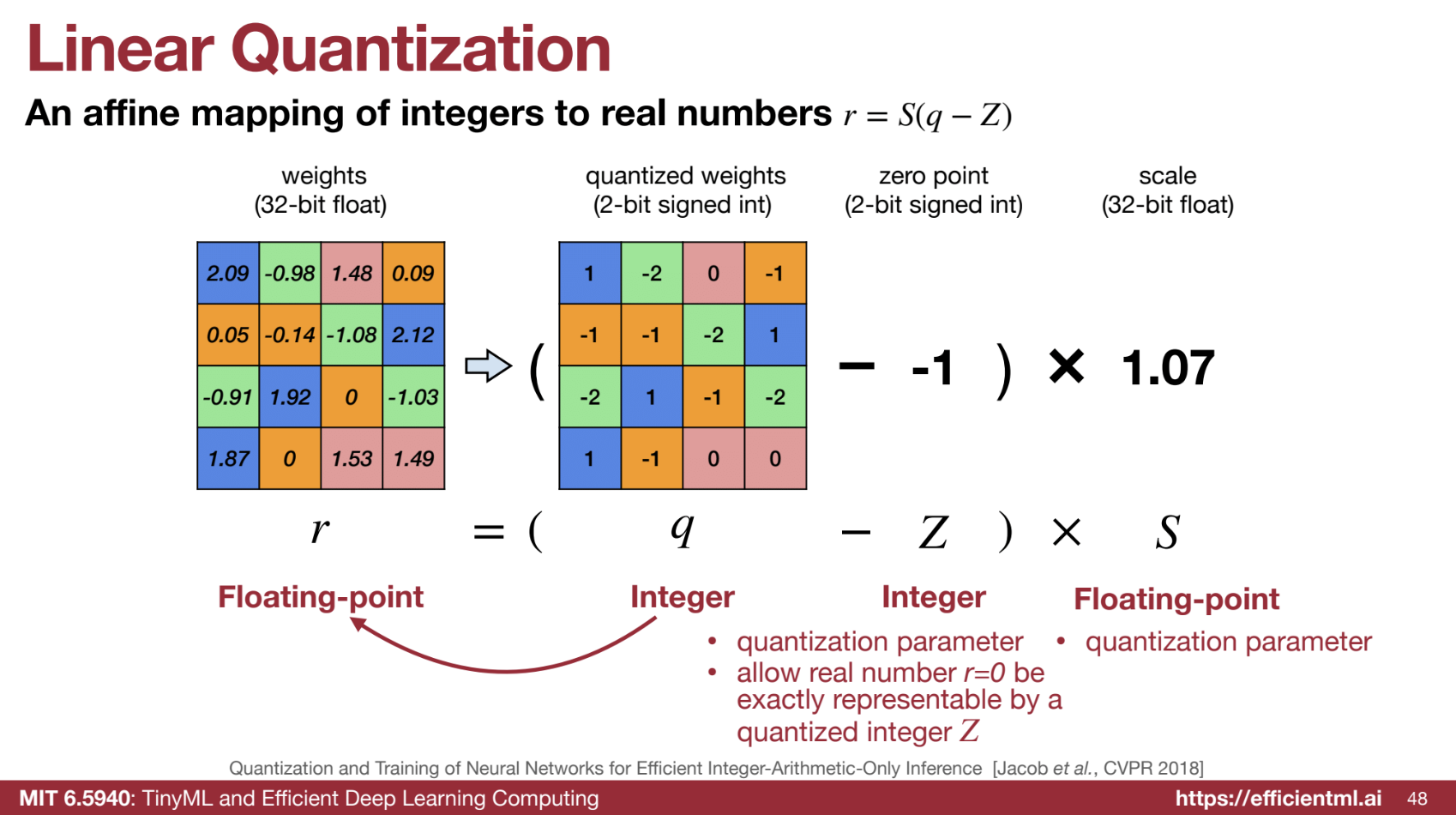
1. Affine Mapping
- Linear quantization uses an affine transformation to map integers to real numbers. The core formula is:
r = S(q - Z)
Where:- ‘r’ - Real (floating-point) number.
- ‘q’ - Quantized integer.
- ‘S’ - Scaling factor (floating-point).
- ‘Z’ - Zero point (integer).
- Zero point ‘Z’ ensures real numbers, particularly zero, are exactly represented by a quantized integer.
- Scaling factor ‘S’ scales the dynamic range of integers to match the floating-point range.
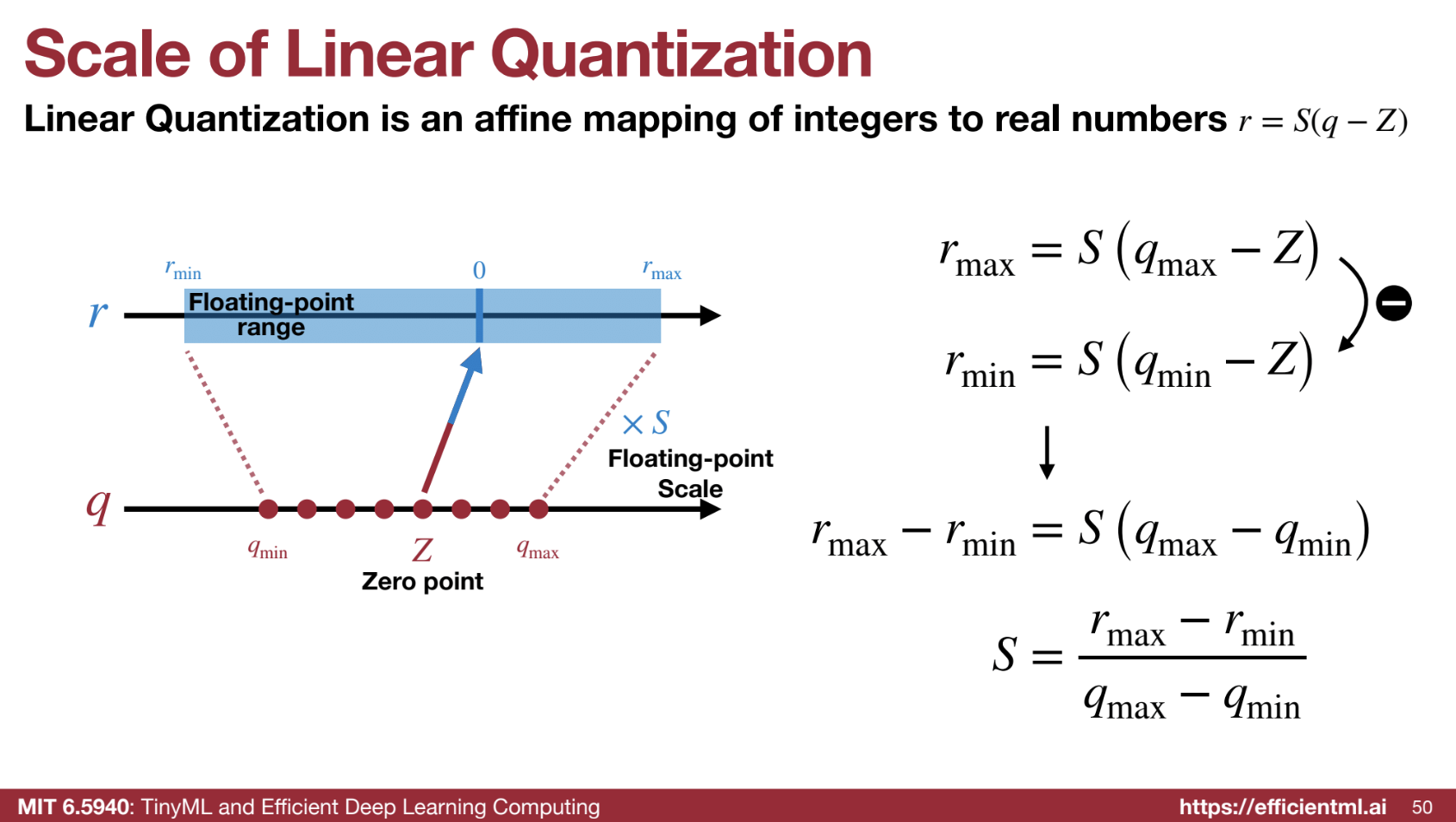
2. 📐 Determining Parameters
- Scaling factor ‘S’ is calculated as:
S = (rmax - rmin) / (qmax - qmin)
Where:- rmax, rmin - Max and min floating-point values.
- qmax, qmin - Max and min integer values.
- Zero point ‘Z’ is calculated using:
Z = round(qmin - rmin / S)
This ensures 0 is accurately represented by an integer.
3. 🔢 Quantization Process
- Floating-point weights are converted to integers:
q = round(r / S + Z)- S and Z map floating-point numbers to integers.
4. ⚙️ Inference with Linear Quantization
- Goal: Perform computations using only integer arithmetic for efficiency.
- Matrix Multiplication (Y = WX):
- Quantized values: qY, qW, qX for output, weight, and input.
- Equation:
SY (qY − ZY) = SW (qW − ZW) ⋅ SX (qX − ZX)
Rearranged:
qY = (SW * SX / SY) * (qW * qX - ZW * qX - ZX * qW + ZW * ZX) + ZY - Simplification:
If ZW = 0 (weights centered around zero):
qY = (SW * SX / SY) * (qW * qX - ZX * qW) + ZY - Main computation: Low-bit integer multiplication (qW * qX).
- Results accumulate in higher precision to avoid overflow.
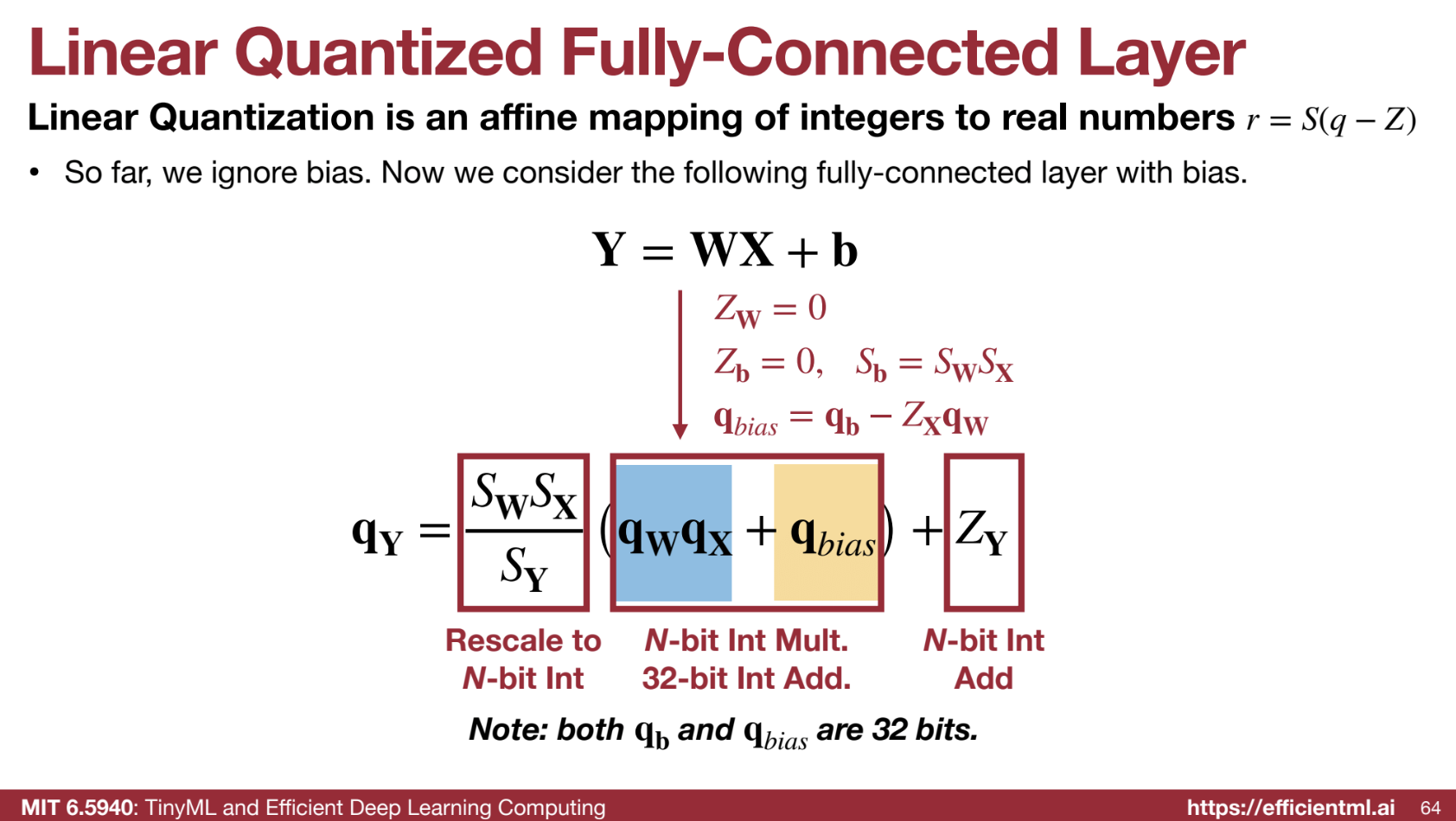
5. ➕ Adding Bias
- Bias term (Y = WX + b) is quantized:
SY (qY − ZY) = SW (qW − ZW) ⋅ SX (qX − ZX) + Sb (qb − Zb)- Zb = 0 (bias zero point), Sb = SW * SX (bias scaling factor).
- Simplified:
qY = (SW * SX / SY) * (qW * qX + qb - ZX * qW) + ZY
Where:
qbias = qb - ZX * qW - Bias is precomputed to keep integer multiplication dominant.
6. 🧱 Convolution
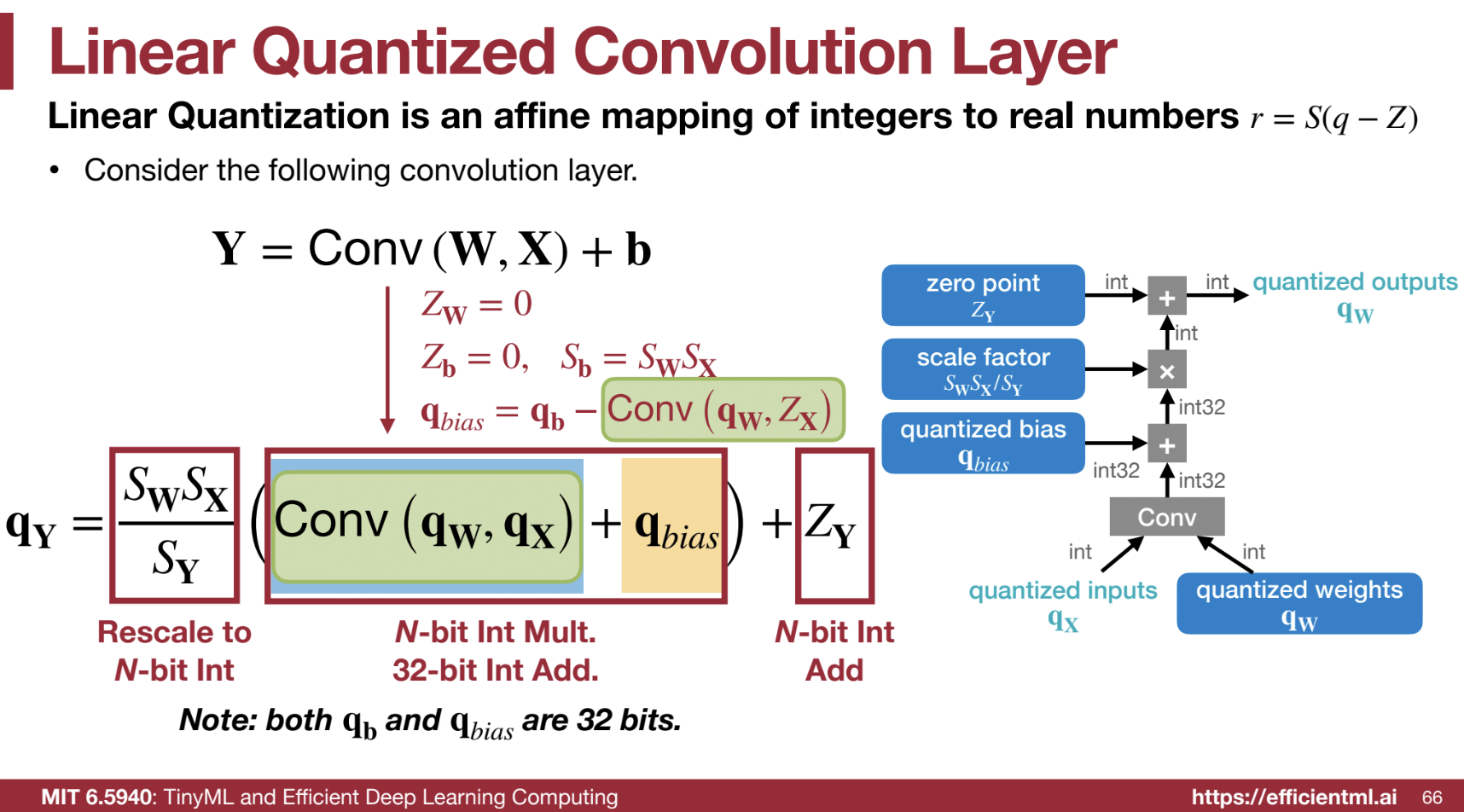
- Similar to matrix multiplication, except multiplication is replaced by convolution.
- Integer weights and activations are used.
- Results accumulate in 32-bit registers.
7. 🚀 Post-Computation
- Integer results are scaled and shifted (by adding ZY) to get final outputs.
🔑 Key Advantages of Linear Quantization
- ⚡ Faster computation – Integer arithmetic is faster and more energy-efficient than floating-point.
- 💾 Reduced memory – Integer weights use less space.
- 🛠️ Hardware acceleration – Modern platforms optimize for integer operations.
Code Example from HW
Part of the code solutions and explainations.
# 1. quantization function
def get_quantized_range(bitwidth):
    quantized_max = (1 << (bitwidth - 1)) - 1
    quantized_min = -(1 << (bitwidth - 1))
    return quantized_min, quantized_max

def linear_quantize(fp_tensor, bitwidth, scale, zero_point, dtype=torch.int8) -> torch.Tensor:
    """
    linear quantization for single fp_tensor
      from
        fp_tensor = (quantized_tensor - zero_point) * scale
      we have,
        quantized_tensor = int(round(fp_tensor / scale)) + zero_point
    :param tensor: [torch.(cuda.)FloatTensor] floating tensor to be quantized
    :param bitwidth: [int] quantization bit width
    :param scale: [torch.(cuda.)FloatTensor] scaling factor
    :param zero_point: [torch.(cuda.)IntTensor] the desired centroid of tensor values
    :return:
        [torch.(cuda.)FloatTensor] quantized tensor whose values are integers
    """
    assert(fp_tensor.dtype == torch.float)
    assert(isinstance(scale, float) or
           (scale.dtype == torch.float and scale.dim() == fp_tensor.dim()))
    assert(isinstance(zero_point, int) or
           (zero_point.dtype == dtype and zero_point.dim() == fp_tensor.dim()))

    ############### YOUR CODE STARTS HERE ###############
    # Step 1: scale the fp_tensor
    scaled_tensor = fp_tensor / scale
    # Step 2: round the floating value to integer value
    rounded_tensor = torch.round(scaled_tensor)
    ############### YOUR CODE ENDS HERE #################

    rounded_tensor = rounded_tensor.to(dtype)

    ############### YOUR CODE STARTS HERE ###############
    # Step 3: shift the rounded_tensor to make zero_point 0
    shifted_tensor = rounded_tensor + zero_point
    ############### YOUR CODE ENDS HERE #################

    # Step 4: clamp the shifted_tensor to lie in bitwidth-bit range
    quantized_min, quantized_max = get_quantized_range(bitwidth)
    quantized_tensor = shifted_tensor.clamp_(quantized_min, quantized_max)
    return quantized_tensor

def get_quantization_scale_and_zero_point(fp_tensor, bitwidth):
    """
    get quantization scale for single tensor
    :param fp_tensor: [torch.(cuda.)Tensor] floating tensor to be quantized
    :param bitwidth: [int] quantization bit width
    :return:
        [float] scale
        [int] zero_point
    """
    quantized_min, quantized_max = get_quantized_range(bitwidth)
    fp_max = fp_tensor.max().item()
    fp_min = fp_tensor.min().item()

    ############### YOUR CODE STARTS HERE ###############
    # hint: one line of code for calculating scale
    # [VERY IMPORTANT] quantized_max - quantized_min = 2 ** bitwith - 1
    scale = (fp_max - fp_min) / (quantized_max - quantized_min)
    # hint: one line of code for calculating zero_point
    zero_point = round(quantized_min - fp_min / scale)
    ############### YOUR CODE ENDS HERE #################

    # clip the zero_point to fall in [quantized_min, quantized_max]
    if zero_point < quantized_min:
        zero_point = quantized_min
    elif zero_point > quantized_max:
        zero_point = quantized_max
    else: # convert from float to int using round()
        zero_point = round(zero_point)
    return scale, int(zero_point)


def linear_quantize_feature(fp_tensor, bitwidth):
    """
    linear quantization for feature tensor
    :param fp_tensor: [torch.(cuda.)Tensor] floating feature to be quantized
    :param bitwidth: [int] quantization bit width
    :return:
        [torch.(cuda.)Tensor] quantized tensor
        [float] scale tensor
        [int] zero point
    """
    scale, zero_point = get_quantization_scale_and_zero_point(fp_tensor, bitwidth)
    quantized_tensor = linear_quantize(fp_tensor, bitwidth, scale, zero_point)
    return quantized_tensor, scale, zero_point


# 2. linear quantization on weight tensor
def get_quantization_scale_for_weight(weight, bitwidth):
    """
    get quantization scale for single tensor of weight
    :param weight: [torch.(cuda.)Tensor] floating weight to be quantized
    :param bitwidth: [integer] quantization bit width
    :return:
        [floating scalar] scale
    """
    # we just assume values in weight are symmetric
    # we also always make zero_point 0 for weight
    fp_max = max(weight.abs().max().item(), 5e-7)
    _, quantized_max = get_quantized_range(bitwidth)
    return fp_max / quantized_max


# Per channel quantization
def linear_quantize_weight_per_channel(tensor, bitwidth):
    """
    linear quantization for weight tensor
        using different scales and zero_points for different output channels
    :param tensor: [torch.(cuda.)Tensor] floating weight to be quantized
    :param bitwidth: [int] quantization bit width
    :return:
        [torch.(cuda.)Tensor] quantized tensor
        [torch.(cuda.)Tensor] scale tensor
        [int] zero point (which is always 0)
    """
    dim_output_channels = 0
    num_output_channels = tensor.shape[dim_output_channels]
    scale = torch.zeros(num_output_channels, device=tensor.device)
    for oc in range(num_output_channels):
        _subtensor = tensor.select(dim_output_channels, oc)
        _scale = get_quantization_scale_for_weight(_subtensor, bitwidth)
        scale[oc] = _scale
    scale_shape = [1] * tensor.dim()
    scale_shape[dim_output_channels] = -1
    scale = scale.view(scale_shape)
    quantized_tensor = linear_quantize(tensor, bitwidth, scale, zero_point=0)
    return quantized_tensor, scale, 0


# 3. Quantized inference
def linear_quantize_bias_per_output_channel(bias, weight_scale, input_scale):
    """
    linear quantization for single bias tensor
        quantized_bias = fp_bias / bias_scale
    :param bias: [torch.FloatTensor] bias weight to be quantized
    :param weight_scale: [float or torch.FloatTensor] weight scale tensor
    :param input_scale: [float] input scale
    :return:
        [torch.IntTensor] quantized bias tensor
    """
    assert(bias.dim() == 1)
    assert(bias.dtype == torch.float)
    assert(isinstance(input_scale, float))
    if isinstance(weight_scale, torch.Tensor):
        assert(weight_scale.dtype == torch.float)
        weight_scale = weight_scale.view(-1)
        assert(bias.numel() == weight_scale.numel())

    ############### YOUR CODE STARTS HERE ###############
    # hint: one line of code
    bias_scale = input_scale * weight_scale
    ############### YOUR CODE ENDS HERE #################

    quantized_bias = linear_quantize(bias, 32, bias_scale,
                                     zero_point=0, dtype=torch.int32)
    return quantized_bias, bias_scale, 0

def shift_quantized_linear_bias(quantized_bias, quantized_weight, input_zero_point):
    """
    shift quantized bias to incorporate input_zero_point for nn.Linear
        shifted_quantized_bias = quantized_bias - Linear(input_zero_point, quantized_weight)
    :param quantized_bias: [torch.IntTensor] quantized bias (torch.int32)
    :param quantized_weight: [torch.CharTensor] quantized weight (torch.int8)
    :param input_zero_point: [int] input zero point
    :return:
        [torch.IntTensor] shifted quantized bias tensor
    """
    assert(quantized_bias.dtype == torch.int32)
    assert(isinstance(input_zero_point, int))
    return quantized_bias - quantized_weight.sum(1).to(torch.int32) * input_zero_point

def quantized_linear(input, weight, bias, feature_bitwidth, weight_bitwidth,
                     input_zero_point, output_zero_point,
                     input_scale, weight_scale, output_scale):
    """
    quantized fully-connected layer
    :param input: [torch.CharTensor] quantized input (torch.int8)
    :param weight: [torch.CharTensor] quantized weight (torch.int8)
    :param bias: [torch.IntTensor] shifted quantized bias or None (torch.int32)
    :param feature_bitwidth: [int] quantization bit width of input and output
    :param weight_bitwidth: [int] quantization bit width of weight
    :param input_zero_point: [int] input zero point
    :param output_zero_point: [int] output zero point
    :param input_scale: [float] input feature scale
    :param weight_scale: [torch.FloatTensor] weight per-channel scale
    :param output_scale: [float] output feature scale
    :return:
        [torch.CharIntTensor] quantized output feature (torch.int8)
    """
    assert(input.dtype == torch.int8)
    assert(weight.dtype == input.dtype)
    assert(bias is None or bias.dtype == torch.int32)
    assert(isinstance(input_zero_point, int))
    assert(isinstance(output_zero_point, int))
    assert(isinstance(input_scale, float))
    assert(isinstance(output_scale, float))
    assert(weight_scale.dtype == torch.float)

    # Step 1: integer-based fully-connected (8-bit multiplication with 32-bit accumulation)
    if 'cpu' in input.device.type:
        # use 32-b MAC for simplicity
        output = torch.nn.functional.linear(input.to(torch.int32), weight.to(torch.int32), bias)
    else:
        # current version pytorch does not yet support integer-based linear() on GPUs
        output = torch.nn.functional.linear(input.float(), weight.float(), bias.float())

    ############### YOUR CODE STARTS HERE ###############
    # Step 2: scale the output
    #         hint: 1. scales are floating numbers, we need to convert output to float as well
    #               2. the shape of weight scale is [oc, 1, 1, 1] while the shape of output is [batch_size, oc]
    output = output.float()
    output *= (input_scale * weight_scale.flatten().view(1, -1) / output_scale)


    # Step 3: shift output by output_zero_point
    #         hint: one line of code
    output = output + output_zero_point
    ############### YOUR CODE ENDS HERE #################

    # Make sure all value lies in the bitwidth-bit range
    output = output.round().clamp(*get_quantized_range(feature_bitwidth)).to(torch.int8)
    return output


def shift_quantized_conv2d_bias(quantized_bias, quantized_weight, input_zero_point):
    """
    shift quantized bias to incorporate input_zero_point for nn.Conv2d
        shifted_quantized_bias = quantized_bias - Conv(input_zero_point, quantized_weight)
    :param quantized_bias: [torch.IntTensor] quantized bias (torch.int32)
    :param quantized_weight: [torch.CharTensor] quantized weight (torch.int8)
    :param input_zero_point: [int] input zero point
    :return:
        [torch.IntTensor] shifted quantized bias tensor
    """
    assert(quantized_bias.dtype == torch.int32)
    assert(isinstance(input_zero_point, int))
    return quantized_bias - quantized_weight.sum((1,2,3)).to(torch.int32) * input_zero_point

def quantized_conv2d(input, weight, bias, feature_bitwidth, weight_bitwidth,
                     input_zero_point, output_zero_point,
                     input_scale, weight_scale, output_scale,
                     stride, padding, dilation, groups):
    """
    quantized 2d convolution
    :param input: [torch.CharTensor] quantized input (torch.int8)
    :param weight: [torch.CharTensor] quantized weight (torch.int8)
    :param bias: [torch.IntTensor] shifted quantized bias or None (torch.int32)
    :param feature_bitwidth: [int] quantization bit width of input and output
    :param weight_bitwidth: [int] quantization bit width of weight
    :param input_zero_point: [int] input zero point
    :param samp: [int] output zero point
    :param input_scale: [float] input feature scale
    :param weight_scale: [torch.FloatTensor] weight per-channel scale
    :param output_scale: [float] output feature scale
    :return:
        [torch.(cuda.)CharTensor] quantized output feature
    """
    assert(len(padding) == 4)
    assert(input.dtype == torch.int8)
    assert(weight.dtype == input.dtype)
    assert(bias is None or bias.dtype == torch.int32)
    assert(isinstance(input_zero_point, int))
    assert(isinstance(output_zero_point, int))
    assert(isinstance(input_scale, float))
    assert(isinstance(output_scale, float))
    assert(weight_scale.dtype == torch.float)

    # Step 1: calculate integer-based 2d convolution (8-bit multiplication with 32-bit accumulation)
    input = torch.nn.functional.pad(input, padding, 'constant', input_zero_point)
    if 'cpu' in input.device.type:
        # use 32-b MAC for simplicity
        output = torch.nn.functional.conv2d(input.to(torch.int32), weight.to(torch.int32), None, stride, 0, dilation, groups)
    else:
        # current version pytorch does not yet support integer-based conv2d() on GPUs
        output = torch.nn.functional.conv2d(input.float(), weight.float(), None, stride, 0, dilation, groups)
        output = output.round().to(torch.int32)
    if bias is not None:
        output = output + bias.view(1, -1, 1, 1)

    ############### YOUR CODE STARTS HERE ###############
    # hint: this code block should be the very similar to quantized_linear()

    # Step 2: scale the output
    #         hint: 1. scales are floating numbers, we need to convert output to float as well
    #               2. the shape of weight scale is [oc, 1, 1, 1] while the shape of output is [batch_size, oc, height, width]
    output = output.float()
    output *= (input_scale * weight_scale.flatten().view(1, -1, 1, 1) / output_scale)

    # Step 3: shift output by output_zero_point
    #         hint: one line of code
    output += output_zero_point
    ############### YOUR CODE ENDS HERE #################

    # Make sure all value lies in the bitwidth-bit range
    output = output.round().clamp(*get_quantized_range(feature_bitwidth)).to(torch.int8)
    return output
Explanation of the quantized_linear() function
The quantized_linear() function is used to perform the forward pass of a fully-connected (linear) layer with quantized input, weight, and bias tensors. It is crucial for running inference with quantized models, which are more memory- and computation-efficient, especially on hardware optimized for low-precision arithmetic (like int8).
What does the quantized_linear() function do?
The function performs the following steps:
- Matrix Multiplication (Linear Operation):
-
The primary operation in a fully-connected layer is the matrix multiplication between the input and weight tensors: $[ \text{output} = \text{Linear}(q_{\text{input}}, q_{\text{weight}}) + q_{\text{bias}} ]$ Here, $( q_{\text{input}} )$, $( q_{\text{weight}} )$, and $( q_{\text{bias}} )$ are all quantized tensors.
- On CPU, the multiplication uses integer arithmetic with 32-bit accumulation (this is done for simplicity since integer operations on CPU are typically slower than floating-point).
- On GPU, PyTorch doesn’t yet support integer-based matrix multiplications directly, so we first convert the quantized input and weight tensors back to float, perform the multiplication, and then round the result to the nearest integer.
-
- Scaling the Output:
After matrix multiplication, the result is scaled to bring it back to the correct range. The scaling factor accounts for the fact that both the input and weight were quantized, and their values may not perfectly align with the expected output range:
$[
\text{output} = \text{output} \times \left(\frac{s_{\text{input}} \times s_{\text{weight}}}{s_{\text{output}}}\right)
]$
- $( s_{\text{input}} )$: The scaling factor for the input tensor (how much the input tensor values have been scaled during quantization).
- $( s_{\text{weight}} )$: The scaling factor for the weight tensor (how much the weight tensor values have been scaled during quantization).
- $( s_{\text{output}} )$: The desired scaling factor for the output tensor (this is what we aim to obtain).
The idea is that the quantized operations cause the output to be distorted compared to the original floating-point result, and we must adjust the output to correct this.
-
Shifting by Output Zero Point: The output tensor is then shifted by the output zero point: $[ \text{output} = \text{output} + z_{\text{output}} ]$ The zero point ensures the output values are centered around 0 (or another desired value). This step is needed because quantized values are typically not symmetric around 0, so the zero point allows the output to align with the intended dynamic range of the output tensor.
- Clamping and Converting:
Finally, the output values are clamped to the valid quantized range (based on the bitwidth), and then they are converted back to the quantized type (usually
int8for this example): $[ q_{\text{final}} = \text{clamp}(q_{\text{min}}, q_{\text{max}}) ]$ The clamping ensures that no values exceed the valid range for the quantized representation (for instance, values shouldn’t go beyond 127 for int8).
Why do we need the quantized_linear() function?
In a neural network, the linear layers (also known as fully connected layers) are fundamental building blocks. These layers are typically represented by matrix multiplication between the input and weight tensors, followed by the addition of a bias.
Quantization allows us to replace floating-point operations with lower-bit integer operations (e.g., int8), which:
- Reduce memory consumption: Storing weights, activations, and biases in 8 bits (instead of 32 bits) reduces memory usage by a factor of 4.
- Increase inference speed: Integer operations are faster than floating-point operations on hardware that supports low-precision arithmetic (e.g., CPUs and NPUs).
- Lower energy consumption: Running quantized models typically consumes less energy, which is essential for deploying models on edge devices like smartphones, IoT devices, and embedded systems.
However, to use quantized models efficiently, we must simulate the original floating-point behavior during inference while maintaining the benefits of reduced precision. The quantized_linear() function is necessary because:
- It handles the quantized matrix multiplication operation using integer-based computations.
- It scales and shifts the result to ensure it fits within the quantized range, maintaining the accuracy of the original floating-point model.
- It ensures the output of the linear operation is correctly adjusted for the output zero point and scaling factor.
Without this function, running inference on a quantized model would require re-conversion to floating-point for each operation, which defeats the purpose of quantization. The goal of quantization is to avoid the need for floating-point operations in the first place.
- Theoretical Linear Quantization (Integer Arithmetic):
- Integer operations (e.g.,
int8 * int8) are faster and more energy-efficient than floating-point operations (float32). - Linear quantization involves mapping floating-point values to integers using a scaling factor and zero-point, and the computations (like multiplication and addition) are done using integers.
- Integer operations (e.g.,
- What’s Missing in the Code:
- The code provided still uses floating-point arithmetic for matrix multiplications, even after quantization.
- Ideally, the code should perform matrix multiplications entirely with integer arithmetic during the forward pass, only converting back to floating-point after the computation (for tasks like loss calculation or display).
- Challenges in Real-World Frameworks:
- PyTorch and current hardware don’t fully support integer-only operations (like integer matrix multiplications) on quantized tensors.
- This leads to the need for floating-point operations during computations, preventing the full computational and memory benefits of quantization from being realized.
- Why Integer Operations Are Faster and More Efficient:
- Integer multiplication is faster and consumes less power compared to floating-point operations, particularly on specialized hardware that supports int8 arithmetic.
- Integer operations are simpler and more energy-efficient, which is why they are ideal for resource-constrained environments like edge devices or embedded systems.
- Conclusion:
- The code provided simulates the concept of quantization but still uses floating-point operations for matrix multiplications.
- In the ideal case, integer-based operations (e.g.,
int8 * int8) would replace floating-point operations for quantized models, providing computational and energy savings. - The lecture discusses the potential advantages of this idealized scenario, but in practice, current hardware and frameworks do not yet fully support integer-based matrix operations for quantized models.
# 4. Put Together Post-Training int8 Quantization

"""
Firstly, we will fuse a BatchNorm layer into its previous convolutional layer, which is a standard practice before quantization. Fusing batchnorm reduces the extra multiplication during inference.
"""
def fuse_conv_bn(conv, bn):
    # modified from https://mmcv.readthedocs.io/en/latest/_modules/mmcv/cnn/utils/fuse_conv_bn.html
    assert conv.bias is None

    factor = bn.weight.data / torch.sqrt(bn.running_var.data + bn.eps)
    conv.weight.data = conv.weight.data * factor.reshape(-1, 1, 1, 1)
    conv.bias = nn.Parameter(- bn.running_mean.data * factor + bn.bias.data)

    return conv

"""
We will run the model with some sample data to get the range of each feature map, so that we can get the range of the feature maps and compute their corresponding scaling factors and zero points.
"""
# add hook to record the min max value of the activation
input_activation = {}
output_activation = {}

def add_range_recoder_hook(model):
    import functools
    def _record_range(self, x, y, module_name):
        x = x[0]
        input_activation[module_name] = x.detach()
        output_activation[module_name] = y.detach()

    all_hooks = []
    for name, m in model.named_modules():
        if isinstance(m, (nn.Conv2d, nn.Linear, nn.ReLU)):
            all_hooks.append(m.register_forward_hook(
                functools.partial(_record_range, module_name=name)))
    return all_hooks

hooks = add_range_recoder_hook(model_fused)
# sample from training data. record the scale and zero point for inference usage.
sample_data = iter(dataloader['train']).__next__()[0]
model_fused(sample_data.cuda())

# remove hooks
for h in hooks:
    h.remove()

"""
Finally, let's do model quantization. We will convert the model in the following mapping
nn.Conv2d: QuantizedConv2d,
nn.Linear: QuantizedLinear,
# the following twos are just wrappers, as current
# torch modules do not support int8 data format;
# we will temporarily convert them to fp32 for computation
nn.MaxPool2d: QuantizedMaxPool2d,
nn.AvgPool2d: QuantizedAvgPool2d,
"""

class QuantizedConv2d(nn.Module):
    def __init__(self, weight, bias,
                 input_zero_point, output_zero_point,
                 input_scale, weight_scale, output_scale,
                 stride, padding, dilation, groups,
                 feature_bitwidth=8, weight_bitwidth=8):
        super().__init__()
        # current version Pytorch does not support IntTensor as nn.Parameter
        self.register_buffer('weight', weight)
        self.register_buffer('bias', bias)

        self.input_zero_point = input_zero_point
        self.output_zero_point = output_zero_point

        self.input_scale = input_scale
        self.register_buffer('weight_scale', weight_scale)
        self.output_scale = output_scale

        self.stride = stride
        self.padding = (padding[1], padding[1], padding[0], padding[0])
        self.dilation = dilation
        self.groups = groups

        self.feature_bitwidth = feature_bitwidth
        self.weight_bitwidth = weight_bitwidth


    def forward(self, x):
        return quantized_conv2d(
            x, self.weight, self.bias,
            self.feature_bitwidth, self.weight_bitwidth,
            self.input_zero_point, self.output_zero_point,
            self.input_scale, self.weight_scale, self.output_scale,
            self.stride, self.padding, self.dilation, self.groups
            )

class QuantizedLinear(nn.Module):
    def __init__(self, weight, bias,
                 input_zero_point, output_zero_point,
                 input_scale, weight_scale, output_scale,
                 feature_bitwidth=8, weight_bitwidth=8):
        super().__init__()
        # current version Pytorch does not support IntTensor as nn.Parameter
        self.register_buffer('weight', weight)
        self.register_buffer('bias', bias)

        self.input_zero_point = input_zero_point
        self.output_zero_point = output_zero_point

        self.input_scale = input_scale
        self.register_buffer('weight_scale', weight_scale)
        self.output_scale = output_scale

        self.feature_bitwidth = feature_bitwidth
        self.weight_bitwidth = weight_bitwidth

    def forward(self, x):
        return quantized_linear(
            x, self.weight, self.bias,
            self.feature_bitwidth, self.weight_bitwidth,
            self.input_zero_point, self.output_zero_point,
            self.input_scale, self.weight_scale, self.output_scale
            )

class QuantizedMaxPool2d(nn.MaxPool2d):
    def forward(self, x):
        # current version PyTorch does not support integer-based MaxPool
        return super().forward(x.float()).to(torch.int8)

class QuantizedAvgPool2d(nn.AvgPool2d):
    def forward(self, x):
        # current version PyTorch does not support integer-based AvgPool
        return super().forward(x.float()).to(torch.int8)

# we use int8 quantization, which is quite popular
feature_bitwidth = weight_bitwidth = 8
quantized_model = copy.deepcopy(model_fused)
quantized_backbone = []
ptr = 0
while ptr < len(quantized_model.backbone):
    if isinstance(quantized_model.backbone[ptr], nn.Conv2d) and \
        isinstance(quantized_model.backbone[ptr + 1], nn.ReLU):
        conv = quantized_model.backbone[ptr]
        conv_name = f'backbone.{ptr}'
        relu = quantized_model.backbone[ptr + 1]
        relu_name = f'backbone.{ptr + 1}'

        input_scale, input_zero_point = \
            get_quantization_scale_and_zero_point(
                input_activation[conv_name], feature_bitwidth)

        output_scale, output_zero_point = \
            get_quantization_scale_and_zero_point(
                output_activation[relu_name], feature_bitwidth)

        quantized_weight, weight_scale, weight_zero_point = \
            linear_quantize_weight_per_channel(conv.weight.data, weight_bitwidth)
        quantized_bias, bias_scale, bias_zero_point = \
            linear_quantize_bias_per_output_channel(
                conv.bias.data, weight_scale, input_scale)
        shifted_quantized_bias = \
            shift_quantized_conv2d_bias(quantized_bias, quantized_weight,
                                        input_zero_point)

        quantized_conv = QuantizedConv2d(
            quantized_weight, shifted_quantized_bias,
            input_zero_point, output_zero_point,
            input_scale, weight_scale, output_scale,
            conv.stride, conv.padding, conv.dilation, conv.groups,
            feature_bitwidth=feature_bitwidth, weight_bitwidth=weight_bitwidth
        )

        quantized_backbone.append(quantized_conv)
        ptr += 2
    elif isinstance(quantized_model.backbone[ptr], nn.MaxPool2d):
        quantized_backbone.append(QuantizedMaxPool2d(
            kernel_size=quantized_model.backbone[ptr].kernel_size,
            stride=quantized_model.backbone[ptr].stride
            ))
        ptr += 1
    elif isinstance(quantized_model.backbone[ptr], nn.AvgPool2d):
        quantized_backbone.append(QuantizedAvgPool2d(
            kernel_size=quantized_model.backbone[ptr].kernel_size,
            stride=quantized_model.backbone[ptr].stride
            ))
        ptr += 1
    else:
        raise NotImplementedError(type(quantized_model.backbone[ptr]))  # should not happen
quantized_model.backbone = nn.Sequential(*quantized_backbone)

# finally, quantized the classifier
fc_name = 'classifier'
fc = model.classifier
input_scale, input_zero_point = \
    get_quantization_scale_and_zero_point(
        input_activation[fc_name], feature_bitwidth)

output_scale, output_zero_point = \
    get_quantization_scale_and_zero_point(
        output_activation[fc_name], feature_bitwidth)

quantized_weight, weight_scale, weight_zero_point = \
    linear_quantize_weight_per_channel(fc.weight.data, weight_bitwidth)
quantized_bias, bias_scale, bias_zero_point = \
    linear_quantize_bias_per_output_channel(
        fc.bias.data, weight_scale, input_scale)
shifted_quantized_bias = \
    shift_quantized_linear_bias(quantized_bias, quantized_weight,
                                input_zero_point)

quantized_model.classifier = QuantizedLinear(
    quantized_weight, shifted_quantized_bias,
    input_zero_point, output_zero_point,
    input_scale, weight_scale, output_scale,
    feature_bitwidth=feature_bitwidth, weight_bitwidth=weight_bitwidth
)

print(quantized_model)

def extra_preprocess(x):
    # hint: you need to convert the original fp32 input of range (0, 1)
    #  into int8 format of range (-128, 127)
    ############### YOUR CODE STARTS HERE ###############
    return (x * 255 - 128).clamp(-128, 127).to(torch.int8)
    ############### YOUR CODE ENDS HERE #################

int8_model_accuracy = evaluate(quantized_model, dataloader['test'],
                               extra_preprocess=[extra_preprocess])
print(f"int8 model has accuracy={int8_model_accuracy:.2f}%")
Post-Training int8 Quantization Process
This code outlines the steps involved in performing post-training int8 quantization to reduce model size and speed up inference by quantizing the weights, activations, and biases of the model. Here’s a detailed explanation of the entire process:
1. Fusing BatchNorm and Convolution Layers:
- The function
fuse_conv_bn()is used to fuse Batch Normalization (BatchNorm) layers with the preceding Convolution layers. This is a common optimization before quantization. - Fusing BatchNorm reduces extra computation during inference (since BatchNorm involves extra multiplication), resulting in more efficient execution.
- The method involves adjusting the convolutional weights and biases to account for the BatchNorm scaling factors (
bn.weight,bn.running_var,bn.bias,bn.running_mean).
When using Post-Training Quantization (int8 quantization), the extra computations introduced by BatchNorm (particularly for scaling and shifting) may slow down inference, and the BatchNorm parameters may not be easily convertible to int8. Therefore, fusing BatchNorm with the preceding convolution layer can reduce this extra computation.
The goal of fusing the BatchNorm and Convolution layers is to combine the operations of these two layers into one efficient operation. When we fuse BatchNorm into Convolution, we can express the combined transformation as a single convolutional operation without needing the separate BatchNorm layer. Here’s how the process works:
-
Conv2D Layer: The convolution operation applies a set of filters (weights) to the input feature map to produce output activations. Mathematically, this can be represented as:
$[ y_{\text{conv}} = \text{Conv}(x) ]$
-
BatchNorm Layer: The BatchNorm layer normalizes the output from the convolution, and applies the learned scaling and shifting parameters:
$[ y_{\text{bn}} = \gamma \left( \frac{y_{\text{conv}} - \mu}{\sigma} \right) + \beta ]$
-
Fusing the Operations: The fusion can be done by incorporating the BatchNorm parameters into the weights and bias of the convolution. This results in an adjusted convolutional weight and bias, such that the BatchNorm effect is embedded into the convolution operation itself.
- The new weight for the convolution layer is adjusted by a factor that accounts for the BatchNorm scaling parameter $( \gamma )$ and the inverse of the standard deviation $( \sigma )$:
$[ W_{\text{fused}} = W_{\text{conv}} \times \frac{\gamma}{\sigma} ]$
- The new bias is adjusted similarly, incorporating the BatchNorm mean $( \mu )$ and the scaling factor $( \gamma )$:
$[ b_{\text{fused}} = \gamma \left( \frac{b_{\text{conv}} - \mu}{\sigma} \right) + \beta ]$
-
Result: After fusing, the BatchNorm layer is no longer required, and the convolution operation effectively absorbs the BatchNorm effect. This results in fewer operations during inference and leads to better performance, especially in the context of model quantization, where extra operations can be costly.
2. Recording Activation Ranges:
- The purpose of this step is to collect the minimum and maximum values of the activations (outputs) of each layer during a forward pass through the model. This helps in determining the scaling factors and zero points needed for quantization.
- The
add_range_recoder_hook()function registers forward hooks on layers likenn.Conv2d,nn.Linear, andnn.ReLUto record activation ranges during inference. - The recorded activation values are stored in
input_activationandoutput_activationdictionaries for later use in computing scaling factors and zero points.
3. Quantization Process:
- Quantization involves converting the model to work with integer-based computations (int8) rather than floating point (fp32). This reduces the model’s size and can make inference faster (when the hardware supports it).
The quantized versions of the layers (QuantizedConv2d, QuantizedLinear, QuantizedMaxPool2d, and QuantizedAvgPool2d) are defined to handle int8 operations:
- QuantizedConv2d: Converts a convolutional layer into a quantized version that can perform integer-based convolution.
- QuantizedLinear: Converts a linear layer (fully connected) into a quantized version.
- QuantizedMaxPool2d and QuantizedAvgPool2d: Modify max pooling and average pooling layers to handle int8 data (note: in the current version of PyTorch, these layers temporarily convert data back to fp32 for computation).
4. Quantizing the Model Backbone:
- The model backbone (typically the feature extraction part of the model) is iterated over to replace
Conv2dlayers withQuantizedConv2dlayers andMaxPool2dorAvgPool2dlayers with their quantized counterparts. - For each
Conv2dlayer, the code calculates the quantization scaling factors and zero points for weights and activations, usingget_quantization_scale_and_zero_point(). - Then, it quantizes the weights using
linear_quantize_weight_per_channel(), quantizes the biases withlinear_quantize_bias_per_output_channel(), and adjusts the bias usingshift_quantized_conv2d_bias().
5. Quantizing the Classifier:
- After processing the backbone, the final classifier layers (usually fully connected layers) are also quantized.
- Similar to the backbone, the classifier’s weights and biases are quantized and the model is adjusted with
QuantizedLinearfor the final fully connected layers.
6. Preprocessing Input for Int8 Format:
- The input to the model needs to be converted into an integer format that corresponds to the int8 range (from -128 to 127). This is handled in the
extra_preprocess()function. - The input, which is typically a floating-point image in the range [0, 1], is scaled and shifted to fit into the int8 range before feeding it into the quantized model.
KMeans and Linear Quantization Comparison
| Feature | K-Means Quantization | Linear Quantization |
|---|---|---|
| Basic Concept | Uses a codebook of centroids to represent weights. Weights are clustered, and each weight is represented by the index of its closest centroid. | Maps integer values to real numbers using a scale factor and a zero point. Each floating-point number is converted to an integer using a formula that involves scaling and shifting by a zero point. |
| Storage | Saves storage by storing integer indices instead of floating-point weights. Requires storing the codebook of floating-point centroids in addition to the integer indices. | Saves storage by using integer weights. The quantized weights, scaling factor and zero point need to be stored. |
| Computation | Computations are still done using floating-point arithmetic, as the integer indices are used to look up the corresponding centroid in the codebook. | Computations can be done using integer arithmetic, which is faster and more energy-efficient. The process involves integer multiplication and addition. |
| Weight Representation | Weights are represented by integer indices that map to floating-point centroids in a codebook. | Weights are represented as integers. During computation, these integers are converted to floating-point numbers by the linear quantization formula that involves a scale factor and a zero point. |
| Quantization Error | Introduced due to approximation of original weights with the closest centroid in the codebook. The goal is to minimize this error by choosing appropriate codebook centroids. | Introduced by mapping floating-point values to integers. The scale factor and zero point are chosen to minimize this error. |
| Parameters | Requires determining the codebook centroids. | Requires determining the scaling factor and zero point. |
| Fine-tuning | Codebook centroids are updated by grouping gradients by cluster and updating the centroid based on the sum of the gradients within each cluster. The assignment of weights to clusters can change based on the updates of the centroids. | The zero point allows a real number to be represented by a quantized integer, the zero point maps zero to zero. The scaling factor is computed based on the dynamic range of the floating-point and integer ranges. |
| Use Cases | Suitable for scenarios where memory is the primary constraint, but floating-point computation is acceptable. Helpful for large language models during the generation phase where memory is the bottleneck. | Suitable for mobile phones, microcontrollers, and edge devices where both storage and computational efficiency are crucial. Particularly useful when hardware has integer units to accelerate computations. |
| Implementation | K-means clustering is applied to group similar weights, then these weights are replaced by their cluster index in a codebook. During computation the weights are looked up from a codebook. | The floating point values are mapped to integers with a scaling factor and zero point, which will also be used to convert these integers back to floating point. The computation is done using the integer values. |
| Compression Ratio | The compression ratio depends on the number of bits used for the indices and the codebook size. With n bits of quantization, the compression ratio can be 32/n if the matrix is large compared to the codebook. | Achieves good compression and speed-up. For example, using 8-bit integers can reduce the size of the model by a factor of 4, relative to 32 bit floats. |