
GPU Kernels & Triton Programming 💻
This lecture dives into writing high-performance GPU code, which is essential for accelerating language models.
- The Challenge: Bridging the gap between high-level frameworks like PyTorch and the underlying GPU hardware, which often leads to “performance mysteries.”
- The Goal: To effectively optimize code by understanding GPU architecture, execution models, and advanced profiling techniques.
1. GPU Architecture and Execution Model Review
Understanding how GPUs operate is foundational to writing efficient code.
- Streaming Multiprocessors (SMs): GPUs (e.g., A100, H100) contain numerous SMs (an A100 has 108).
- Memory Hierarchy:
- DRAM (Global Memory): Large but slow (e.g., 80GB on A100).
- Caches (L2, L1): Faster and smaller. L1 cache and shared memory are inside the SM and are very fast.
- Register File: “Very very fast memory that each each thread can access.”
- Execution Model:
- Threads: The “atomic unit” of computation.
- Thread Blocks: A collection of threads scheduled on a single SM. Communication within a block is fast.
- Grid: A collection of thread blocks.
- Warps (Waves): Threads are grouped into blocks of 32, which are executed together.
- Occupancy and Wave Quantization: To maximize GPU utilization, the number of thread blocks should ideally be a multiple of the number of SMs (ideally >= 4x) to ensure all SMs are saturated.
- Arithmetic Intensity: Defined as
# FLOPs / # bytes. High intensity means an operation is “compute-bound (good),” while low intensity means it’s “memory-bound (bad).”
2. Benchmarking and Profiling: Essential Tools
“If you want to write high performance code you should remember to benchmark and profile your code.”
Benchmarking
Measures the “wall-clock time of performing some operation.”
- Key Practices:
- Warm-up Iterations: Crucial to measure “steady state speed” instead of “startup speed.”
torch.cuda.synchronize(): Essential for accurate GPU timing, as the CPU and GPU run asynchronously.- Multiple Trials: Average multiple runs to account for fluctuations.
def benchmark(description: str, run: Callable, num_warmups: int = 1, num_trials: int = 3):
    """Benchmark `func` by running it `num_trials`, and return all the times."""
    # Warmup
    for _ in range(num_warmups):
        run()
    if torch.cuda.is_available():
        torch.cuda.synchronize()
    # Time it for real
    times: list[float] = []
    for trial in range(num_trials):
        start_time = time.time()
        run()
        if torch.cuda.is_available():
            torch.cuda.synchronize()
        end_time = time.time()
        times.append((end_time - start_time) * 1000)
    mean_time = mean(times)
    return mean_time
Profiling
Provides a “much more fine grained” view, revealing “where time is being spent.”
PyTorch’s Built-in Profiler
The Torch Profiler is a powerful built-in tool to understand where your code spends its time, both on the CPU and the GPU.
- Core Purpose: To pinpoint performance bottlenecks by showing “exactly where your… bottlenecks are and exactly what the machine is doing”.
- Low-Level Visibility: It reveals the “whole universe of CUDA stuff that’s being called beneath PyTorch,” including:
- PyTorch’s C++ Interface (
aten::). - CUDA Kernel Launches (
cudaLaunchKernel). - Actual CUDA Kernels (
vectorized_elementwise_kernel,cutlass::Kernel2, etc.). - Synchronization Points (
cudaDeviceSynchronize).
- PyTorch’s C++ Interface (
- How to Use: Wrap the code you want to analyze within a
torch.profiler.profilecontext manager.- Warm-up iterations are crucial to measure steady-state speed.
torch.cuda.synchronize()is critical for accurate GPU timing.with_stack=Trueallows generating visualizations like flame graphs.
- Interpreting Output: The profiler output provides a table with metrics for each operation:
Self CPU %: Percentage of CPU time spent directly in this operation.Self CUDA: Time spent on the GPU for a specific CUDA kernel.# of Calls: How many times this operation was called.
- Example (
a + b): For adding two 2048x2048 matrices, the profile showsaten::addconsuming ~98% of CPU time (1.392ms), while the actualvectorized_elementwise_kernelon the GPU takes only 17.119us. This shows that for small operations, CPU overhead dominates.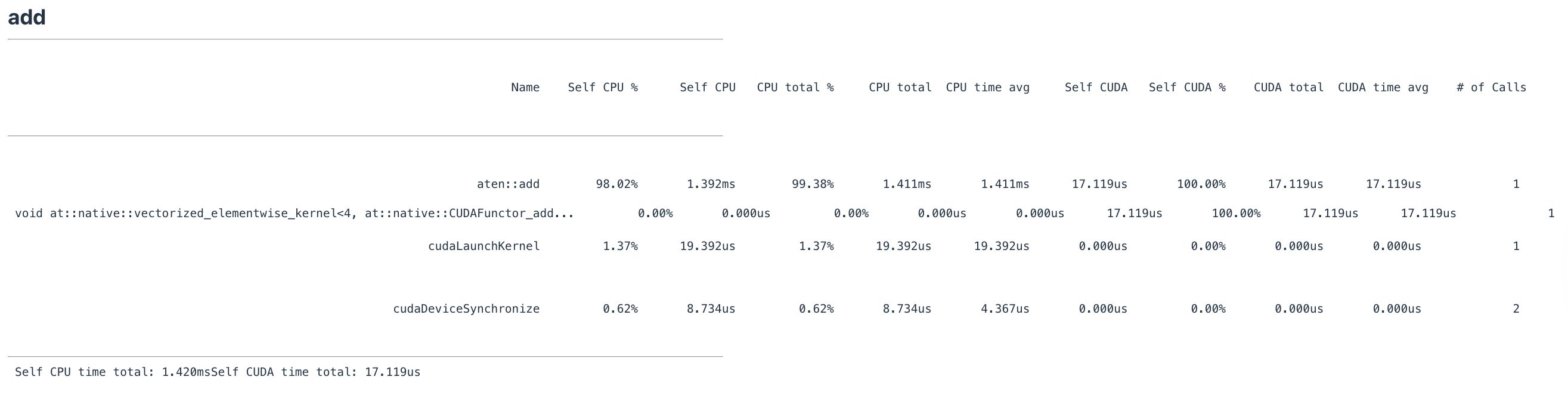
- Example (
a @ b): For matrix multiplication, the GPU time (cutlass_80_simt_sgemm) is much higher, indicating a compute-bound operation. - Kernel Fusion: The profiler can show how an operation like
torch.nn.functional.geluis a single, fused CUDA kernel (GeluCUDAKernelImpl), making it much more efficient than a manual implementation with separate operations.
def profile(description: str, run: Callable, num_warmups: int = 1, with_stack: bool = False):
    # Warmup
    for _ in range(num_warmups):
        run()
    if torch.cuda.is_available():
        torch.cuda.synchronize()
    # Run with profiler
    with torch.profiler.profile(
            activities=[ProfilerActivity.CPU, ProfilerActivity.CUDA],
            with_stack=with_stack,
            experimental_config=torch._C._profiler._ExperimentalConfig(verbose=True)) as prof:
        run()
        if torch.cuda.is_available():
            torch.cuda.synchronize()
    # Print table
    table = prof.key_averages().table(sort_by="cuda_time_total", max_name_column_width=80, row_limit=10)
    return table
Nsight Systems (NVIDIA’s Profiler)
NVIDIA’s Nsight Systems is a “grown-up profiler” for deep-dive analysis of GPU behavior and performance.
- Comprehensive Visualization: Provides a visual timeline that tracks activity on both CPU threads and GPU hardware side-by-side.
- Revealing CPU-GPU Interaction: Clearly shows the asynchronous nature of CPU and GPU execution. You can see the CPU “run ahead and keep running” after dispatching kernels, queuing up work for the GPU. This is why a high-level language like Python isn’t a bottleneck for GPU-bound workloads.
- Identifying Implicit Synchronization Bottlenecks: Nsight can expose subtle points where the CPU is forced to wait for the GPU. A common example is a
printstatement in a training loop, which forces acudaStreamSynchronizeand can prevent the CPU from queueing kernels ahead of time. - Code Annotation with NVTX: You can add annotations to your code using NVTX (NVIDIA Tools Extension Library) to segment the profiler’s timeline with custom labels (e.g., “step 0”, “step 1”), making it easier to analyze specific parts of your code.
- Granular Kernel Analysis: Allows you to see the execution of individual CUDA kernels, their start times, durations, and overall contribution to the total computation.
3. Kernel Fusion: Minimizing Memory Operations
- Key Principle: “Organize computation to minimize reads/writes.”
- Analogy: “warehouse : DRAM :: factory : SRAM”. Naively executing multiple operations means repeatedly shipping data from the “warehouse” (DRAM) to the “factory” (SRAM) and back.
- Kernel Fusion: Performing “all the operations at once” in the “factory” to avoid this shipping cost.
- Example: GELU Implementation
- Manual (Naive) GELU: 8x slower than the PyTorch fused version due to multiple distinct CUDA kernel launches.
- PyTorch GELU: Uses a “fused operator that computes all of this” in a single CUDA kernel.
4. Writing Custom GPU Kernels
4.1. CUDA (C++ API)
Writing custom CUDA kernels in C++ gives you direct control over the GPU.
- What is a CUDA Kernel? A function that executes on the GPU, performing the actual computation. It’s the lowest-level code you typically write to interact with the GPU.
- Why Write Custom CUDA Kernels?
- Kernel Fusion: The primary motivation. You can fuse multiple operations into a single kernel launch to minimize memory movement.
- Performance Beyond Existing Implementations: For novel operations not yet optimized in standard libraries, a custom kernel can unlock significant speedups.
- GPU Execution Model and Kernel Structure:
- You program at the level of individual threads, explicitly calculating each thread’s global index based on its block and thread indices.
- A typical implementation involves:
- A CPU wrapper function to orchestrate the kernel launch (checking inputs, allocating output memory, calculating grid/block dimensions).
- The GPU kernel function (marked with
__global__) that defines the parallel computation.
- Boundary checks (
if (i < num_elements)) are critical.
- Debugging: Setting the environment variable
os.environ["CUDA_LAUNCH_BLOCKING"] = "1"is advised for debugging, as it forces synchronous execution and provides immediate error messages. - Performance (GELU Example): A custom CUDA C++ GELU kernel (1.8ms) was significantly faster than a naive PyTorch version (8.1ms) but slightly slower than PyTorch’s highly optimized fused kernel (1.1ms).
def create_cuda_gelu():
    """
    Create a CUDA-accelerated GELU activation function and bind it to Python.

    This function:
    1. Reads a CUDA kernel from a file.
    2. Compiles it into a PyTorch extension using `torch.utils.cpp_extension.load_inline`.
    3. Returns a callable Python function that executes the CUDA kernel on tensors.

    CUDA basics:
    - CUDA extends C/C++ with APIs for writing GPU-parallel code.
    - You write a function (called a "kernel") that runs in parallel across many GPU threads.
    - Threads are grouped into blocks, and blocks are grouped into grids.

    Thread indexing:
    - `blockIdx`: the index of the current thread block in the grid.
    - `threadIdx`: the index of the current thread inside its block.
    - `blockDim`: number of threads in a block.
    - Global thread index = blockIdx.x * blockDim.x + threadIdx.x.
    """

    # Make CUDA operations synchronous for easier debugging.
    # Without this, CUDA calls are asynchronous and errors may appear much later.
    import os
    os.environ["CUDA_LAUNCH_BLOCKING"] = "1"

    # ------------------------
    # Step 1: Read the CUDA kernel source code from file
    # ------------------------
    # This file `gelu.cu` contains CUDA + C++ code implementing the GELU function.
    cuda_gelu_src = open("gelu.cu").read()

    """
    CUDA kernel logic (from gelu.cu):

    #include <math.h>
    #include <torch/extension.h>
    #include <c10/cuda/CUDAException.h>

    // This function runs on the GPU: one thread processes one element.
    __global__ void gelu_kernel(float* in, float* out, int num_elements) {
        int i = blockIdx.x * blockDim.x + threadIdx.x;  // Compute global thread index
        if (i < num_elements) {  // Check bounds
            // GELU formula: 0.5 * x * (1 + tanh(√(2/π) * (x + 0.044715x³)))
            out[i] = 0.5 * in[i] * (1.0 + tanh(0.79788456 *
                       (in[i] + 0.044715 * in[i] * in[i] * in[i])));
        }
    }

    // Helper function: ceil(a / b) without using floats
    inline unsigned int cdiv(unsigned int a, unsigned int b) {
        return (a + b - 1) / b;
    }

    // C++ function that wraps the CUDA kernel so it can be called from Python
    torch::Tensor gelu(torch::Tensor x) {
        TORCH_CHECK(x.device().is_cuda());       // Must be a CUDA tensor
        TORCH_CHECK(x.is_contiguous());          // Must be contiguous in memory

        // Allocate an output tensor with same shape and dtype
        torch::Tensor y = torch::empty_like(x);

        int num_elements = x.numel();            // Total elements
        int block_size = 1024;                   // Threads per block
        int num_blocks = cdiv(num_elements, block_size);  // Number of blocks needed

        // Launch CUDA kernel: <<<grid_size, block_size>>>
        gelu_kernel<<<num_blocks, block_size>>>(x.data_ptr<float>(),
                                                y.data_ptr<float>(),
                                                num_elements);

        // Immediately check for CUDA errors
        C10_CUDA_KERNEL_LAUNCH_CHECK();
        return y;
    }
    """

    # ------------------------
    # Step 2: Declare the C++ function signature for PyTorch binding
    # ------------------------
    cpp_gelu_src = "torch::Tensor gelu(torch::Tensor x);"

    # ------------------------
    # Step 3: Compile and bind the CUDA code to Python
    # ------------------------
    from torch.utils.cpp_extension import load_inline
    from pathlib import Path

    def ensure_directory_exists(path):
        Path(path).mkdir(parents=True, exist_ok=True)

    ensure_directory_exists("var/cuda_gelu")

    import torch
    if not torch.cuda.is_available():
        return None  # Cannot run without a GPU

    # Compile and load the inline CUDA extension
    module = load_inline(
        cuda_sources=[cuda_gelu_src],  # CUDA kernel source
        cpp_sources=[cpp_gelu_src],    # C++ binding declaration
        functions=["gelu"],            # Functions to expose to Python
        extra_cflags=["-O2"],          # Compiler optimization
        verbose=True,
        name="inline_gelu",            # Module name
        build_directory="var/cuda_gelu"
    )

    # Retrieve the compiled CUDA GELU function as a Python callable
    cuda_gelu = getattr(module, "gelu")
    return cuda_gelu
4.2. Triton (OpenAI’s DSL)
Triton is a domain-specific language from OpenAI that makes GPU programming more accessible by allowing you to write kernels in Python.
- Why Use Triton?
- Accessibility: Writing GPU code in Python is more familiar and easier to debug than C++.
- Automatic Optimization: Triton’s compiler automatically handles complex low-level optimizations:
- Memory Coalescing
- Shared Memory Management
- Scheduling within SMs
- Execution Model: Triton shifts the programming paradigm from individual threads to thread blocks. You program at a block-centric level, operating on vectors of elements.
- Structure of a Triton Kernel:
- A CPU wrapper function orchestrates the kernel launch.
- The GPU kernel function (marked with
@triton.jit) defines the computation. - Masking is crucial for handling boundary conditions.
- Performance (GELU Example): A Triton GELU kernel (1.8ms) performed comparably to the custom CUDA C++ version.
- PTX Inspection: You can inspect the PTX (GPU assembly language) code generated by Triton to see low-level optimizations like memory coalescing (
ld.global.v4.b32). - Aggregation Operations (Softmax): Triton excels at reductions like softmax. The common strategy is to assign each row of a matrix to a separate thread block, allowing the reduction to occur entirely within fast shared memory.
@triton.jit
def triton_gelu_kernel(x_ptr, y_ptr, num_elements, BLOCK_SIZE: tl.constexpr):
    pid = tl.program_id(axis=0)
    block_start = pid * BLOCK_SIZE
    offsets = block_start + tl.arange(0, BLOCK_SIZE)
    mask = offsets < num_elements
    x = tl.load(x_ptr + offsets, mask=mask)
    # Approx gelu
    a = 0.79788456 * (x + 0.044715 * x * x * x)
    exp = tl.exp(2 * a)
    tanh = (exp - 1) / (exp + 1)
    y = 0.5 * x * (1 + tanh)
    tl.store(y_ptr + offsets, y, mask=mask)
4.3. torch.compile (PyTorch’s JIT Compiler)
- Automatic Optimization: Takes “nonoptimized PyTorch code” and attempts “to automatically do optimizations like kernel fusion.”
- Performance:
torch.compileGELU was slightly faster than both the handwritten CUDA and Triton kernels. It often generates Triton code under the hood.
4.4. Summary of Approaches
| Approach | Performance (GELU) | Performance (Softmax) | Pros | Cons |
|---|---|---|---|---|
| Manual PyTorch | Slow (8.1ms) | Very Slow (3.7s) | Easy to write | Poor performance due to no kernel fusion |
| Custom CUDA C++ | Fast (1.8ms) | - | Maximum control, high performance | Very complex, hard to debug |
| Custom Triton | Fast (1.8ms) | Fast (1.9s) | Accessible (Python), auto-optimizations | Still requires manual kernel design |
torch.compile |
Fastest (1.47ms) | Fastest (1.3s) | Automatic, best for many cases | May not beat hand-tuned kernels for very complex/novel ops |
In summary, while manual PyTorch is the slowest, custom CUDA and Triton kernels offer significant gains by enabling manual fusion. However, torch.compile often provides the best of both worlds, achieving excellent performance automatically, making it a powerful first choice for optimization.
When to Use Custom Kernels
torch.compileis excellent for simple operator fusion and optimizing matrix multiplies.- For “non-trivial optimizations” (like Flash Attention 3), custom kernels (Triton) might still yield better results.
- The general rule is to “not write CUDA kernels for every single part of your language model,” but rather for “new architecture[s] with some complicated piece” that are not getting good utilization.